

theme Ixion header image does not display
-
I use a wordpress blog with subdomain like http://www.myblogname.wordpress.com.
My header image of Ixion theme does not display. I don’t know why.
This is screenshots of the problem:
No header image in my blog: https://postimg.org/image/3qxwqjn95/
Already set header image in customize, but no header image displayed: https://postimg.org/image/3qxwqjn95/ -
I want to correct my screeshots a bit.
No header image in my blog: https://postimg.org/image/7bts9rrsp/
Already set header image in customize, but no header image displayed: https://postimg.org/image/3qxwqjn95/ -
It looks like you haven’t quite set your front page correctly in the Customizer:
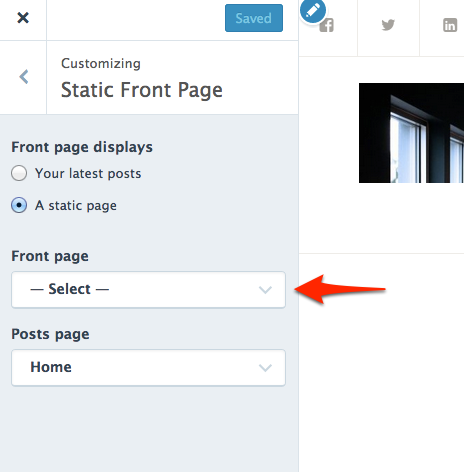
If you want your posts to be displayed on the front page, choose “Your latest posts” under “Front page displays.”
Or, if you want the front page to be a static page instead, you’ll need to select one from the drop-down menu.
Once you set your front page properly, your custom header should appear on the homepage.
Let me know how it goes.
-
kathrynwp,
Thanks for your response. I did like you wrote.
Front page displays, I chose a Static Page as with font page as ‘post list’ and posts page as ‘home’ as follows: https://postimg.org/image/rn11iburd/It does work, but the header image only appear in the ‘post list’ page: https://postimg.org/image/z0gfhaet5/
With the other 3 pages: home, about, contact, the header image does not display: https://postimg.org/image/9iy0xox2x/ (in my home page)
How can I make the header image display in all pages?
-
I would like to ask that when I choose ‘Font page displays’ as ‘your latest posts’, the header image does not display in all of my 4 pages: https://postimg.org/image/eka0cstx5/
-
The custom header only displays on the posts page in Ixion.
If you add a featured image to each of your static pages, it will display in the header area:
-
kathrynwp,
I succeeded in setting featured image with my ‘about’ and ‘contact’ pages: https://postimg.org/image/jwyuqxhtl/
But with my home page which I set as posts page in font page displays (static page): https://postimg.org/image/rn11iburd/ , its featured image does not like the above 2 pages.
I set featured image for my home page exactly the page as I did with my about and contact pages: https://postimg.org/image/bsqqm6veh/
https://postimg.org/image/twtr6tt2x/but the featured image does not display. Why is that?
-
screenshot of my home page in which its featured image does not display: https://postimg.org/image/qehrafs6x/
-
Sorry for the confusion – when you set your posts to display on a static page, this posts page does not display either a custom header or a featured image, as you can see on the demo:
https://ixiondemo.wordpress.com/news-events/
This is because when you assign your posts page to a static page, that page is just a “dummy” page, not a real page whose content is displayed. I know it’s not super intuitive.
If having a custom header on the blog page is important to you, one workaround I can think would be to Use the Display Posts shortcode to output your posts instead of assigning them to a static page in the Customizer.
-
The way to use shortcode looks like complicated to me. I don’t dare to use them.
Thanks for your support so far. -


- The topic ‘theme Ixion header image does not display’ is closed to new replies.
 WordPress.com Forums