

Theme pictures not visible
-
Having selected Cubic as the theme the pictures do not appear. Is this because I need to wait for some time after the site has been registered before it is fully active or is there something fundamentally wrong?
The blog I need help with is: (visible only to logged in users)
-
Your detailed theme description page is at https://wordpress.com/themes/cubic/ and that’s where set up instructions for it are found. The live demo site is at https://cubicdemo.wordpress.com/
re: images
For accepted file types for uploading see here http://en.support.wordpress.com/accepted-filetypes/
Are you running a browser and version of it found at http://browsehappy.com? If not, upgrade.
Have you tried dragging an image straight from your desktop or computer’s image folder and drop it directly into your post’s editor?
If you prefer you can click on the Add Media button from the toolbar of your editor to upload an image to your post.
See: https://en.support.wordpress.com/images/adding-images-to-posts-or-pages/
For uploading images into posts and pages see here http://en.support.wordpress.com/images/adding-images-to-posts-or-pages/
For using the new editor for this see the instructions Staff ie. supernovia provided here https://en.forums.wordpress.com/topic/images-arent-clickable-any-more?replies=15#post-2530659
For image editing see here https://en.support.wordpress.com/images/image-editing/
For troubleshooting images see here > http://en.support.wordpress.com/images/troubleshooting-images/
If you upload lots of images you can exhaust that free space allocation quickly. Currently, the only way to get an extra space allocation after you upload the images again, is to purchase an upgrade bundle. https://en.support.wordpress.com/space-upgrade/
If you still have issues then type modlook into the sidebar tags on this thread for a Staff follow-up. How do I get a Moderator/Staff reply for my question? https://en.support.wordpress.com/getting-help-in-the-forums/#how-do-i-get-a-moderatorstaff-reply-for-my-question Please subscribe to this thread so you are notified when they respond and be patient while waiting. To subscribe look in the sidebar of this thread, find the subscribe to topics link and click it.
-
Looks like you’re running Harmonic now. If you have another site running Cubic, could you please provide a link here so I can take a look?
Cubic pulls in the featured image you’ve added to each post and displays it on the blog page. If you haven’t added a featured image, it pulls in the first image inserted in each post.
-
Yes understood. I’m not a first time user to WordPress and in the past when you select the current theme the images of the pages available appear over which is written the text. You do not have to specially import the images – they appear automatically. In my case I am unable to see the images. So I switched themes to Skylark, clicked on customise and – well – nothing. No images. I tried other themes – nothing but text only. The theme images do not appear. I am left thinking if this is because of site settings or some other problem? I would imagine you can access the Site I am using so you can see the problem for yourself.
-
I wonder if part of the problem here is that your front page isn’t set to display your latest posts.
Could you try going into your Customizer‘s Static Front Page panel and set the front page to display your latest posts. Your front page would then look like this:
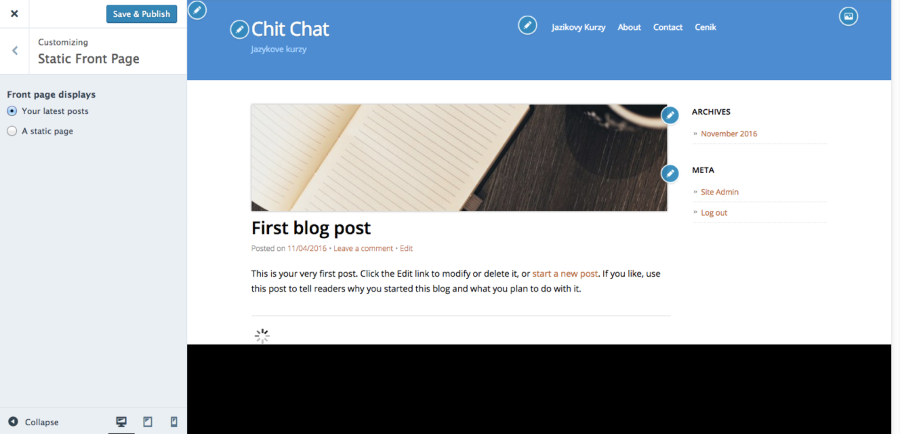
Let me know if this solves the problem. Thanks!
-
Thanks. This might work for you but not me. I have a screenshot of the home page after doing exactly as you say but I realise I cannot attach this or paste it in. Have you got a direct email so you can see what is happening?
-
What I see currently on your homepage running Cubic is what I’d expect to see, since you only have one published post:
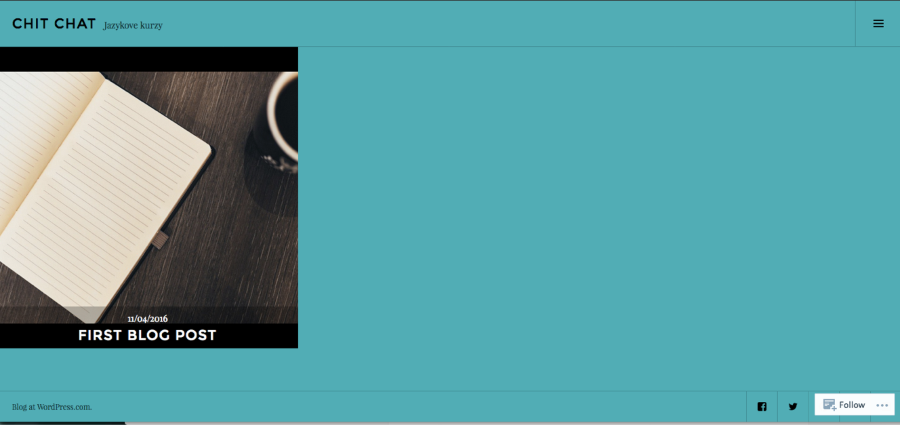
You can upload your screenshot – in a graphic format like JPG, PNG, or PDF – in your Media Library, and provide a link so I can see it, or upload it with a service like Cloudup, Imgur or Snaggy.
-
In fact, if you make changes and save them nothing happens for me while editing. But yes, I agree you can see the result in the webpages online. I have found that if I make changes and then save them and then press f5 the page updates for me in customise mode.


- The topic ‘Theme pictures not visible’ is closed to new replies.
 WordPress.com Forums