

Theme Seeting
-
I have chosen the theme twentyfourteen for my blog. As per the design of this theme my top 6 topics are suppose tobe shown on the first page, I have tried setting in both grid and slider but still i am not able to see my posts as per the actual theme design. Plz help.
The blog I need help with is: (visible only to logged in users)
-
The first place for information about working with a theme is the theme’s showcase page: http://theme.wordpress.com/themes/twentyfourteen/
Featured Images in the TwentyFourteen theme need to be at least 1038 pixels wide. Your current images do not meet that requirement.
-
-
Every image in your Media Library indicates the pixel dimensions, but you can do this prior to uploading by looking at an image’s properties or in image editing software. There are free programs mentioned at the bottom of this page: http://en.support.wordpress.com/media/image-optimization/#image-editing-software
-
I tried this by posting 6 new rough posts and uploading a photo above 1038 pixles wide, but still I am facing the same problem. Any other guidance please.
-
Hi there – it looks like you haven’t set up your featured-content tag correctly in the customizer.
Try a single, uncapitalized word like featured as the tag, instead of what you have now: Neemrana Fort Palace, Mussorie, Holi, Featured.
Your three posts already tagged “featured” should then be displayed, if their featured-image size meets the minimum required.
Let me know how it goes.
-
Hi, thanks for your guidance but I tried what you have mentioned above and it didn’t work for me, rather I lost the posts that I had made after making the changes:
“Try a single, uncapitalized word like featured as the tag, instead of what you have now: Neemrana Fort Palace, Mussorie, Holi, Featured.”
Please have a look at my blog now and guide me further. Thank a lot.
-
Something weaired I just noticed is when I mention these tags:Neemrana Fort Palace, Mussorie, Holi, Featured”, my posts are visible to me and when I mention only “featured” tag, my posts are not visible.
-
I read somewhere to do the following:
“Each post has to be made sticky in order to make it featured and that’s done by going into each blog post separately in the editing screen then clicking on the top right where it says ‘visibility’ then tick the box for ‘stick this post to the front page.”
I did this too but still i am not able to see my posts and they not coming in 6 top also.
-
The reason no posts are showing up now is that you’ve set your front page to display a static page, but you haven’t selected any page to be displayed, nor have you selected a page to display your blog posts.
I suggest you go under Appearance > Customize > Front, and select “Your latest posts” for your front page, as in this screenshot:
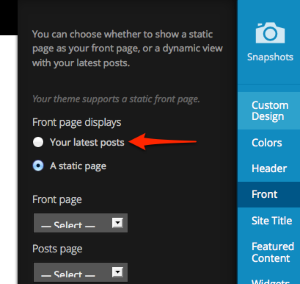
Your featured-content tag (the word “sticky”) now matches the tag you’ve assigned to your three posts, so it isn’t necessary to give the posts sticky status as well.
Let me know how it goes once you’ve reset your front page to display the latest posts and removed the sticky status from your three posts.
-
Thank you so much for your kind support…my problem was solved…I was about to give up on this theme but u saved me ;)
-
You’re very welcome – I’m glad you didn’t give up and that it’s working now! :-)
I’ll close this thread but feel free to start a new one if you need help with anything else.


- The topic ‘Theme Seeting’ is closed to new replies.
 WordPress.com Forums