

TONAL theme: how to change font size
-
Hi, I’ve just signed up for the TONAL theme. How can I change the font size? The chosen typeface is fine, but I’d like to decrease the point size.
The blog I need help with is: (visible only to logged in users)
-
These are 3 ways to change fonts on WordPress.com blogs.
(1) Changing font families, colors and size in text in posts or pages either post by post or page by page by coding into the Text ie. HTML editor. http://wpbtips.wordpress.com/2009/07/11/formatting-text-pt-5/
(2) Changing font colors in text in posts or pages either post by post or page by page using the #4 icon (Select text color – change the text color) in Row 2 the Visual editor. http://en.support.wordpress.com/visual-editor/#row-2
(3) Changing all font families, colors and sizes throughout the whole blog by purchasing an annually renewable Custom Design upgrade and using Typekit Fonts with Staff support.
http://en.support.wordpress.com/custom-design/
http://en.support.wordpress.com/custom-design/#custom-fontsIf you do purchase the custom design upgrade you can use this link https://en.forums.wordpress.com/forum/css-customization#postform so you can copy and paste your text into a thread that will appear in the CSS Forum where you will get the help you need.
-
moniqueahsue – I’m not seeing Tonal on this site: http://moniqueahsue.wordpress.com/ – is there another site you need help with? Timethief has given you some great advice above, so if you still need any help, just post the URL of the site here and I’ll be glad to take a look.
-
Hi, kathyrnwp here is my blog:
I have chosen the TONAL theme for my blog. I see the recommendations by timethief. I don’t know how to code, so her first suggestion I don’t know how to do. It looks like I will have to purchase Custom Design to change font size and family?
Thanks for your help-very much appreciated.
-
It looks like I will have to purchase Custom Design to change font size and family?
That’s correct.
-
No worries. You don’t need to know CSS just to change the font size. You can follow the instructions in the Custom Fonts support document timethief linked above.
We are glad to help you even if you need some CSS. Please confirm that you have Custom Design upgrade on your account and let us know the customizations you would like to make.
-
Hi, Thank you-I’ve purchased the Custom Design upgrade and changed my font + size. After hitting SAVE, I see the font changes applied when I view on a desktop, but when I view on a tablet and phone I still see the old default font/size. I waited an hour to see if it would update with new changes, but it did not. I see on the bottom of my screen it shows to view it as desktop/tablet/mobile, but again I don’t see changes taking effect once I save?
-
Will you please post the URL of the exact site in question starting with http:// because http://moahsue.wordpress.com/ is not waring the Tonal theme. It is wearing the Titan theme.
-
Hi timethief,
Yes, you have the correct site.
According to my dashboard in WPadmin, the theme says TONAL is activated.
Thanks for your time :)
-
On http://moahsue.wordpress.com/ I saw the Titan theme and now I see Tonal. Please be patient while waiting for chaitanyamsv to assist you with your CSS editing.
-
I see that you’ve selected “-2” as the body font size on moahsue.wordpress.com. That size should affect both desktop and mobile devices. This is what I see on iPad:
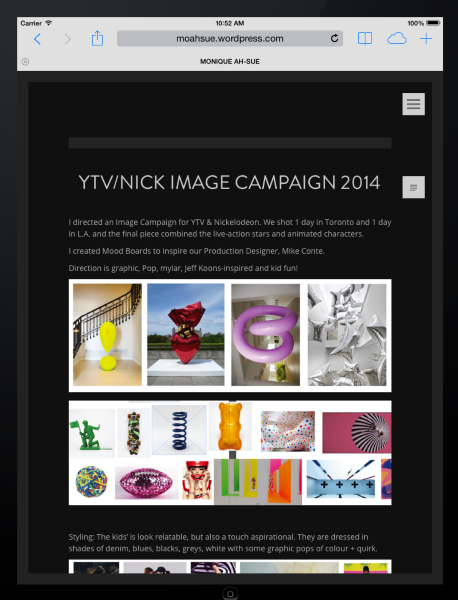
Would it be possible to upload a screenshot to help in troubleshooting? Here’s a guide on how to make a screenshot: http://en.support.wordpress.com/make-a-screenshot/
You can upload the screenshot – in a graphic format like JPG, PNG, or PDF – in your Media Library so I can see it. Thanks.
-
Hi Kathrynwp, I just uploaded an iPad screenshot to my media library. The screenshot file is called for_kathrynWP.png
I can’t figure out why I’m not seeing the updated font design on my iPad or iPhone.Thank you for your help.
-
Thanks for the screenshot!

I’m not sure why the discrepancy between what you and I are seeing, but what I might suggest for finer control over font size is to first reset the font sizes to their defaults in the Customizer under Fonts, and then add some custom CSS – for example:
.entry-content {
   font-size: 80%;
}
Let me know if that works better.


- The topic ‘TONAL theme: how to change font size’ is closed to new replies.
 WordPress.com Forums