

Transfer of My Domain
-
It may be easier for me to have WordPress.com be the registrar for the domain I want to use for my site but I want to use my own email provider, thus, I need to control the MX records *and* add a SPF record.
And also, I’ve never done this before so I may need help with the transfer (while keeping the MX records intact so I don’t loose any emails sent to me).
Thanks -
I’m disappointed with no response, so before I move on to another provider that responds, I’m going to ask the my questions more specifically:
1. Do I have control over my MX Records if I transfer my domain over to wordpress.com?
2. Is there actually someone who can answer any other questions about the transfer process or is all help done through this forum?
-
Hi there,
You can have your domain on WordPress.com and change its DNS records (MX, TXT, etc.) to use your own email provider. Instructions for that can be found here:
https://en.support.wordpress.com/add-other-email/
As for transferring your domain here, you can follow our step-by-step guide:
https://en.support.wordpress.com/incoming-domain-transfer/#transferring-a-domain-to-wordpress-com
If you have any other questions, just let me know and I’ll be happy to help.
-
Thanks for replying. I went ahead and purchased 2 years of the $8/business plan. I’m already having doubts that WordPress.com was the right decision but I’m new so maybe you can help allay my fears…
I need my website to be able to ask for emails from visitors to let me create a mailing list for updates. I don’t know if that’s in a Theme you provide or if that’s a plug-in. For my $8/month site, I need that capability and I also need to let people view the trailer of my film.
If I can have email requests and showing the trailer for $8/month then (combined with the URL I got, which is awesome) then I’ve made the right choice.
But if I have to jump to $25/month to just get that, then I’ve made a huge mistake. I await your help and TIA!
-
Hi there,
I need my website to be able to ask for emails from visitors to let me create a mailing list for updates.
On WordPress.com we have a MailChimp widget that allows you to add a MailChimp subscription pop-up form to your site even on the free plan:
WordPress.com does not itself provide a newsletter service, nor is it a feature built into the open source WordPress software, though, so no matter where you host WordPress you’d need to use a third party service like MailChimp for this.
To add pop-ups or embed forms for other services you’d need the Business Plan to install plugins for those services.
However, WordPress.com does come with our own email subscription service built in where visitors can sign up to receive email notifications each time you publish a new post. But in that case the subscription is in the subscriber’s control and you cannot use that feature to send out your own newsletters or email campaigns separately from new post notification emails.
https://en.support.wordpress.com/following/#change-your-email-settings
-
I am starting to really find my way around WP and have implemented the MailChimp pop up (or slide out, in my case) for email subscriptions, per your suggestion, so thanks for that. I’m starting to like how the website is looking. So, maybe this will be my one last question:
Nowhere can I find a way to remove the Follow icon in the lower right-hand corner that requests email addresses from users. I already have the MailChimp slide-out, so to have a second widget that wants people to subscribe (again) will be confusing.
So, how do I get rid of that (it doesn’t seem to be a requirement of my plan to have it appear)? I’m using the Gigawatt theme.
TIA!
-
That
+followbutton is something that folks see when they come to your site and they are signed in to their own WordPress.com accounts in the same browser. This gives WordPress.com followers the option to follow the site through the WordPress.com Reader. When you make new posts, they get the notification in The Reader. Email followers will get the notification of your new posts in their email, these are 2 different ways for people to follow your site, and for you to grow your audience.More details about how WordPress.com Reader works can be found on this page:
I also want to confirm that you’re working on https://bloodlust.movie/? Or is it a different site? That’s the only one connected to this account. I can also confirm that the email pop up worked for me when I visited.
We have some other tips for growing your audience outlined on these pages, take a look:
– https://en.support.wordpress.com/grow-your-community/
– https://en.support.wordpress.com/getting-more-views-and-traffic/You can also see who follows by WordPress.com account versus email: https://en.support.wordpress.com/followers/
Materials to help you get started and familiarized with WordPress.com:
– https://learn.wordpress.com/
– https://en.support.wordpress.com/video-tutorials/Please continue to write back with additional questions. We’re always happy to help and near by. Cheers!
-
OK, thanks. To answer the one specific question you asked me: Yes, I only have the one domain: bloodlust.movie
That +follow button is something that folks see when they come to your site and they are signed in to their own WordPress.com accounts in the same browser.
At the risk of disagreeing with the expert, I gotta disagree with this. It seems like the opposite behavior is occurring. When I open the page that has no WP cookies set (using a browser with no history or cookies), that’s when it shows up on top of the slide-out window from MailChimp. So the two together looks very confusing! That’s my issue. (If I could attach a screenshot, I’d show you.)
-
Hi bloodlust2019,
(If could attach a screenshot, I’d show you.)
If you have a screenshot, please upload it to your Media Library or a service like Snaggy and we’ll take a look.
-
OK, this is what I’m talking about (hopefully the image will display so you can view the issue I’m describing):
-
Thanks for the screen shot.
The follow button you’re speaking of is called the WordPress.com action bar. That appears on all WordPress.com sites by default, and is the primary method for people with WordPress.com accounts to follow your site in the WordPress.com Reader.
As you have the Premium Plan you can use custom CSS code to hide that, but note that this will make it harder for people to follow your site in the Reader, and on most WordPress.com sites most follows happen there, rather than via email (both our own email subscriptions and external newsletter services).
If you want to hide it, go to My Site ->Customize ->Custom CSS and paste the following on a new line:
/* Hide action bar */
div#actionbar {
  display: none;
}
Another option is to edit the form in MailChimp that it doesn’t appear in the lower-right corner of your site where the action bar already appears. Selecting the “Modal” option in the MailChimp form builder, for example, will make that pop-up appear in the center of the screen instead.
-
Apologies for the long delay in my reply. The Custom CSS is very helpful and I will try that.
One last question about subscriptions I just don’t get:
I’ve put a Subscribe block that I tested with an unused email (that got sent to me) on my front page. Once I confirmed, I was a subscriber to the website, no problem. I did not have to sign up to join WordPress just to get updates. But, when I tried sending out an email invitation (managed from the same screen) to another unused email, then I was forced to sign up for a WP account to stay up-to-date.
What I want to do is to send out invites to people who I know want to subscribe, but let them simply click on Confirm (like with the Subscription block form) so that their email gets listed in the Email Followers without forcing them to create an account (which would be a huge impediment for many people). -
Hi there,
The Subscription Form block doesn’t require someone to have or create a WordPress.com account to follow your blog.
On the confirmation email make sure to click on the Confirm Follow button and not on the sign up for a WordPress.com account link as shown in the following screenshot:
-
Sorry, but you did not understand what I wrote.
The issue is not with confirming from the Subscription Form block email. That does work the way I want (that is, it does not require the recipient to create or login to WP). The recipient just confirms their email and ta-da, they’re on my email list without having to create a WP account.The issue I have is:
I want to send out invites to various people, but let them simply click on Accept Invitation (like with the Confirm Follow via the Subscription block form) so that their email gets listed in the Email Followers without forcing them to create an account.
So, from this link:
https://wordpress.com/people/new/bloodlust.movie
someone gets an email with an Accept Invitation button in the email.
But that forces them to setup a WordPress account (if they don’t already have one), which is a huge impediment to getting subscribers. -
someone gets an email with an Accept Invitation button in the email.
But that forces them to setup a WordPress accountClicking the Accept button in the email does take you to the new account signup screen, yes. But below the boxes to create an account you should see a link to subscribe via email only:
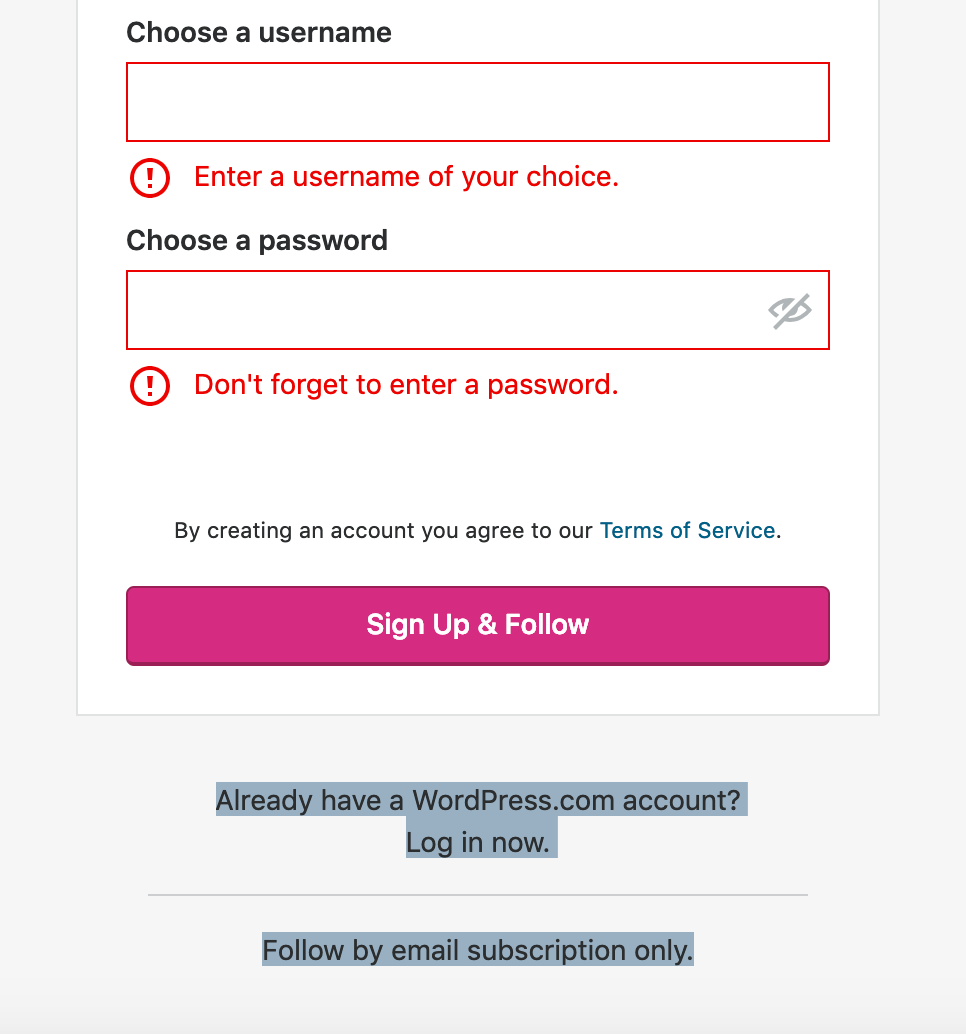
I see with our new color scheme that text is white, so it’s nearly invisible, though. I’ll report that to our developers so they can fix that.
-
Just wanted to follow up that this has now been fixed, and if your subscribers click the link to accept the subscription, they should now see the option to follow by email only, without creating an account.


- The topic ‘Transfer of My Domain’ is closed to new replies.
 WordPress.com Forums
