

Transfer Theme
-
I deleted a blog. I forgot to detach the theme. Now I can’t transfer the theme to another site. It keeps saying that “Before you transfer Outspoken to another blog, you’ll first need to deactivate the theme from the original blog’s dashboard. Then reload this page and try the transfer. Note: theme options and settings will not transfer to the new blog.” How do I fix this?
The blog I need help with is: (visible only to logged in users)
-
Hello Keokah! I am happy to help you with this. I see that you originally bought this theme for empowerherweb.wordpress.com. Could you please tell me to which site you want Outspoken transferred?
Thanks so much! -
-
Hi again! Thanks for the info. You are all set now. I’ve transferred Outspoken to keokahtsanders.wordpress.com/. Keep in mind, the layout of the theme is different than the one you had been using. You’ll have some adjustments to make.
Here is the Outspoken support page, which is brimming with specifications, and instructions about how to use your theme:
http://theme.wordpress.com/themes/outspoken/support/Let me know if you have any other questions. Thanks much!
-
Robin, I still have an issue. I have two sites on wordpress: 1)keokahtsanders.wordpress.com and 2) politixpro.com or embraceyourhips.wordpress.com. I had you transfer the Outspoken them to the keokahtsanders.wordpress.com. I am now trying to transfer it to the politixpro site just to see what it looks like, but I don’t have the option to. Usually there’s a button that says transfer to another site, but that button is not present. Can you help?
-
Hi there! Have you used your Preview function yet? If not, you can see how any theme will look on your site. Here’s how:
- Go to the Dashboard for embraceyourhips.wordpress.com.
- Click Appearance → Themes.
- Search for Outspoken.
- Hover over Outspoken and you’ll see a Preview button:
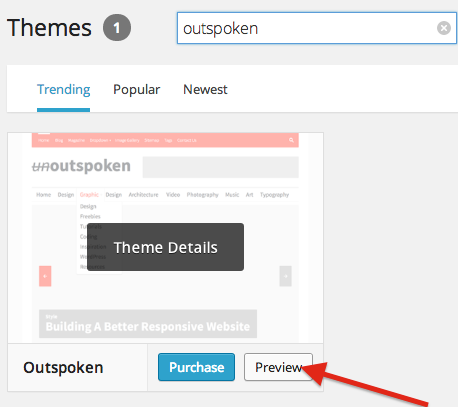
- Click that to see how it looks on your site.
If you want the transfer to become permanent, go to Store → My Upgrades, and move your upgrade.
Let me know how that works out for you!
Thanks so much :)


- The topic ‘Transfer Theme’ is closed to new replies.


 WordPress.com Forums