

Tried re-mapping my domain to new one; now my site is gone & so is domain?
-
Yesterday I paid $13 for my WordPress site to be mapped to happydogclipsandkennels.com. I built the website and decided I wanted to re-map it to happydogcountryclipsandkennels.com. I couldn’t figure out how to do it without paying an additional $13, so I asked for help. WordPress person named Rachel said she did it for me and asked that I update the DNS (which I did). Now my site is gone and it’s mapped to happydogcountryclipskennels.wordpress.com and no refund.
How can I get my account mapped to happydogcountryclipsandkennels.com (which I own) without having to pay an additional $13 AND get the site back as it was last night?
The blog I need help with is: (visible only to logged in users)
-
I’ll tag this thread for a Staff follow-up. Please subscribe to the thread so you are notified when they respond and please be patient while waiting.
-
-
-
Disregard – I stil am seeing happydogcountryclipskennels.wordpress.com as my blog, but happydogcountryclipsandkennels.com is working. What’s going on?
-
Hi there,
Currently, the domain: happydogcountryclipsandkennels.com is pointing to the site: happydogclipsandkennels.wordpress.com as seen here:
If that is not what you want, can you please clarify exactly which domain you want pointed to which WordPress.com site?
Thank you!
-
Hello,
When I go to http://wordpress.com/my-blogs/ it shows that my blog is happydogclipsandkennels.wordpress.com (hdcck.wp.com), not happydogcountrclipsandkennels.com (hdcck.com). When I go to edit, I don’t see any of my pages that exist on hdcck.com. It’s not the right site, and I can’t make any edits.
When I click to see Domains on http://wordpress.com/my-blogs/ I do not see that hdcck.wp.com is mapped to hdcck.com. I paid for mapping and it’s not connected.
-
Hi there,
Please note that the domain: happydogcountryclipsandkennels.com never deletes, which is actually a good thing so if you one day decide not to renew the domain or it expires accidentally all your content will still be available at happydogclipsandkennels.wordpress.com.
However, as long as you keep your domain renewed, your readers will see your site at happydogcountryclipsandkennels.com. Even if they go to happydogclipsandkennels.wordpress.com they will be automatically redirected to happydogcountryclipsandkennels.com.
Please go to Store > My Upgrades and you should see the Domain Mapping upgrade there. Here is the direct link:
https://happydogclipsandkennels.wordpress.com/wp-admin/paid-upgrades.php?page=my-upgrades
Please make sure you are logged into that account.
You have another account which contains the site: happydogcountryclipskennels.wordpress.com which is empty and no domain is pointing to this site.
-
Ok…
This is the website I want to be able to edit. I own the site. I paid and had one site mapped, but wanted it updated to happydogcountryclipsandkennels.com. When the remapping was done by a WordPress associate, I lost access to being able to edit the site.
This is what my dashboard looks like. It does not say happydogcountrclipsandkennels.com as my domain. It has WordPress. When I click on “Dashboard”, this is what I see: http://bit.ly/1o7PJ2G
If the domains were properly mapped to each other, I would be able to update the pages. There are no pages; it is not mapped correctly.
When I clicked on the link you provided, this is what I see: http://bit.ly/1jEScj6. I do not have access to update happydogcountryclipsandkennels.com because it is not mapped correctly to my account. I do not have any different account information that would allow me access.
I’m not sure where the confusion is – I’ve paid for domain mapping once. I asked for the mapped domain to be updated. It was updated but something happened where it isn’t mapped right. Can I please have my account mapped to happydogcountryclipsandkennels.com?
-
Hi there,
So the problem is that there are two accounts, and you are not logging into the one with the paid domain. If you want access to the one with the paid domain, you must log in to this account:
https://happydogclipsandkennels.wordpress.com/wp-admin/paid-upgrades.php?page=my-upgrades
That username is not hdcck. You are currently logged into another account, and trying to edit a blog that is not in that account. Therefore, you are getting that error:
As for the domain mapping – everything is correct. Currently the domain is mapped to the blog you want. You’re just not logged into that account. Please look at the URL at the top. It is currently mapped to the site that you want to edit:
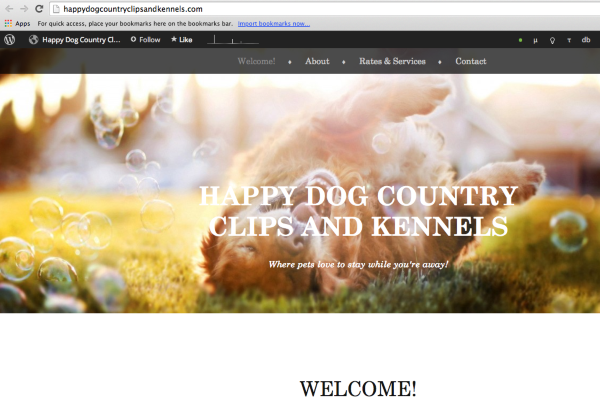
If you need help logging into the correct account and need an account recovery, let me know and I can help you, but for security purposes I cannot give out the username/email address associated with that account.
Here’s more information on account recoveries:
There’s a form there that will help you recover the account.
-
Perfect, so I just fill out the form to recover my account? Because there shouldn’t be a second account that happydogcountryclipsandkennels.com was moved to. I never created a second account, so I don’t have any other email to use.
It should still ALL be under the user name hdcck. I did not approve it to be moved to a new account, nor did I create one.
-
Yes please fill it out. Sometimes creating a new blog can be confusing with creating a new account. So, that’s probably what happened. Fill out the form and you can get this all figured out. You have the PayPal transaction ID number from the upgrade so you can get access to that account shortly.
Cheers!
-
Hello, it’s me again!
I just tried submitting the form to recover my account, and it seems the Receipt ID isn’t valid… although I am copy/pasting EXACTLY what was sent to me.
Instead of making this even more difficult, can someone from WordPress PLEASE just call me? I’m happy to PM my cell number so I can talk to someone directly in order to get this fixed ASAP.
-
Just a note here – when you are in the Dashboard – you will always work in the base blog that you bought the custom domain name for i.e.
your-site.wordpress.com – you will never see your-site.com as part of the dashboard – that is the way domain mapping works
-
I completely understand.
When I log into the Dashboard though, the link I do click on does NOT lead to my website, that is already built, to edit. Instead, I see nothing. No pages, no content, no nothing.
It’s like my websites information was transferred to a different account, because I have NO way to access it.
-
Hi there,
You can easily get the PayPal transaction ID number. All our payments are processed by PayPal (even if you paid directly with a credit card).
PayPal can provide you with this transaction ID that we can then verify on our end. It’s a 17-digit number. You can reach them at these numbers:
1-888-221-1161
1-402-935-2050 (if calling from outside the U.S.)You can find additional ways to contact PayPal here:
https://www.paypal.com/us/contactus
Once you get that ID number please fill out the contact form. Then you will get access back to your account shortly. Until we get any sort of verification we cannot help you for security reasons. I’m sorry for the inconvenience, but we take account recovery/security very seriously as we will not compromise any user’s account.
Thank you.


- The topic ‘Tried re-mapping my domain to new one; now my site is gone & so is domain?’ is closed to new replies.
 WordPress.com Forums