

TRITON LITE theme – CSS change container background only?
-
Hi
I am using Triton Lite theme with custom upgrade, would like to change the container background colour, i.e on the front page where the posts are and the post pages, but not the area around the edges, the widgets or navigation – not the whole back ground.There is a general theme option to change the whole background colour or upload background pic, but this changes the display of the entire background, including posts (whereas in some themes changing the background does no effect the post area container) hope this makes sense!
I have managed to identify which bit of CSS stylesheet code changes the container independently from the background and add a bit to make it change the colour – BUT it also changes the colour of the 2 footer widget areas backgrounds and the top navigation bar, which is a real problem. I want to make background a dark picture, and have a light coloured page container over the top of that, so that the posts stand out more. the below code worked, except as I say, it also changes the top nav bar background and the middle and footer widget background colours
.container {
display: block;
margin: 0 auto;
width: 960px;and I added:
background: #fffff0;
}Is there a way to do this? If so, I am a mere novice with the CSS stuff, any step by step guidance would be very much appreciated!
many thanks :)
The blog I need help with is: (visible only to logged in users)
-
The designer used the same class for a number of major page elements, so you will need to add the following to the bottom of your CSS to target those and set the background color to transparent.
You can then set the background color for .container as you were doing.
#header .container, #footer .container, #midrow .container { background: transparent; } -
Hi thesacredpath,
.
thank youThe following :
#header .container, #footer .container, #midrow .container {
background: transparent;
}.container {
display: block;
margin: 0 auto;
width: 960px;
background: #FFFFF0;gave me this on the front page: (screenshot)
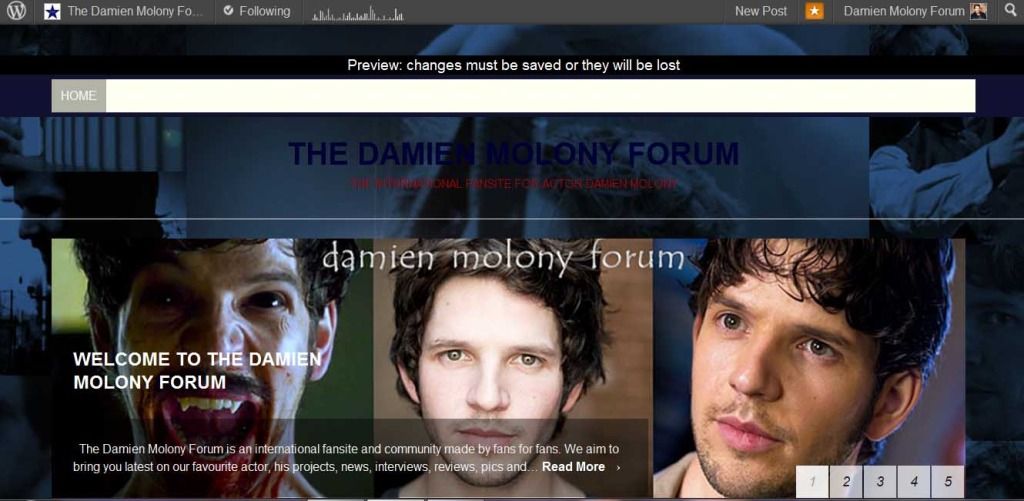
and this on a post page:
it worked to exclude the bottom widgetized area containers, but
on front page the navbar and header text containers are still not right , and the left and right container margins look a bit odd too.
On the post page the header text container seems ok, but same issue with navbar and left and right margins.any ideas?
thanks for you help :)
-
-
I would like the navbar and header text area to stay as they are now, with the background (not uploaded in this screenshot in order to show you original appearance) beginning underneath the line that goes full width across page underneath the header text container:

-
Give this a try:
body > .container,
#slider-wrapper {
	padding-left: 10px;
	background-color: red;
}
#midrow .container,
#footer .container {
	padding-left: 10px;
}
#header .container {
	width: 970px;
	background-color: #fffff0;
}
Update “red” to a color of your choice. Make sure to update the “#header .container” background color to match your main body background color.


- The topic ‘TRITON LITE theme – CSS change container background only?’ is closed to new replies.
 WordPress.com Forums