

Trouble inserting a link to my own posts
-
I would like to put links to other posts I’ve written in my new posts. I’ve been through the insert link steps when drafting the post, which are quite straight-forward. The link to my other posts shows up in the draft (in code) but not when it is published. Your assistance in identifying where I’m going astray would be much appreciated.
The blog I need help with is: (visible only to logged in users)
-
Hi Jann,
Can you show me which post this is happening on and I can take a further look?
Thank you!
-
The post was ‘Harmony, everything belongs’. I was trying to put in a link to an earlier post titled ‘Planetary pop-ups’. The code for the link still seems to be in the version of the Harmony post that I can see. It’s just not visible in the published version. Thanks, Jann
-
Hi Jann,
I went through that post and I could not find any links within the draft or the published version. However, I did do a test just to see if it was working and it is. For example, I added the link to http://wordpress.com and it was working as seen here:
Draft:
https://cloudup.com/ckswpCx5aJQPublished Version:
https://cloudup.com/cG4VhvQvBqSLet me know if you have any questions!
-
Dear Grace,
This is the code I was referring to:
Like Captain Planet and the App Tengami (check out the post ‘Planetary pop-ups’), Rudolf Steiner and the Prince of Wales (Prince Charles) have more in common than many may appreciate. They were/are both interested in education, farming without chemicals, geometry, architecture, beauty, the interconnectedness of nature, spirituality, addressing the crises facing humanity and creating harmony. In this vein, both have books with Harmony in the title which are related to the elements fire, water, earth, air and aether/spirit.
I’d also be keen to know how to embed a link into the text rather than having a space above and below it. The times I’ve been able to put in a link to an external URL (compared to linking to my own posts which I haven’t been successful at) it has appeared as your WordPress.com link appears. I’ve seen lots of other WordPress blogs where they type ‘click here’ within the text so it can be done!
Regards, Jann
-
Me again!
When I submitted my previous comment the code related to posting a link to one of my other posts disappeared on the screen! The code is in the copy of the unpublished blog with the first set of brackets yet disappears when I go to publish. I don’t want to post a screen-shot of my dashboard to a public forum so am not sure how to show you.
Regards, Jann
-
Hi Jann,
Like Captain Planet and the App Tengami (check out the post ‘Planetary pop-ups’), Rudolf Steiner and the Prince of Wales (Prince Charles) have more in common than many may appreciate. They were/are both interested in education, farming without chemicals, geometry, architecture, beauty, the interconnectedness of nature, spirituality, addressing the crises facing humanity and creating harmony. In this vein, both have books with Harmony in the title which are related to the elements fire, water, earth, air and aether/spirit.
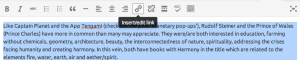
That is just text. Where would you like to embed the link? Select a word, or the multiple words (you can select the entire paragraph if you want), then click on the link icon as seen here:
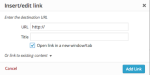
Then, a window will pop up. Then enter the link you want to link it to as seen here:


- The topic ‘Trouble inserting a link to my own posts’ is closed to new replies.


 WordPress.com Forums