

Trouble verifying site with Pinterest
-
I have tried everything. Is it not possible to verify my site through pinterest if I don’t self host it and use wordpress.org?
The blog I need help with is: (visible only to logged in users)
-
Hi there,
You should be able to verify your WordPress.com site through Pinterest with the following instructions:
http://en.support.wordpress.com/webmaster-tools/#pinterest-site-verification
Can you give that a try?
-
It still doesnt work. When I copy the meta tag and save it in my Pinterest site verification it changes to this…
redactedIt should look like this..
<meta name=”p:domain_verify” content=”redacted”/> -
Hi there,
You only need to enter the string of numbers into that field, not the entire tag. The field automatically strips the tag down to the numbers as that is all that’s necessary. Were you able to complete the last steps to complete the verification on Pinterest?
-
-
Hi there,
Unfortunately, there are some issues with Pinterest, which display error messages even though the site verification is indeed working. I was able to successfully verify my site following the instructions here:
http://en.support.wordpress.com/webmaster-tools/#pinterest-site-verification
A couple of notes:
- Please enter skiptomyrue.com in the domain field (not your WordPress.com default URL
- Enter only the string of numbers at WordPress.com (not the entire tag).
- After saving the changes at WordPress.com, click back to the Pinterest tab and click “Complete Verification”. You’ll receive this error:
- Click “Ok” and “x” out of the pop-out window
- Refresh the page. You should now see a checkmark by your domain like this:
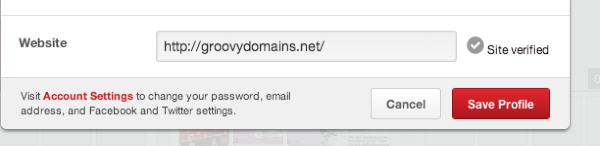
That means the verification was successful
Can you give the steps above a try with those notes in mind?
-
-


- The topic ‘Trouble verifying site with Pinterest’ is closed to new replies.
 WordPress.com Forums