

Trouble with migrating followers to wordpress.org
-
Hello, I just recently moved from my wordpress.com website to a self hosted wordpress.org website. I faced few issues. I hope you will help me.
1. I see people liking my newest post and I get notifications that they liked it and commented on it, but I don’t see them in my total ‘Like’ and ‘Comment’ count under the post.
2. I gained new 8 followers on my wordpress.com account but I am not able to migrate them to my wordpress.org blog. I was able to do that the first time I migrated all of my 486 followers, but now I don’t see ‘MIGRATE FOLLOWERS’ button in ‘SETTINGS’. -
We’ve been seeing the issue in #2 whenever the Jetpack site is using a domain registration that’s also still associated with the old WordPress.com site. I went ahead and performed the migration again for you. :)
Regarding issue #1, I do see a like appear on your newest post:
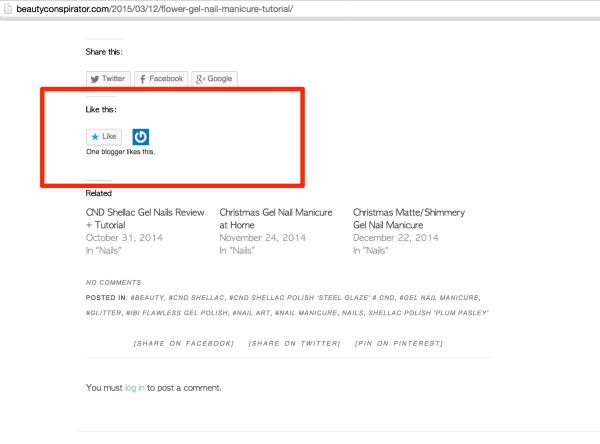
Should there be more than one “Like” at the moment?
Are the comments being held for moderation?
-
Thank you for migrating the followers. So each time when I will need to migrate them I’ll need the help of one of the staff members?
1. No, there are no comments being held in moderation. I get notifications that I gained 6 more likes on my newest post but I don’t see it.
2. Why only wordpress bloggers can comment on my posts? How can I make commenting available to everyone?
3. Do those followers really get notifications about my newest posts that I am writing in wordpress.org now? I usually get about 30-50 likes on each post, but after migration I get max 1-3 likes. -
At the moment, if you need a migration a staff member will need to do it. The bug is that our ‘My Sites’ dashboard isn’t correctly distinguishing between the self-hosted beautyconspirator.com and your WordPress.com site because beautyconspirator.com is also attached to the WordPress.com site. The migration tool still works — so once we get the ‘My Sites’ issue resolved, you’ll be all set in the future. :)
1. No, there are no comments being held in moderation. I get notifications that I gained 6 more likes on my newest post but I don’t see it.
Looking into our database for Likes, the 7 Likes do appear there — which explains the notifications. Jetpack might be having trouble reaching our servers.
Could you confirm that you have the “Likes” module activated in your Jetpack settings?
http://beautyconspirator.com/wp-admin/admin.php?page=jetpack_modules#
Also that “WordPress.com Likes are On for all posts” here:
http://beautyconspirator.com/wp-admin/options-general.php?page=sharing#likes
And that “Disable CSS and JS” is unchecked on that page as well.
Do you have any other plugins activated that affect sharing buttons or comments?
2. Why only wordpress bloggers can comment on my posts? How can I make commenting available to everyone?
Your appear to be that only users of beautyconspirator.com can comment on posts.
Visit your discussion settings at http://beautyconspirator.com/wp-admin/options-discussion.php
Review the option for “Users must be registered and logged in to comment”
Example screenshot from a testing site
You’ll want that unchecked (and perhaps the “Comment author must fill out name and e-mail” option unchecked as well.)
3. Do those followers really get notifications about my newest posts that I am writing in wordpress.org now? I usually get about 30-50 likes on each post, but after migration I get max 1-3 likes.
Yes. Your followers will still see your blog in their Reader, and receive email notifications, the same way they would when you were hosting on WordPress.com.
However, your posts will no longer be displayed in the tag/categories listings in our Reader. Users of the WordPress.com Reader also tend to use the Like feature more than comments, so that may very well affect your number of Likes.
-
1. Yes, like button is activated in my jetpack modules. “WordPress.com Likes are On for all posts” is activated also. “Disable CSS and JS” is unchecked on that page too. It seems everything is right, but there are no likes appearing. Can you transfer those likes that I earned to my wordpress.org page manually?
2. Thank you! You just solved this issue. I unchecked the option “Users must be registered and logged in to comment”. Are you able to check if now every non-wordpress blogger can comment on the post?
3. I also got few new comment in my wordpress.com blog. Is there a possibility to transfer them to my org blog?
-
Hello again. So a non-wordpress user still cannot write comments or like my posts even though I unchecked the option “Users must be registered and logged in to comment” yesterday. Also, followers number is still 486 for a non-wordpress user, even though when I log in to my org account, it writes 492 followers. Why is that?
-
Hi again! :)
Hello again. So a non-wordpress user still cannot write comments or like my posts even though I unchecked the option “Users must be registered and logged in to comment” yesterday.
After unchecking that option yesterday, did you scroll down and click “Save Changes”?
That login is not for logging into WordPress.com or WordPress.org, but for logging in as a user of beautyconspirator.com – I’m assuming you’re the only user of the site. Even as WordPress.com administrator, I’m given the same notice:

On my self-hosted site the only way I can replicate this is with the “Users must be registered and logged in to comment” option.
Also, followers number is still 486 for a non-wordpress user, even though when I log in to my org account, it writes 492 followers. Why is that?
This was likely just browser caching. Try clearing your browser’s cache and reloading the page. I see the expected 492 followers:
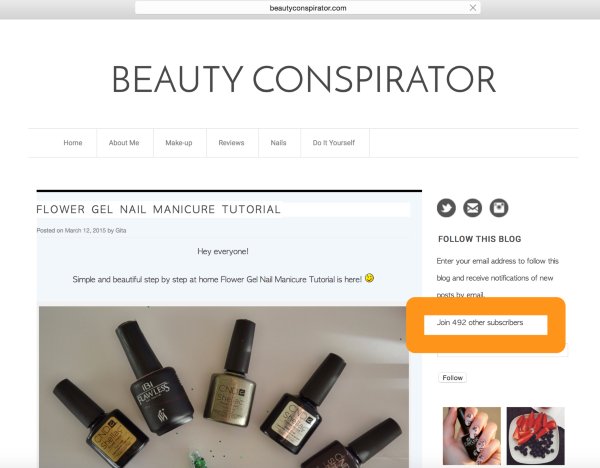
When you were logged into your /wp-admin/ and viewed stats, the stats page would’ve refreshed to show the most recent available data. Your browser was likely not asking your site’s servers to refresh the Follow Blog data and just displayed what it had already cached.
Yes, like button is activated in my jetpack modules. “WordPress.com Likes are On for all posts” is activated also. “Disable CSS and JS” is unchecked on that page too. It seems everything is right, but there are no likes appearing. Can you transfer those likes that I earned to my wordpress.org page manually?
Thank you for confirming those settings.
Likes on previous posts cannot be transferred to self-hosted sites the way Stats and Followers can be. But since this post was only on your self-hosted site and not your WordPress.com site they should definitely be displaying.
But since you’ve confirmed those settings are correct, I’ve reported this as a bug to our developers and will have them investigate into possible causes. :)
3. I also got few new comment in my wordpress.com blog. Is there a possibility to transfer them to my org blog?
You can run an export and import for all your blogs comments, but not just a single comment. This process would create a duplicate of all existing comments on your site, so perhaps more trouble than its worth. Most folks just reply back to the reader in the old site’s comment and include that you’ve moved and provide a link the new site’s article. Since your old site currently redirects to your new site, this commenter likely responded from an old post in the reader, their notifications, or an email notification. As you continue building the self-hosted site, this should happen less and less.
-
Thank you for all your help, Alex. I appreciate it a lot! :)
What I still don’t understand is the problem with commenting. Now even when a wordpress user clicks the ‘login to comment’ hyperlink, he is taken to the login window. After correctly logging in, WP redirects back to the correct post.
BUT….Even after successfully logging in (I’ve tried it with Subscribers and Admin) we still only see “You must login to comment” and the login link.
It’s a desperate situation… No one can comment on my posts in wordpress.org , even the followers are not able to do that… Do you have any ideas what the issue here could be?
I found in forums saying that it could be related to the problem with the theme. I bought that theme and know other wordpress users that use it, but when I want to comment in their page, I am asked to write my name, email and the comment. That’s it. I am able to comment in their page. So probably something is wrong with my settings?
When that link is clicked, it takes the (now logged in) user to their Edit Profile page. So obviously, WP knows that the user is logged in. But the page does not update to show the “Add Comment” link.
-
Still thinking through the commenting issue with a couple folks, but the Likes situation is making sense now. The Likes that were coming through came through on your old WordPress.com site, on a post with the same title but different content.
Adding a “noredirect” argument to this link so that you can see the post with the likes showing, instead of it redirecting to your self-hosted site:
https://glamourindex.wordpress.com/2015/03/12/flower-gel-nail-manicure-tutorial/?noredirect=true
Since your followers are migrated, and anyone that tries to view your WordPress.com site (without that redirect argument) gets forwarded to your self-hosted site anyway — it’s less confusing for your readers that receive notifications if you don’t post any content on the old site. You may even want to set it to private.
Some themes do have their own commenting systems and it’s possible you need to configure their system somewhere that I don’t know about. Can you send me a link to where you bought the theme?
-
Hi again!
I needed to make some updates to your site’s Jetpack connection on our end. Can I have you disconnect and reconnect Jetpack to your WordPress.com account? This will refresh those settings on your end.
To disconnect/reconnect Jetpack, go to Jetpack -> Jetpack in your site’s dashboard. Scroll down to the footer of that page to find the “Disconnect from WordPress.com” link as shown here: http://d.pr/i/10QE . Click that, then reconnect to WordPress.com when you see the button to do so.
-
Here is where I bought my theme: http://www.themefashion.net/
I just reconnected Jetpack as you said. :) Do you think it will help?
-
Might help with the comments, but definitely will help with making sure your Jetpack stays connected to WordPress.com. While looking at your site we just noticed a couple potential issues with the connection and wanted to fix it before it causes problems. These reconnections can clear up a lot of things though. :)
Since we did that reconnection would you please check one more time on your Discussion settings here?
http://beautyconspirator.com/wp-admin/options-discussion.php
If it’s checked, uncheck “Users must be registered and logged in to comment” then scroll down and save changes. Let me know. :)
-
The option “Users must be registered and logged in to comment” was unchecked. My wordpress follower still sees the same issue as before. He is not able to comment. :(
-
-
Migrated 5 followers. :)
Was really hoping that reconnection would clear up the comments — but everything now looks like Jetpack is running smoothly. And Jetpack comments won’t ever bring up that message with “Users must be registered and logged in to comment” unchecked.
The theme designers you sent me don’t appear to have documentation available for any of their themes, but they also don’t appear to have any unique commenting system built in. So it’s unlikely the theme is causing this.
Would you mind sending me a list of all the Plugins you’re running? If one of them affects comments that’s the next most likely thing to be interfering.
-
Hey, here’s the list of my plugins:
1. Akismet 2. BackUpWordPress 3. Google Analytics 4. Google Analytics by Yoast 5. Instagram Feed 6. Jetpack by WordPress.com 7. Twitter 8. Twitter button plus 9. W3 Total Cache 10. WooCommerce Product Slider 11. WordPress Importer 12. WordPress SEO -
-
I’ve talked this through with a some folks on the Jetpack team. We’ve sent you an email with further information. Please check your inbox for an email from support (at) jetpack.me and reply there. :)
-
-


- The topic ‘Trouble with migrating followers to wordpress.org’ is closed to new replies.
 WordPress.com Forums