

Troubleshooting recipe short code
-
I discovered the shortcode that allows recipes to be embedded in WordPress.com posts. I have been going through my blog, Gathering Flavors, updating recipes. All was going well, but then suddenly the code has not been offsetting recipes as I like them. That is, although I place [/recipe] at a certain spot, everything afterward in included in the recipe box.
For the sake of clarity, here is a recipe where the recipe is embedded exactly as I would like:
http://gathering-flavors.com/2014/02/12/penne-pasta-with-shrimp-and-chicken/
You will see that there is a horizontal line, some special characters and then some text left outside the box.Here is a post that is not as I would like:
http://gathering-flavors.com/2013/02/07/cookies-chili-life-and-let-it-snow/The horizontal line, special characters and text are inside the recipe box, even though I placed the [/recipe] above them.
Finally, here is a post with a recipe that is not reformatted:
http://gathering-flavors.com/2013/02/23/the-nature-of-love/
I was working backwards on my posts to embed recipes and it is with this post that I began having problems. Perhaps there is something in this post that is causing the coding not to work properly?Your help will be greatly appreciated.
Dena
The blog I need help with is: (visible only to logged in users)
-
Hi:
I have been working on this on my own while await Forum input.
While I have not fixed the above problems yet, I have been working on other posts where I encounter similar problems. The trick to fixing things seems to lie in not doing too much new formatting at once and patience when things don’t go right the first time.
I am thrilled that WordPress.com has added this shortcode/recipe feature, so am willing to take the time to make it all work properly.
Still, any thoughts/comments/input you might have on streamlining this process to update my recipes & to incorporate this new feature in to new posts will be greatly appreciated.
Thank you.
Dena
-
Hi there – I’m really glad to hear you’re liking the new recipe shortcode!
I had a look at some of the posts that include unexpected text and horizontal rules within the recipe.
This is happening because of some overlapping div tags within those posts.
I copied this post into a test site and flipped to Text (HTML) view to see the code behind the scenes.
Here’s what I saw at the bottom, just outside the closing recipe shortcode tag:
<div style="text-align: center;"><em> <span style="color: #191970;"><em>♦♦♦♦</em></span></em><span style="color: #191970;">
</span></div>
<div style="text-align: left;"></div>
<div style="text-align: left;"><em><span style="color: #800000;"><strong>One Year Ago</strong></span>: <a title="A Little Something Different: Spiced Muffins with Brown-Butter Frosting" href="http://gathering-flavors.com/2012/02/13/a-little-something-different-spiced-muffins-with-brown-butter-frosting/">Spiced Muffins with Brown Butter Frosting</a></em></div>
</div>
When I cleaned up the code to eliminate empty and unbalanced tags (i.e. tags missing their opening or closing partner), the code now looks like this:
♦♦♦♦</span></div>
<em><span style="color: #800000;"><strong>One Year Ago</strong></span>: <a title="A Little Something Different: Spiced Muffins with Brown-Butter Frosting" href="http://gathering-flavors.com/2012/02/13/a-little-something-different-spiced-muffins-with-brown-butter-frosting/">Spiced Muffins with Brown Butter Frosting</a></em>I also spotted a stray div tag further above, within the recipe shortcode:
<span style="color:#191970;"><span style="text-decoration:underline;"><span style="font-family:inherit;font-size:medium;">Directions:</span></span></span>
<div> /* STRAY TAG HERE */
<ol>
I removed the stray div tag – and combined the three span tags to clean it up further – so it now looks like this:
<span style="color:#191970; text-decoration:underline; font-family:inherit; font-size:medium;">Directions:</span>
<ol>
The recipe now looks correct:
https://cloudup.com/crRHX9pyewUJust to be clear, the specific thing that was throwing off the layout was one single div tag. With the opening tag within the recipe shortcode and the closing tag being outside it, this caused improperly nested tags throughout the post, which threw off the whole recipe display.
If you go through your other recipes and remove any improperly nested div tags, you should solve the display problems.
I thought I’d share another tip that might make your recipe formatting a bit easier, since you have Custom Design. The recipe content has the CSS class .jetpack-recipe. This means that you can style elements in the recipe by adding code to your Custom CSS editor, instead of within each recipe individually.
For example, to make all your recipes within the shortcode appear in blue text, you’d just add this:
.jetpack-recipe {
color: #191970;
}
That lets you avoid adding so much inline formatting within each recipe. Should be a time-saver. :-)
Let me know how it goes!
-
Kathryn:
I really appreciate you taking the time to work on this with me. The recipes I am having trouble with are older recipes that I imported from Blogger, which may be why they contain some code that does not belong there.
Still, I’d like to fix them but seem to have failed when I tried to duplicate what you did above.
Just to simplify things I took out the “one year ago” text. Then I tried to rework the code as you showed me, but the problem persists with the horizontal line and diamond shapes staying inside the recipe instead of outside. Here is how it looks now:
http://gathering-flavors.com/2013/02/07/cookies-chili-life-and-let-it-snow/
Questions:
1. Do you see something I goofed up on in terms of reworking things in the text editor?
2. Would it work if I go through those old recipes, remove the recipe portion entirely from the posts, then rewrite new recipes and add them back in? My worry is that even if I remove the recipe, some of the extraneous code would still be there….Finally, thanks for the tip about the CSS for the color of the text within recipes. I will add that right now. I was wondering, too, if it might be possible to highlight the entire area around the recipe to another color, like a linen or light blue….Is there a way to do that?
I will look forward to hearing from you.
Dena
-
The best way to copy-paste content from another source into the editor is by pasting it in as plain-text, that way any extraneous code doesn’t get carried over. You would then add any formatting back within the Visual Editor.
There are a few ways to do this, but one of the easiest is to use the “paste as plain text” button, which is the fifth button in the second row of buttons:
http://en.support.wordpress.com/visual-editor/#pasting-textIn terms of this post:
http://gathering-flavors.com/2013/02/07/cookies-chili-life-and-let-it-snow/I still see a stray closing div tag at the very bottom. If you flip to Text view, you’ll see it. You can also remove the empty tag just above it. Here’s a screenshot showing the lines you should remove:

The overlapping opening div is also still present, if you scroll up you can see it. You’ll need to remove that tag as well:
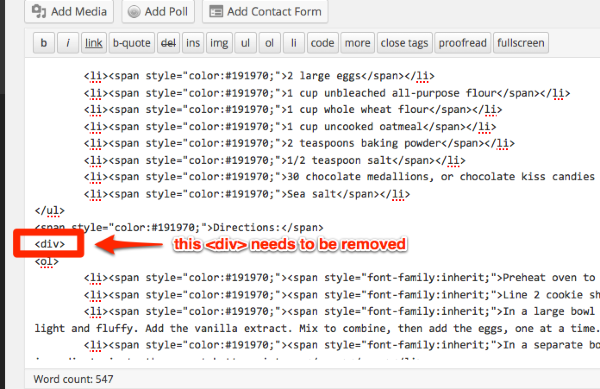
Another way you could make these fixes on the existing posts is to copy the code for each post into a code editor, like the free TextWrangler for Mac. It will allow you to make the code edits a bit more easily, and you would then paste the fixed code back into Text view.
-
I was wondering, too, if it might be possible to highlight the entire area around the recipe to another color, like a linen or light blue….Is there a way to do that?
You can change the background colour behind the recipes, is that what you mean?
Try adding a new line to the code I gave you above for a light blue, for example:
.jetpack-recipe { color: #191970; /* text color */ background-color: #f2f2fc; /* bg color */ } -
Hi.
I appreciate you sticking with me on this. I am going to have more time later this afternoon to apply most of what you said above and I will report back.Re: the background color…I put the code in but the backgrounds still show as white….hmmm. What do you think?
D -
Looks like you’re just missing the dot before the jetpack-recipe class. You have:
jetpack-recipe {
	color: #191970;
/* text color */
	background-color: #f2f2fc;
/* bg color */
}
It should be:
.jetpack-recipe { color: #191970; /* text color */ background-color: #f2f2fc; /* bg color */ } -
Thanks! I fixed the background color and just downloaded Text Wrangler. I will let you know how it goes!
D -
Kathryn:
I was finally able to fix the code on the recipe you were helping me with, that is this post
http://gathering-flavors.com/2013/02/07/cookies-chili-life-and-let-it-snow/
is fixed thanks to you. Since I am unaccustomed to reading code I was having trouble in the details, but I stayed with it and now it is fine. Hurrah!I did look at Text Wrangler, but that feels like a whole new world to learn, so I will save it for later.
I was able to fix another post by removing the recipe, copying it into a Google document, removing formatting and put it back in the post using the plain text button. I then reformatted it and added the recipe shortcode. Worked like a charm.
HURRAH.
I think I have enough input now to fix the remaining recipes on my own.
Thank you so so much for all your help! You are truly a happiness engineer.
And thank you to WordPress for adding this feature. I have been wanting it for years!
Unless there is anything else you think I should know/be aware of/do to make life simpler, I think we can close this thread. But please leave it public in case it can help someone else.
Dena
-
Yay – sounds like you’re on your way!
It’s been my pleasure to help. I love seeing the recipe shortcode in action on your site and I hope it gets easier and easier to format them as you go along.
Don’t hesitate to post again if you need further help, and yes, this will remain public in case it helps others in the future!


- The topic ‘Troubleshooting recipe short code’ is closed to new replies.
 WordPress.com Forums