Turning off Autosave
-
I want to turn off Autosave. I came across a post that says to go to your “wp-admin/post.php file and to the wp-admin/post-new.php files. How in the heck do I find those two things? And where the heck is the “gray bar” that’s supposed to be at the top of my pages that’s supposedly the “AdminBar?”
Thanks in advance
Melanie
Oh, my
Thanks in advance
The blog I need help with is: (visible only to logged in users)
-
Hi Melanie,
Those instructions don’t apply to WordPress.com since we manage your WordPress site for you (and changing those files would impact everyone on WordPress.com!).
When logged in, the Admin Bar is the bar across the top of your site.
What are you wanting to achieve with turning off autosave?
Cheers!
For anyone that comes across this thread with a self-hosted WordPress site, modifying core files (wp-admin/post.php, etc) is extremely discouraged. If nothing else, the changes will be overridden on the next update and not updating will leave your site open for issues. On WordPress.com, there’s no need to worry about that.
-
I want to turn off auto save because posts are saved before they’re finished and titles are given to them I don’t compose so I literally have hundreds of incomplete junk posts on my site.
-
Hi,
You don’t have to abandon an autosaved post because of the title. You can still modify the title and publish it.
For example, you can see the list of drafts by visiting the Posts->All Posts page on your Dashboard, then click “Drafts” near the top. Here’s a direct link https://melaniekillingervowell.wordpress.com/wp-admin/edit.php?post_status=draft&post_type=post
Click on a draft, and when you’re editing it, fill in the title. When you publish, the title is set and the URL will show the title (e.g. the previous http://example.wordpress.com/2014/01/07/123456 that was showing near the top will change to http://example.wordpress.com/2014/01/07/post-title/ ). You can continue to edit drafts as much as you need to before publishing (and edit it after publishing, too).
Does that help?
Cheers!
-
No, honestly it doesn’t.
Take this for example: One of my regulars commented on this unfinished post which doesn’t appear in my post log and which I can’t get to to delete or update: http://melaniekillingervowell.wordpress.com/wp-admin/post.php?post=67034&action=edit
This is the finished version: http://sayitaintsoalready.com/2014/01/06/freaky-photo-of-a-freezing-lake-michigan/
Why is that first, unfinished version even out there?
This happens All. The. Time. Autosave makes me look like an idiot blogger.
-
That first link isn’t a post, but a media page. Each picture you upload has a page corresponding with it. When you insert the image into a post, you can select where it will link to. In this case, it is set to link to the “attachment page”.
You can see this in action by going to the post, http://sayitaintsoalready.com/2014/01/06/freaky-photo-of-a-freezing-lake-michigan/ and clicking on the image. It’ll take you to the attachment page, where the regular commented.
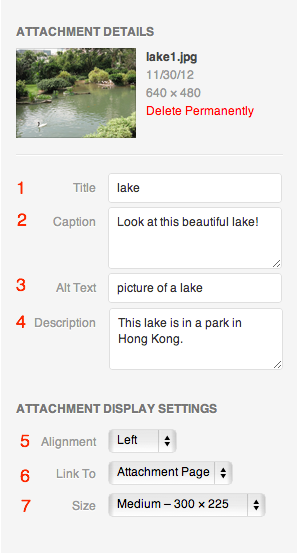
When inserting an image, selecting “None” will ensure folks can’t click through on the image to an attachment page. You can set this by changing #6 as described in this image: http://en.support.files.wordpress.com/2009/08/image-settings1.png?w=688
Does that help explain things any?
-
Yes. That helps a lot.
My newest best friend is the “None” option.
Thank you very, very much!
-


- The topic ‘Turning off Autosave’ is closed to new replies.
 WordPress.com Forums