

Tutorial on Saga
-
Is there a tutorial on Saga? I want to have a menu item for recipe pages, but I don’t want each page listed as a submenu item. If I create a widget, then all pages show under the heading of recipes since I can’t tag with a free domain. I haven’t been able to successfully create drop-downs either. I may upgrade later after I see how much I will use my blog. Maybe this isn’t the best theme for my purpose, but so far, I like the look of it the best especially for writing with a photo included.
The blog I need help with is: (visible only to logged in users)
-
Howdy!
For all the information on your theme “Saga,” you can find it at https://theme.wordpress.com/themes/saga/.
For more on customizing your menus and creating submenus, you can find it at https://en.support.wordpress.com/menus/. It provides a video to help out.
Let me know if this helps. Happy New Year!
-
I want to have a menu item for recipe pages, but I don’t want each page listed as a submenu item.
I haven’t been able to successfully create drop-downs either
If you create a custom menu you can decide which specific menu items get submenus.
The guide Erick pointed you to explains how to create menus and submenus. Where are you getting stuck?
If I create a widget, then all pages show under the heading of recipes since I can’t tag with a free domain.
Could you explain what you mean here? Adding tags doesn’t require any sort of upgrade so I’m not sure what you have in mind.
You can learn more about adding tags to posts here:
-
I was able to create submenus from the page Erick referred to, but that isn’t what I really want. If you are viewing the menu, I want it to look something like this
About Me
Recipes
Contact
I want to either click to get to the various recipe pages or have a drop down. Currently, clicking only takes the viewer to the first page. When I use either a widget or submenus, all of them are listed on the menu page. It’s not a big deal with only a few, but once a lot are added, it will get very cluttered and not be user friendly.
Maybe there is a better theme. If so, it would be easier to change now.
Thanks to you both for trying to help! -
Ah – I think I see what’s happening.
The “Recipes” item isn’t actually part of your primary menu, it’s a widget. Because it’s so close to the menu it looks a bit like it’s part of it, but it’s something else. Here’s a screenshot:
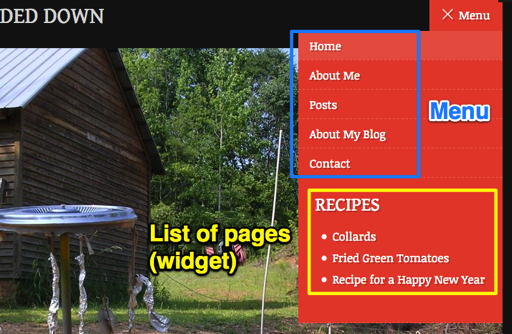
You can try removing that widget to start off.
Saga doesn’t have drop-down menus, but it does have submenus that look like this:
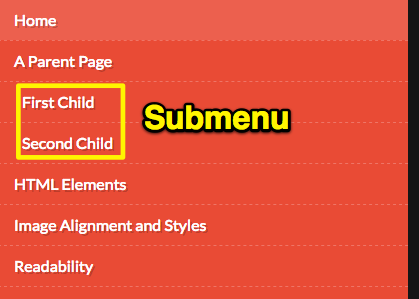
If you plan to have a lot of sub-pages of Recipes, then Saga may not be the ideal theme for you, or you may want people to go to the Recipes page and then put a list of your sub-pages directly on the page instead of in the menu.
Another alternative would be to list recipe categories in the menu instead, like Soups, Salads, Main Dishes, Desserts, and then have those link to the category pages where folks could scan through your recipes. If you go the category route, I’d suggest you consider making your recipes posts, instead of pages. Posts can have categories and tags and be viewed in different ways.
You can learn more here about the difference between posts and pages:
Perhaps this is where the confusion arose over the ability to tag? Only posts can be tagged, not static pages.
Let me know how it goes.
-
Thx! I will play with these suggestions. Do you have a suggestion for another theme similar to Saga that would allow drop downs? If I change, it would be best to do it before adding a lot of content. Thanks again for the help!
-
Oh, at one point, I had Recipes in the primary menu, but that still made the pages visible as submenus, so I tinkered with the widget. Basically, I got the same effect. I will try your suggestions. My computer skills have been hampered after a year of cancer treatment and lack of daily computer use.
-
Two grid-layout themes that are great for food blogging are:
Dyad – https://dyaddemo.wordpress.com/
Pictorico – https://pictoricodemo.wordpress.com/
They both have more conventional horizontal menus with drop-downs for sub-menus.
If you’d rather keep the layout similar to Saga, here are a few other themes with the type of menu you’re looking for:
Button – https://buttondemo.wordpress.com/
Lovecraft – https://lovecraftdemo.wordpress.com/
Libre – https://libredemo.wordpress.com/
Libretto – https://librettodemo.wordpress.com/
Nucleare – https://nuclearedemo.wordpress.com/
My computer skills have been hampered after a year of cancer treatment and lack of daily computer use.
Welcome back to blogging! We’re here to help you get back up to speed. :)
-
-
Thank you soooo much! We are having storms now. I look forward to trying out these other themes when the weather lets up. I have read and had several people suggest including my doctor that writing is a good way to heal. I had been a writer before but didn’t have it in me when I was sick.
-
-


- The topic ‘Tutorial on Saga’ is closed to new replies.
 WordPress.com Forums