Tweek spacing between posts in Nishita.
-
I’ve had lots of really good help from several folks today and I am learning (however slowly) how to search very particular parts of my blog … but I don’t seem to be able to locate the CSS/HTML which codes for the space between my blog posts. So, I’m looking for the code which controls the space/padding between the box which contains the date, categories, and comments of one post … and the boxed title of the next post.
And, while we’re at it … how about the location of code to control positioning of the image in my header … now its left, I want to center it.
Sorry to be a pain … I really am trying and, believe it or not, making progress (however glacial!).
DThe blog I need help with is: (visible only to logged in users)
-
Hi there, the spacing between posts is a bottom margin. Add the following to your custom CSS and edit the value as desired.
div.post, div.attachment {
    bottom-margin: 18px;
}
To center your header image, what you want to do is to set the left and right margins for it to “auto” using the following CSS.
#header-image img {
    margin-left: auto;
    margin-right: auto;
}
And you are NOT a pain. You are learning, and we are here to help with that, so please, don’t worry about asking questions. We have all been where you are now – learning. :)
-
Hey there thesacredpath, thanks for your help … rather than simply cut-and-paste your code, I wanted to find this with the ‘inspector.’ And couldn’t. I wish I could show a screen shot of what I see. Is there a way you can tell me how to visualize the code you’ve got above … especially the div.post, div. attachment line … can’t find it anywhere. I’m visually scanning for ‘div.post’ and can’t find it … where would it be? Thanks. What do they say … give a guy of loaf of bread and he eats for a day … teaching a guy how to bake bread and he eats for a lifetime! I’m trying to learn to bake bread … ! D
-
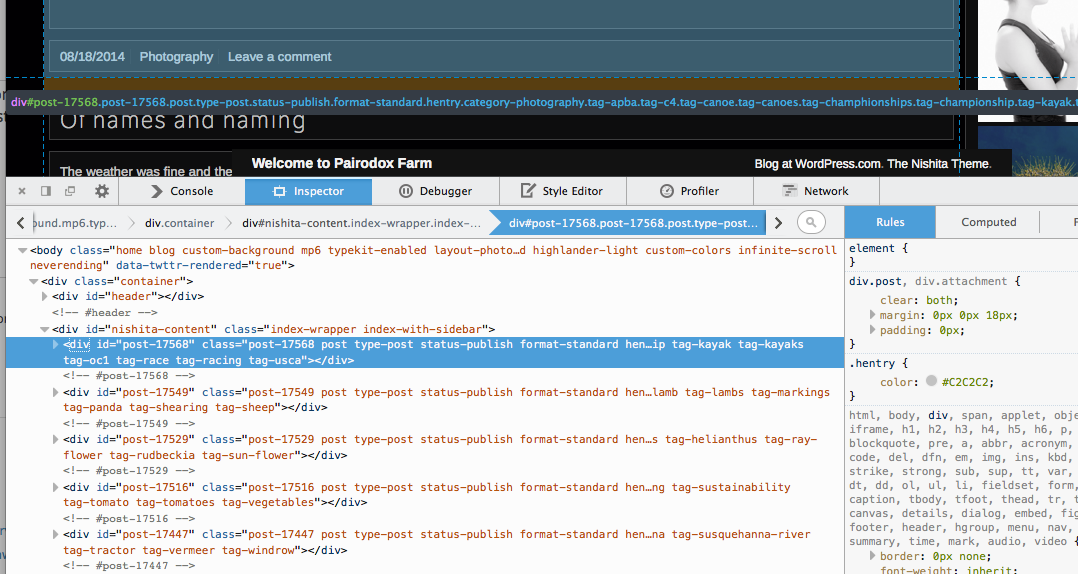
Hi, what I did was to inspect a post on the main page. Sometimes it takes a bit of moving around to get it to highlight an entire post and not the entire column of posts, or one element within the post. Here is a screenshot of what I saw. It is the top level div of an individual post. Note on the HTML side that it shows it as a div, and then lists the unique CSS ID and then the classes assigned to the post. The first class is the unique CSS class for that individual post, and then the next is “post”. If you look to the CSS pane on the right, you will see div.post, div.attachment and the declarations below. That is where I found the bottom margin of 18px. The first number in the margin declaration is the top, the second is a combo left/right, and the third is the bottom.
I like hearing people say they want to learn to bake bread. :)
-
Hey there again thesacredpath … you are either an educator by trade or you just come by the skills of an educator naturally. Thanks so much for your help here. Rather than using your code directly (eating a loaf), I was able to track down the codes in situ and see how it was that they were doing what they were doing. Then I felt as if I had earned the right to cut-n-paste (baking a loaf myself). I’m learning lots of nice little tricks, I only hope I can apply them to new problems in the future. I fear I’m learning CSS and HTML through the backdoor … and am not sure this is really the way to be doing it. Is there anything wrong with learning by doing? Anyway, thanks again and keep doing what you’re doing. PS: I’ve been reading, around here and there, that folks have gotten pretty upset about certain changes that WordPress has made to its editor … something about a beep, boop, boop (?) … it took me quite a while to figure out what folks were talking about until I managed, with some difficulty, to recreate the action myself. I really don’t know what folks are upset about? Really. I guess there are just folks out there who don’t feel that their day is complete without saying something nasty to someone, somewhere. As I said earlier … keep on keepin on … WordPress is doing just fine by me. D
-
Nothing at all wrong with learning by doing. That is how I learned CSS and HTML.
I’ve not been following the beep boop boop thing, but yes I take it some are not to pleased. ;-P
Thanks for the compliments, and we will try to keep “doing just fine” – or better. Come to think of it, better is better.
As you continue with your site, we are here to help if you run into problems.
-
Hey there … its me again … when you have time … see my very last widget … the blog stats? I can’t find the code for the entirely unnecessary little line underneath the number … and what about the huge space at the very end of my side bar (underneath that little line?). I did try to locate these … but couldn’t. D
-
On the blog stats widget, add the following to make the line underneath the number go poof!
.widget-area #blog-stats-3 ul li {
    border: none !important;
}


- The topic ‘Tweek spacing between posts in Nishita.’ is closed to new replies.
 WordPress.com Forums