

Twentynineteen template – basic design customization problem
-
Hello,
the background of solid color pullquotes can not be edited to any of the basic colors in my twentynineteen template, although the font colors can be changed.I have checked the sourcecode and the color is changed there in the text, but the appearance still looks the same.
Can you help please?
JanyThe blog I need help with is: (visible only to logged in users)
-
Hi Jany,
The only Customisation options for the free plan are listed in My Sites > Customise > Colors & Backgrounds — selecting a custom primary colour will also change the line on the left of the quote. Any colour changes beyond what is available there would need to be made with custom CSS.
I haven’t seen any quotes with background colours on jnyprojects.wordpress.com though, can you send a link to the post or page where this is happening?
-
Hi Gemma,
thank you for getting to my question. What I have problem with are not the classical quotes with the line on the left, but the blocs called ‘pullquote’. In my web jnyprojects.wordpress.com, these are the big blue boxes with texts under the ‘What we do’ section .
The pullquote blocs have their own customization menu in the right panel under the tab ‘Block’ to change one of 2 styles (Regular / Solid Color) and to change color of text and the background. I would like to be able to get to the same result of pullquotes as in the model website for the theme twentynineteen as is seen here: https://theme.files.wordpress.com/2018/12/twenty-nineteen-home-page-blocks.jpg
Currently, these setting do not work consistently. For example yesterday, I was able to change the text color in the ‘Solid Color’ Style and today I am not. Today, it allowed me somehow to change background color of the ‘Regular’ Style but I cannot change it back. I am using just the visual editor, so I assume there must be some bug in there.
I assume that as long as I am trying to achieve a look that is shown in the model website and as there is a clickable customization menu available, this should be possible to change also for me on the free plan. Of course, when I am able to build the basic website and get through these issues, I am more than open to consider upgrading.Thank you and I am looking forward to your reply!
Best regards from Munich,
Jany
-
Hi there,
Both the Regular and the Solid Color options work without any issue on my end.
Are you using the editor from the classic dashboard (https://jnyprojects.wordpress.com/wp-admin/) or from the WordPress.com interface (https://wordpress.com/)?
-
Hello,
I am using the new WordPress.com interface on the current GoogleChrome (64 bits, version 71.0.3578.98), Win 10. I have tried to log me in and out, close tabs etc. but it was of no help yet.
Also, I noticed, the preview of the page keeps refreshing every 10 seconds.
Thank you!
Jany
-
Hi there,
I have found a away around the problem.The preset colors do not work at all for me but when I set a new color through the custom color picker, then it works fine.
Thank you for your assistance though!
Jany
-
I’m also having trouble customizing the Pullquote block in Twenty Nineteen for alixohlinauthor.com. I’m hoping to have a colored background similar to the demo version of the theme.
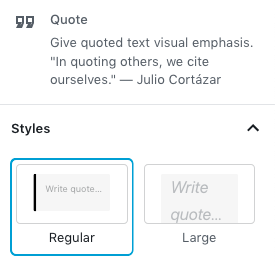
In the question above, trnkajan mentions Regular and Solid Color as style options for the Pullquote block. I only see Regular and Large. I’m working in the Gutenberg editor on a premium plan. Am I missing something, or is this only customizable with CSS?
-
I only see Regular and Large.
There isn’t any option in the settings for the Pullquote block that has “Large” as a heading or option. The only options available for this block in the sidebar are these:
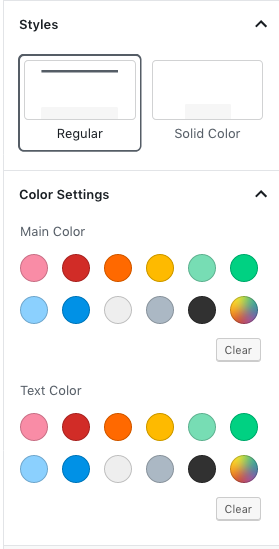
Please make sure you have the Pull Quote block selected in the editor to change that specific block’s color options. If you have another block selected, you’ll see the options for that block – it sounds like you’re looking at the Quote block, rather than the Pull Quote block:


- The topic ‘Twentynineteen template – basic design customization problem’ is closed to new replies.


 WordPress.com Forums
