

Twitter share button not available
-
I can not see twitter sharing button in Settings > Sharing
I checked my blog Reading status and its set to –> Allow search engines to index this site. I have already configured Twitter in publicize section.The only services I see are Email, Print, Google+ and Pocket.
The blog I need help with is: (visible only to logged in users)
-
Perhaps double check if you’re seeing Twitter listed in “Available Services” section. If so, drag it into the “Enabled Services” section below it:
-
I have already configured Twitter in publicize section.
The only services I see are Email, Print, Google+ and Pocket.
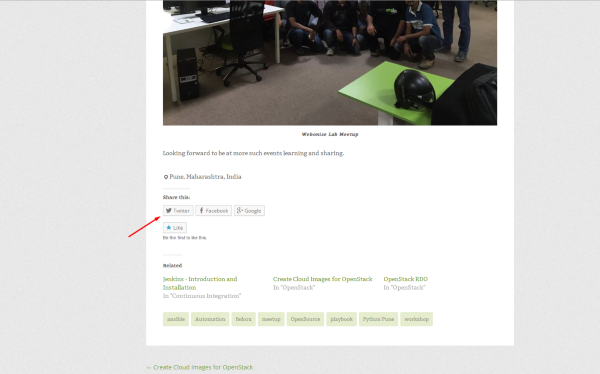
I see your Twitter button perfectly:
-
@jami0821 I can not find buttons in the share section. Please check this screenshot –> http://postimg.org/image/d62v5gli9/
@galois Which browser you are using ? I checked on chrome and firefox, still can not locate the share buttons. Please check –> http://postimg.org/image/m69y04q69/
-
-
-
@rescuethemes Already tried that. Also tried opening blog in private session (incognito mode). Did not work.
-
Aah looks like my AdBlocker is blocking some contents, including half the share buttons. Disabling AdBlocker on the blog did the trick for me. I can now finally see all the Share Buttons in Sharing options as well as the posts.
Thank you all for the time and help. :-)
-


- The topic ‘Twitter share button not available’ is closed to new replies.
 WordPress.com Forums