

Twitter View Details shows wrong Twitter handle for Worpress gallery link
-
Twitter Details for WordPress.com blog post link showing wrong Twitter Handle for Post by: and Gallery by: …the Twitter handle generated after clicking Twitter share button is correct but the handle on the Twitter View Details tab shows wrong handle for WordPress link info.
The blog I need help with is: (visible only to logged in users)
-
So I figured out from other forum posts and experimenting that when you have changed your Twitter Handle, it will only work for posts published after the change. It will not show the correct one for older posts that are shared, so now I just need someone to fix it where it will work for my older posts that I want to share on Twitter. I saw that it could be done on another post, I would very much appreciate it (-: And no more Twitter Handle changes xD
-
What was your old Twitter Handle?
If you could also give me a link to a post that shares with the old handle I’ll be happy to take a look.
-
Old Twitter: kwyattphotog
Post with Old Twitter: https://kwyattphoto.wordpress.com/2013/02/05/cumberland-island-national-seashore-georgia-usa/
New Twitter: kwyattphoto (I switched with another K. Wyatt and they now have my old one)
Thank you (-:
-
When I click the twitter share link on that post, this is the share option I see
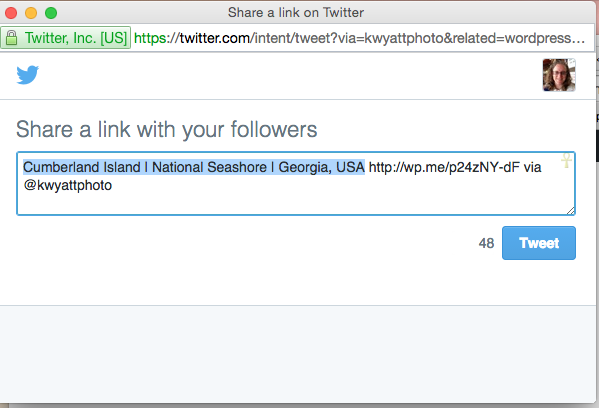
That’s the new twitter handle correct?
Could you send me a screen shot of where you are seeing the old one?
Here are instructions on making a screen shot
-
Yes, as I noted in my original post, this is the case. Here is a link to a screenshot of what I am talking about. The image on the left being the wrong handle created from an old WordPress post, the image on the right being the correct handle created by a new WordPress post. I hope this helps (-:

-
So the problems you see are on Twitter, not on WordPress.com?
If that’s the case, the only option I know of is to delete the old tweets and retweet from the new account.
You could also try contacting Twitter support.
-
That’s not what I’m saying. I’m sharing a WordPress link, that link contains information that is then generated on Twitter. It’s not about old tweets or anything. It’s about WordPress posts I made before and after I changed my Twitter handle. Old WordPress posts of mine generate the old Twitter handle, I want them to generate the new Twitter handle just as it does if I were to go make a new blog post and share it on Twitter right now. The old WordPress posts generating the wrong handle is the problem, it’s not all posts, only posts predating my Twitter handle change. I still believe this is a WordPress problem not Twitter because Twitter is just reading the info from the WordPress short URL that is being shared.
-
Hi!
I checked the article you mentioned here:
That post seems to be generating the new Twitter handle (@kwyattphoto). I checked in three places:
1. Viewing the source on the post (which shows the information we have for that particular post). You can find that by pasting the following in your browser:
view-source:https://kwyattphoto.wordpress.com/2013/02/05/cumberland-island-national-seashore-georgia-usa/You’ll see the following lines if you do a search for Twitter:
<meta name="twitter:site" content="@kwyattphoto" />
<meta name="twitter:image0" content="https://kwyattphoto.files.wordpress.com/2013/02/dsc_0181_pic2020413.jpg?w=640" />
<meta name="twitter:image1" content="https://kwyattphoto.files.wordpress.com/2013/02/dsc_0113_pic2020413.jpg?w=640" />
<meta name="twitter:image2" content="https://kwyattphoto.files.wordpress.com/2013/02/dsc_0152_pic2020413.jpg?w=640" />
<meta name="twitter:image3" content="https://kwyattphoto.files.wordpress.com/2013/02/dsc_0073_pic2020413.jpg?w=640" />
<meta name="twitter:card" content="gallery" />
<meta name="twitter:creator" content="@kwyattphoto" />
<meta name="twitter:description" content="Gallery post by @kwyattphoto." />
The handle looks correct there.
2. When clicking the Twitter sharing icon from beneath your post. That’s returning the correct Twitter handle on my side as shown in this screenshot:
3. The Twitter card validator here:
https://cards-dev.twitter.com/validator
This previews what your post will look like on Twitter. When I enter the URL of the post and click Preview Card, I get the correct handle as shown here:
Perhaps this took a bit of time to update? Otherwise, could you pass along another post URL that you’re seeing the old Twitter handle for?
-
Thank you for checking on this. I believe that it must have just updated then as I just now checked the same post and another older post as well and it is using the correct handle now, and I had just generate one for the screenshot yesterday and it was still wrong. Again thank you for looking at this, I really appreciate it.
-
No problem at all! It may have just taken this some time to update. Let us know if you notice it grabbing the wrong username again though!


- The topic ‘Twitter View Details shows wrong Twitter handle for Worpress gallery link’ is closed to new replies.
 WordPress.com Forums