

Twitter Widget – Not Working – Theme Oxygen
-
Evening to all.
My twitter widget simply stop working 4 days ago.
The code is correct. I already deleted and installed again…but still nothing.Need some advice and guidance please.
The blog | http://alexkrausz.wordpress.com/Thanks and excellent week.
The blog I need help with is: (visible only to logged in users)
-
I am using Firefox 27 and I see it displaying properly in your right sidebar.
1. If you are not running one of the browsers and versions listed at http://browsehappy.com/ please try upgrading or switching first.
2. If you are using an IE browser in compatibility mode please disable that mode. http://www.sevenforums.com/tutorials/1196-internet-explorer-compatibility-view-turn-off.html
3. If you are running one of the browsers and versions listed at http://browsehappy.com/
(a) Try clearing your browser’s cache http://www.google.com/support/accounts/bin/answer.py?hl=en&answer=32050
If applicable see here for instructions on how to clear the cache for Chrome and Safari on the iPad:
http://browsers.about.com/od/howtousemobilebrowser1/ss/safari-ipad-clear-cache.htm
http://browsers.about.com/od/howtousemobilebrowser1/ss/How-To-Clear-Browsing-Data-In-Chrome-For-Ipad_6.htm(b) Make sure that you have both third-party cookies enabled and JavaScript enabled
http://en.support.wordpress.com/third-party-cookies/
http://www.google.com/adsense/support/bin/answer.py?answer=12654(c) Disable all browser extensions or add-ons temporarily.
(d) Try enabling HTTPS: http://en.support.wordpress.com/https/
Add both *.wordpress.com and *.wp.com to your list of trusted sites under the Security tab. Make sure to uncheck the box for “Require server verification (https:) for all sites in this zone.” http://en.support.wordpress.com/https/#frequently-asked-questions
4. You can use this link to see if your flash is up to date. http://www.adobe.com/software/flash/about/ If it’s not then go to http://www.adobe.com/products/flashplayer/ and download and install the latest version of flash.
5. Try using another browser.
-
Thank you Timethief for your answer.
Nevertheless, the problem still persists. I’ve checked in more then 4 laptops and within those I also cannot see the Twitter widget.Something is quite wrong with my WP.
Any further advice?Alex
-
I’ll tag this thread for a Staff follow-up. Please subscribe to the thread so you are notified when they respond and please be patient while waiting.
-
-
Do know that you failed to answer my questions above and Staff may ask you the same ones so they have something to work with. At this point I don’t know:
what your operating system is,
how you connect to the internet and WordPress.com
and exactly which browser(s) and version(s) you are using
let alone the answers to anything else I asked above. -
I’d like to confirm whether or not your used this guide > http://en.support.wordpress.com/widgets/twitter-timeline-widget/
-
You are right.
I use my laptop and operate via chrome and firefox latest version. My OS it is Windows 8.1 . My connection it is via fiber with speeds around 120mbps.
Thanks!
-
-
-
Hi there,
After looking into your account, I found that your Twitter Timeline is now functioning as seen here:
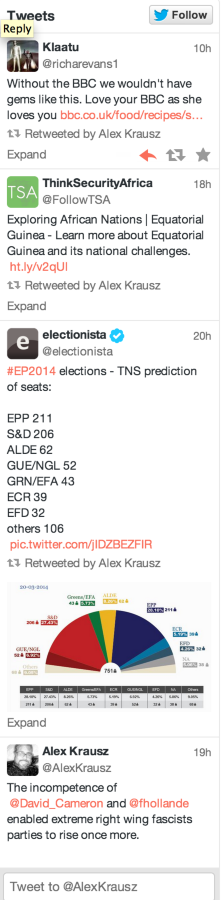
Please let me know if you run into this again!
Cheers!


- The topic ‘Twitter Widget – Not Working – Theme Oxygen’ is closed to new replies.
 WordPress.com Forums