

Unable to log in to wordpress.com through chrome
-
I am getting the following message while logging into wordpress.com through chrome to work on my blog, counterview.org.
I get the following message:
—
Cannot connect to the real en.wordpress.com
Something is currently interfering with your secure connection to en.wordpress.com.
Try to reload this page in a few minutes or after switching to a new network. If you have recently connected to a new Wi-Fi network, finish logging in before reloading.
If you were to visit en.wordpress.com right now, you might share private information with an attacker. To protect your privacy, Chrome will not load the page until it can establish a secure connection to the real en.wordpress.com.
—
I changed wifi network but the problem continues. I am using windows xp.
On Mozilla, however, I can log in to wordpress.com
Kindly help urgently!The blog I need help with is: (visible only to logged in users)
-
Hi there!
Are you by any chance attempting to reach WordPress.com over an HTTPS connection rather than an HTTP? For example, does this link work?
Let me know if you’re still experiencing trouble!
-
Thanks. This is what I get after I log in: https://wordpress.com/wp-login.php.
Icon lock is slashed, and the https is crossed. If I remove “s” from https, it returns to https://wordpress.com/wp-login.php and I get the message which I have quoted in my first message. If I click on the Reload red button, for a moment it seems to login, but I return to Reload (red) and More.
I formatted the C drive to try to find out if there is any computer problem, but the problem continues with Chrome (not with Mozilla). -
Sorry, I rechecked, instead of https://wordpress.com/wp-login.php it’s http://wordpress.com/wp-login.php (without “s”) after I remove “s”, but it doesnt change anything. I can’t login through Chrome!
-
Can you take a screenshot of your Privacy settings and upload the screenshot to your Media Library? To find this in Chrome, click “Chrome-> Preferences -> Advanced Settings”.
-
Pls take these… Have taken these two screenshots. Hope its okay…
http://counterview1.files.wordpress.com/2014/04/privacy-settings1.png

-
Those settings look correct. Can you take a screenshot of the error window you receive when trying to login to WordPress.com?
-
Please take the two screenshots of the error logging in through Chrome:
1. http://counterview1.files.wordpress.com/2014/04/screen.png
2. http://counterview1.files.wordpress.com/2014/04/screen1.png -
Can you try clicking the broken lock in the address bar? You should see a menu like this:
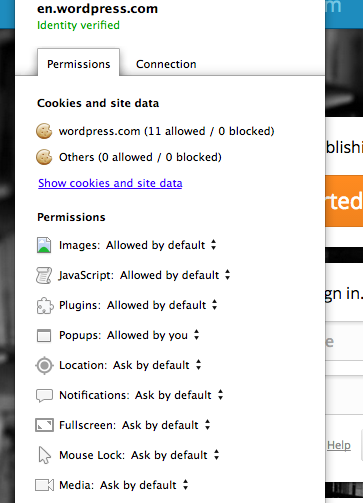
From that menu, click “Show Cookies and Site Data”. On the next menu, can you let me know if there is anything under the “Allowed” or “Blocked” tabs?
-
Hi!
That’s odd. Those settings look like they’re correct. What happens if you clear your browser cache and cookies as explained here (Note: clearing cookies will reset your login information for any sites you have logged into)?
Additional browser instructions can be found here:


- The topic ‘Unable to log in to wordpress.com through chrome’ is closed to new replies.
 WordPress.com Forums


