

unable to reach statistics from dropdown menu
-
Hello.
I am unable to reach my stats from the right dropdown on the administration bar when viewing my blog
https://cafedog.wordpress.com/the link directs to:
https://my-stats/?blog=1066300
and it says “server not Found”.
no i.p. address is given.
browsers firefox 33
seamonkey 2.5I am able to get to my statistics from the dashboard page.
thanks.
The blog I need help with is: (visible only to logged in users)
-
I can’t speak as to why your link is broken, but the link you are looking for is https://wordpress.com/my-stats/. For some reason, the wordpress.com/ part is getting left out. Try https://wordpress.com/my-stats/?blog=1066300 and see how that works for you.
-
Thanks arinwokur,
The direct links you suggested work fine.just any extra info for the wp tech folks, its the dropdown menu on all my blogs, the link is broken from firefox, seamonkey and chrome.
-
Hi there,
I tagged this thread for Staff. Please subscribe to it so you are notified when they respond. -
Hi Chris,
Thanks for the report. You mentioned this:
just any extra info for the wp tech folks, its the dropdown menu on all my blogs, the link is broken from firefox, seamonkey and chrome.
Can you please explain exactly which one? I’m going to this one and I’m being directed correctly:
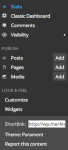
Please let me know!
-
@gracjiyoung,
not the menu in your screenshot.
the dropdown menu that opens on the right side of the top administrator bar….
right next to “New post”, when you hover over your gravatar. -
Ah, thank you for the report. I was able to reproduce it as well. I have reported this to our team for review.
Cheers!
-
-
-


- The topic ‘unable to reach statistics from dropdown menu’ is closed to new replies.
 WordPress.com Forums