

unpublish a blog post
-
How do I unpublish a blog post and but it back into a draft status?
The blog I need help with is: (visible only to logged in users)
-
Hi There!
You can revert published post to draft as follows:
1. Please go to your posts: https://wordpress.com/posts/
2. Then select a post you’d like to edit and click on Edit button in the bottom left corner of the blog post.
3. You will then see the word “Published” on your left hand side and the settings sign right before the word.
4. Click on the settings sign and you will see an option to Revert to Draft as shown on this screenshot:
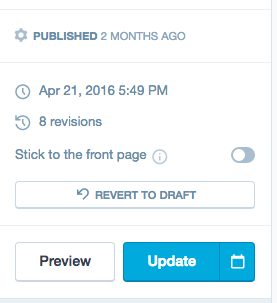
5. Click on the Revert to Draft button and you are all set!
Please let me know if you have additional questions.
Cheers!


- The topic ‘unpublish a blog post’ is closed to new replies.
 WordPress.com Forums