Upcoming Events widget lists wrong times
-
Never mind me, I’m simply unsubscribing from this thread. The form won’t let me submit an empty comment in order to simply uncheck the notify me box.
-
Thank you macmanx, the google calendar settings only of gmt timezones to choose from. I could not find any UTC options. I tried deselecting GMT 5:00 Toronto and just selecting GMT 5:00 Eastern time and that did not make a change.
This widget was working properly before. I just noticed that the dates were a day early yesterday… -
-
I’ve got the same problem. My widget is set to display up to 3 events. A December 2012 event is appearing at the bottom of the event list, and a January 2013 appears at the bottom, with a February 2013 event in the middle. It’s not even reverse chronological order.
Time zones are all consistent and correct.
Thanks in advance for any help. -
-
Google calendar does not give an option to select a gmt time zone without an offset. I played with the blog timezones by trying several manual UTC offsets to see if any would make a difference but I did not see any change. My events are in chronological order though unlike some other posters. They are just all posting a day prior than the calendar actually shows. I know I mentioned this before but everything was okay until yesterday?
-
From your calendar settings, check “Display all time zones” then choose anything that’s “GMT +00:00”.
-
Hello again,
I set my calendar to GMT+00:00 and refreshed my blog but nothing changed – the dates are still behind. Thank you for any help you can provide. -
-
-
macmanx:
I’ve been following this thread and have a similar problem. I don’t know if the GMT+0 suggestion was for all time zones or just for skateamherstburg, but it didn’t work for me.
My public google calendar is at: https://www.google.com/calendar/embed?src=lbdurhamnc%40gmail.com&ctz=America/New_York
and my WP page is at: http://longballdurham.com/calendar/
The calendar displays fine, but the Upcoming events is off by a day.
Any help is appreciated. Thanks.
-
<p>I’ve activated this widget. There are 2 related problems:
<p>1. Events displayed in the wrong order. I have this problem on my site, and have tried nearly everything to correct it, to no avail. Given the specific malfunction in the order my events are appearing, I believe that the events are being sorted by the order in which they were ENTERED into the Google calendar. (I tried EDITING each event, but editing does not alter the order of appearance.) I wonder if one of our happiness engineers could check into that possibility?
<p>2. Incompatibilities between time zones. I did have that problem but I’ve been able to correct it. For some reason, it works for me to set the calendar to London and the WordPress site to NY (my local time zone). Don’t ask me why that works.
-
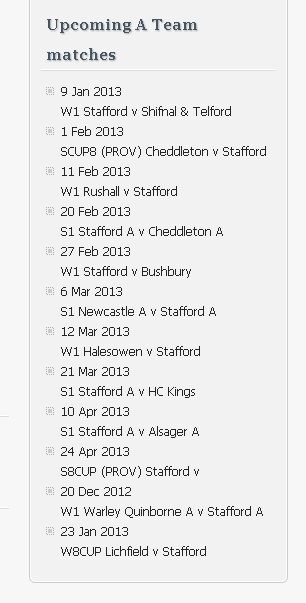
I also have the problem with this widget. I have checked all the timezone and privacy settings as advised to others here, but a couple of my events are way out of line for the dates (20-Dec-2012 is listed after 24 Apr 2013).
I am 99% sure the listed order is the actual order I entered these events into the calendar.
The public calendar is viewable here (but only the purple events are relevant here): http://staffordcc.wordpress.com/calendar/
The Upcoming events widget is here: http://staffordcc.wordpress.com/ and is currently set to show all events. Notice the last 2 events in the list labelled ‘Upcoming A Team matches’.
Thanks
Ken
-
Hi there,
I don’t think I’m seeing what you’re seeing. Could you take a screenshot? You may also benefit by clearing your cache. Here is more information about how to do that:
http://en.support.wordpress.com/browser-issues/Cheers!
-
This widget is DEFINITELY broken. It’s clearly illustrated here:
You can see the embedded Google calendar and the Upcoming Events widget (bottom sidebar) are off. Timezones on both are correctly set to EST and using the same .ics link and importing locally shows the correct events.
Here is the ICS link:
http://www.google.com/calendar/ical/admin%40corneliuspto.org/public/basic.ics
Please advise ASAP.
-
Photobucket Screenprintzandyring, Please see this image:
However, I wonder why you couldn’t see the issue, so I logged on from work (not my usual pc so no cache issues) and the widget reported that there were no events to display, so I refreshed the page and there it is, my list is back, but in the order I created the events rather than the date order of the events themselves.
Hope this helps you to help.
Regards
Ken
-
Hi there,
I see what you mean now. I’m running some testing and I’ll get back to you on what I uncover.
Cheers!
-
Hi again,
This is definitely an error, and we are working on a fix!
So sorry for the inconvenience.
-
Thank you for the confirmation of the error and the effort being put in to fix it.
Have a fabulous Christmas.
Ken
-


- The topic ‘Upcoming Events widget lists wrong times’ is closed to new replies.
 WordPress.com Forums