

updating site name
-
Hi, I was just wondering if I’m able to easily change the address of a site I already have but want to change the name/topic.
WP.com: Yes
Correct account: YesThe blog I need help with is: (visible only to logged in users)
-
Hi there,
You can change your blog address by going to the WordPress.com dashboard, clicking Upgrades > Domains, clicking the three dots next to the blog you want to update, and then under Change Site Address, adding the new address in the field.
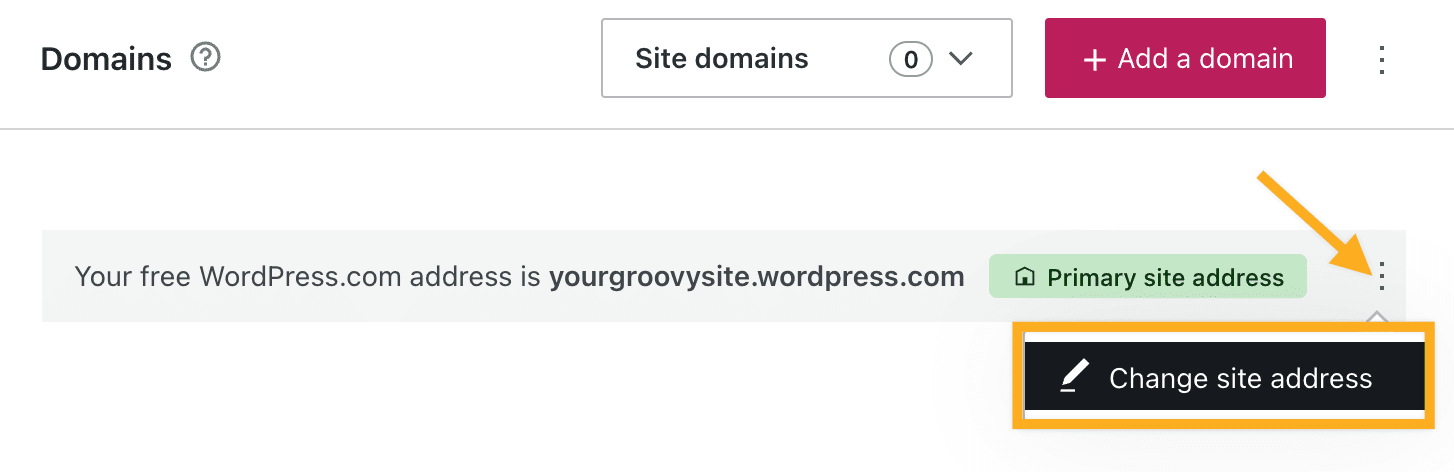
Please note that the old address will not be available for use again.
For detailed instructions/information on changing your blog name, please visit our support document:
http://en.support.wordpress.com/changing-blog-address/
You can change the title of your site under your General Settings Page:
https://wordpress.com/settings/general
For instructions on how to change your title, please visit our support page:
https://en.support.wordpress.com/settings/general-settings/#changing-your-site-title-and-tagline
Let me know if you have any questions.
Thanks!


- The topic ‘updating site name’ is closed to new replies.
 WordPress.com Forums