

upgrade
-
There are specific things I am looking for in upgrade; How do I customize footer? How do I change font Color? How Do I customize the page Title per page? How do I set a constant pic for each page? Why is the domain name still showing as stacynicole.wordpress.com and not HauteDesignLiving.com etc. I thought a chat service was available
The blog I need help with is: (visible only to logged in users)
-
Hi there!
How do I customize footer?
The footer credit is required to be displayed according to our terms of service:
http://en.wordpress.com/tos/Note that even sites hosted through our VIP program, such as the TED blog, display a credit to WordPress.com in the footer.
(See the bottom of http://blog.ted.com/ for an example)Let us know if you have any additional questions about this.
How do I change font Color?
Here is information about adjusting colors for your site:
http://en.support.wordpress.com/custom-design/custom-colors/If you have any trouble identifying and changing specific colors, let me know what precisely you want to change, and what color you want.
How Do I customize the page Title per page?
The title you give each Page will be the title that appears at the top of the page.
How do I set a constant pic for each page?
If you are referring to the Featured Image on the page, then here are the instructions:
en.support.wordpress.com/featured-images/
If you simply want to add an image to each individual page:
If you’re referring to something else, please explain in a bit more detail and I’ll help!
Why is the domain name still showing as stacynicole.wordpress.com and not HauteDesignLiving.com etc.
Your site can be seen online as hautedesignliving.com. On the other hand, stacynicole.wordpress.com, is the name of your actual site at WordPress.com. No one else will see it but you. Here’s some info about how domain names work with WordPress.com sites:
I thought a chat service was available
Whenever an operator is available for a live chat, you’ll see a pop up box in your dashboard, or in our contact form:
en.support.wordpress.com/contact/
I hope this helps! If you have any other concerns, drop me a note. Thanks much!
-
Thank you for your response! However I am aware of wordpress needing to be in the footer, I would like to copyright my Blog and remove the theme name. Is that available as a feature of the upgrade? I would like the navigation font color to grey in my logo. How do I get the most recent 3 post, so that there is a grid of 6 below main image.
-
Hi again!
However I am aware of wordpress needing to be in the footer, I would like to copyright my Blog and remove the theme name. Is that available as a feature of the upgrade?
You cannot remove the theme name…however, I can help you add your own copyright information in the footer, if you’d like. We can do that with the help of the CSS revisions you can make with your Premium upgrade!
If you’d like to do this, just let me know what you need added, and I’ll send you instructions.
I would like the navigation font color to grey in my logo.
I’m not quite sure what you’re asking here. Which color do you want change to gray? Thanks!
How do I get the most recent 3 post, so that there is a grid of 6 below main image.
There really isn’t a way to do this. In the Edin theme, there are just three areas directly below the main image that can be filled with optional pages.
If you want to add a recent posts widget, it will appear as it does here (in the Edin demo):

Please let us know if you have any other questions. Thanks much!
-
In the demo, below the frontage image there are a total of 6 paragraphs shown, I would like to have 3 of the 6 preferably the same row be my most recent 3 blogs. I apologize I did not clarify myself in my prior communication. Yes, I would like my copy right information added to the footer. The navigation from is black I would like to change this to #696969 Dim Gray
-
Hey Nicole,
In the demo for Edin, below the front page main image, there are actually three areas below the front image that display Pages. That area is meant for Pages, not posts, as seen here:

The area below that section is made up of three individual widgets:
CUSTOM PAGE TEMPLATES is a Text widget placed in the Front Page One area
SOCIAL MEDIA INTEGRATION is a Text widget placed in the Front Page Two area
RECENT NEWS is the Recent News widget placed in the Front Page Three area
You can see those widgets beneath the three pages links here:
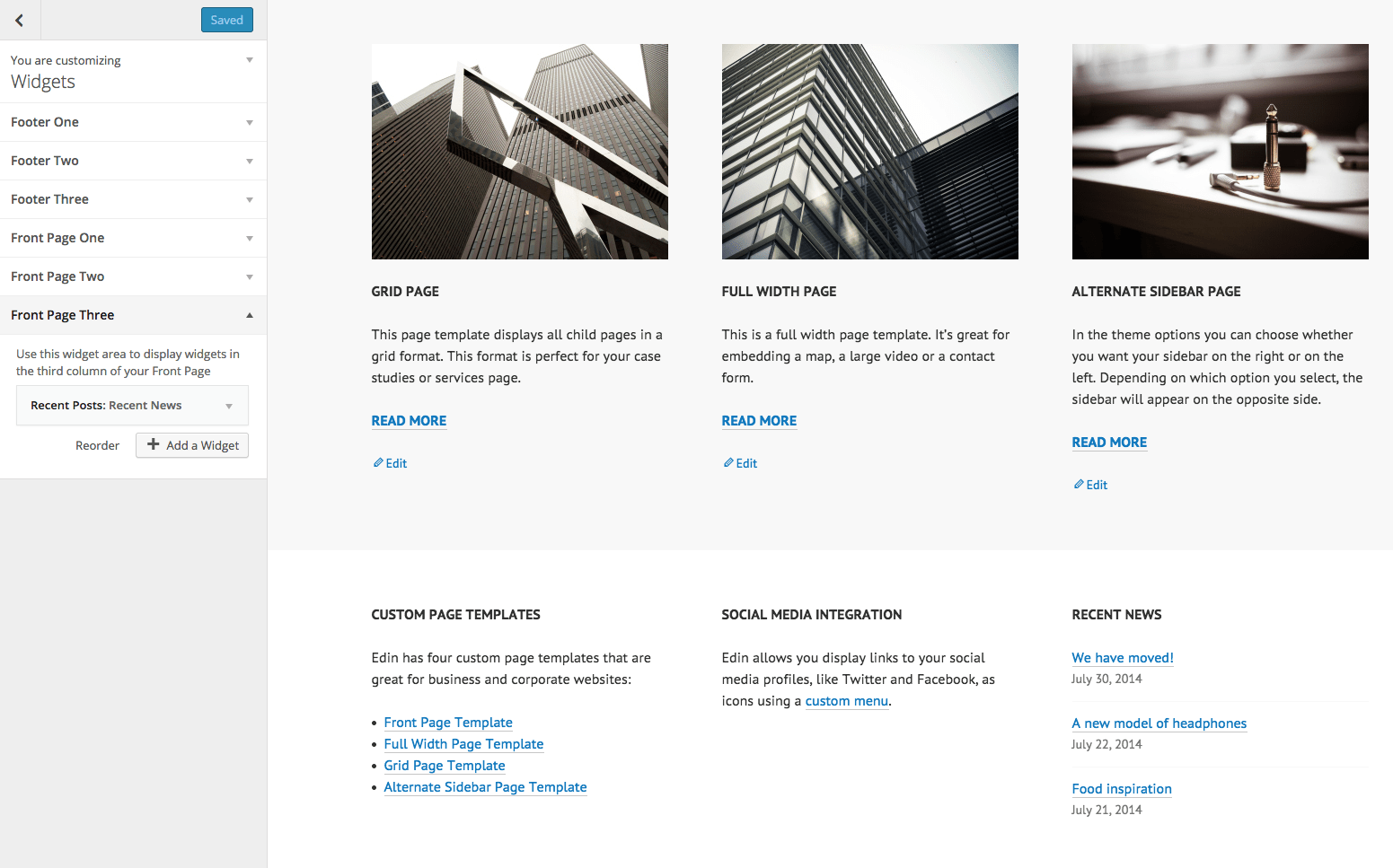
Your recent posts won’t display in Edin in the manner you’re requesting. If you very much want posts (rather than pages and widgets) to be highlighted on your front page, you may want to switch to a theme that better suits you. Let me know if you need an assistance with this.
Yes, I would like my copy right information added to the footer.
You can add this by editing your CSS code for your theme. If you’d like to give this a try, go to your Customizer. Then, click CSS in the menu. In the CSS Revisions box, please paste the following underneath all existing text:
.site-info:before {
content: “YOUR PERSONAL COPYRIGHT INFORMATION HERE”;
display: block;
}Then Save your changes.
The navigation from is black I would like to change this to #696969 Dim Gray
I’m not sure what you mean by “navigation from.” Could you explain? Are you referring to your menu text (which is black)? Or, the background of the footer (which is dark gray)?
Help with more details, please :)
Thanks!


- The topic ‘upgrade’ is closed to new replies.
 WordPress.com Forums