

upgrading to Puzzle theme.
-
I’d like to maybe purchase the Puzzle theme as I really like the front page look. Am I right in thinking that I can set it up so that when a user clicks on Older Posts that same format will be replicated. When I go to older posts in the preview it is just a list and does not have a nice look at all. Thanks in advance.
The blog I need help with is: (visible only to logged in users)
-
Hi there,
When you click on “Older Posts”, the same grid-looking format should be replicated with the additional posts that load. That’s currently happening for me on the demo as shown here:
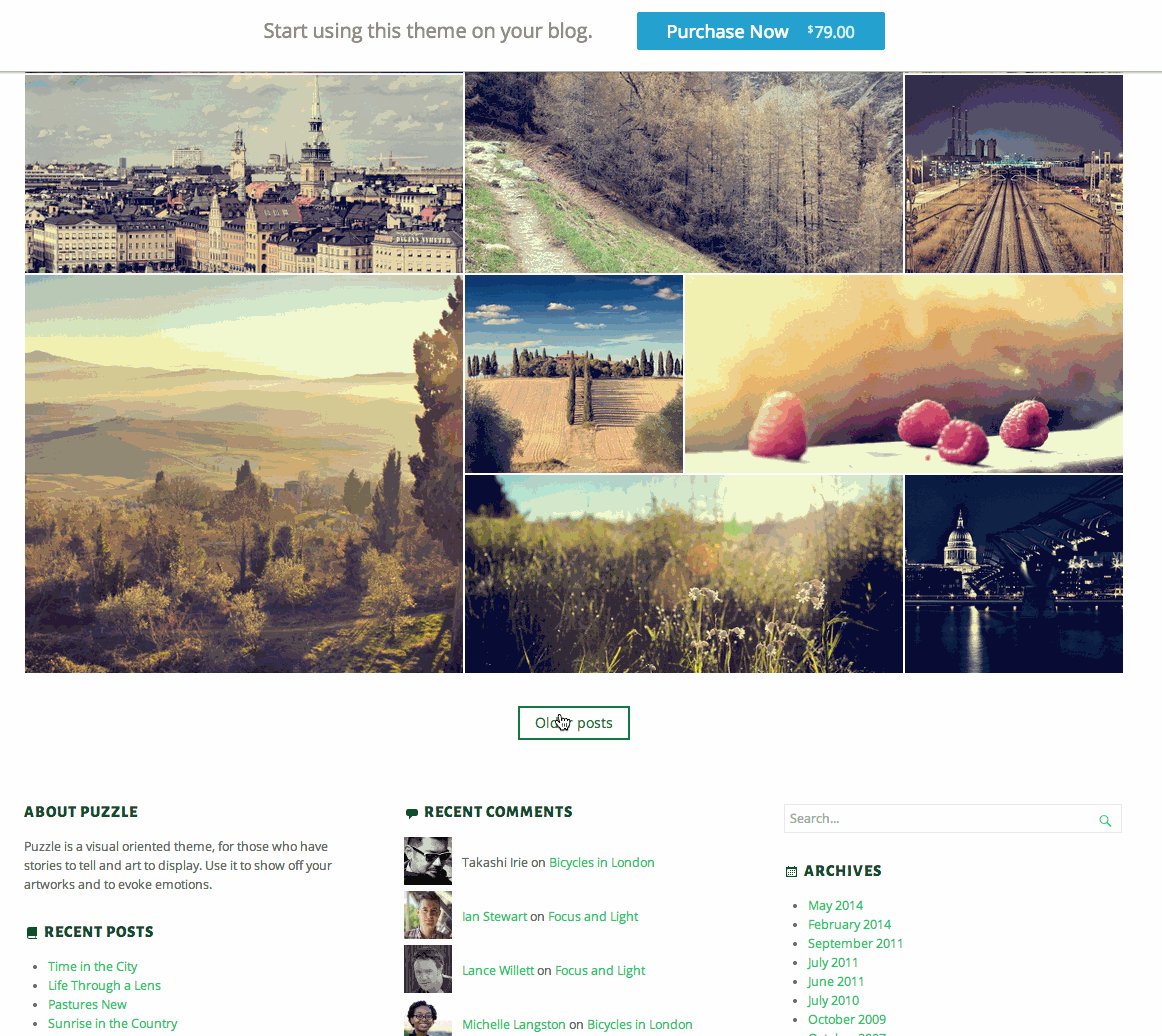
Can you clarify where you’re loading that isn’t displaying the grid format?
-
Thanks Jeremeyl. I get something that looks similar to that on the 1st preview page but the Older Posts look like this (hope it works for you). Also, one of the grids has a photo that is not from that particular post, but that’s not the main issue at the moment.
Not sure what you mean about where I’m loading. I’m just exploring different themes from my current blog page (using Promenade theme ATM) to find something I like.
https://europewithanedge.wordpress.com/wp-admin/customize.php?theme=premium%2Fpuzzle
-
I suspect that’s just an issue with how the “Older Posts” link works in the theme preview (I’ll be investigating and reporting this to get fixed). Once you activate the theme, the “Older Posts” link should cause the posts to load in the grid format. If for some reason you end up not liking the Puzzle theme, you can also get a refund within 30 days of purchase.
-
Thanks again Jeremey – I thought it must be something like that – it would be strange to not be able to continue the first page theme for all posts.
Just one more question if I may – if I purchase the theme will it be complicated to change over from Promenade to Puzzle? Going by this link it sounds like it will be with all the instructions about extracting files from an ftp site. It sounds easier to do the installing via the Word Press option (the second bullet point). Also, I’m not sure what all the next information about Theme Update relates to, but hope it will have nothing to do with me!
Thanks a lot in advance.
-
Those are actually instructions for self-hosted sites running on WordPress.org software. Installing the Puzzle theme at WordPress.com is much more simple. You can just click “Buy and Activate” on the page here:
http://theme.wordpress.com/themes/puzzle/
That will walk you through the steps of installing the theme!
-
Thanks a lot. I actually ended up going for one of the free ones – Pictoria – which is similar in look and I am pretty happy with. Just one more question – can I remove or at least move the Search feature up the top of the page. At the moment, when I click on it, even when logged out, it shows searches I’ve done on a totally unrelated political site.
Again, thanks very much in advance.
Ian
-
Hi Ian,
Glad you found a theme that works! It isn’t possible to remove the search function from the top of Pictorico without using Custom CSS, which would require the upgrade shown here:
http://en.support.wordpress.com/custom-design/
If you would like to go that route, I’m happy to let you know the CSS you’ll need to use.
Even if you do use the search function, it should only show posts that are on your site. I gave this a try, and I’m currently only getting results from your posts. Could you let me know a URL that you’re seeing in the search results that isn’t a post on your site?
-
Thanks Jeremey. What I get is a drop-down menu that includes only the names of people I’ve searched for another site. Sometimes I like to look at what they are saying on Free Republic, a very right-wing site, especially when things aren’t going their way! So, when I click on the Search tab I get a list of names – Sarah Palin, Ted Cruz etc, but it doesn’t search for them – they just appear on the drop down menu and if I click their name and hit Enter it comes back with ‘no results’. If I type something that I know is on my site, like Sarajevo, it works. But like I say, when I click on Search I get a list of about half a dozen entries that are names I know I have searched for on Free Republic! Weird huh.
-
Thanks for clarifying! That’s a by-product of your browser. It’s suggesting things that you have searched for in the past. For example, here’s what I’m seeing on my side:

Is that the same drop-down menu (obviously not the same content) that you’re seeing?
-
Yep that’s it. It doesn’t matter really if when you (or a visitor) clicks on Search then they don’t get that drop down menu. Is there any easy way that you know of to clear it though? TIA – and also for answering so many questions!
Ian
-
-
Hi Ian,
It doesn’t matter really if when you (or a visitor) clicks on Search then they don’t get that drop down menu. Is there any easy way that you know of to clear it though?
That particular setting is controlled on the user-end by their individual browser, not by a setting on your side. So, each user might have a different experience. It’s currently not possible to disable that feature for all users that visit your site since it’s controlled on their side.
Do you have any idea why it is only suggesting things I have searched for on FR?
Could you clarify what you mean by FR? It should only suggest things that you’ve searched for or typed into search forms recently within your browser.
-
Thanks again. FR is Free Republic, that political site I mentioned above. That’s what is strange to me – I have eclectic interests so in one week might search for Johnny Cash to Henry VIII to the films of the Coen bros but all that comes up is politicians who I would have searched for on the FR site.
Re the drop down menu, that all sounds fine though if each person gets items from their own past searches.
-
Hi Ian,
I have seen that same thing happen in my own browser as well (though never as I recall on a WordPress.com site). It will “helpfully” suggest previously searched terms that I have never searched on that site, which is what it sounds like may be happening for you.
Could you try using a different browser and see if the same thing is happening there? I’d be interested to see if that is the case or if it is something more wide-spread.
-
Thanks for that. I just tried it on Explorer and nothing comes up when I click on Search, but then again I never use Explorer – just Google Chrome.
What is odd to me, as per my replies to Jeremey, is that what comes up is only terms I would have searched for on Free Republic!?
-
If your browser thought that you were actually on the site Free Republic, then those are the options that it would provide to you. You may be able to clear these out by going in to your settings where you would normally clear your cache and/or cookies and clearing the entirety of your browsing and searching history, though that can frequently be a bit of an overkill.
-
Well I tried that and it seems to have deleted everything (including the little screenshots of frequently viewed sites on the chrome homepage, which included my Word Press blog) but the same search items come up when I open my blog!
-
Is the “Free Republic” that you mentioned freerepublic.com? I wanted to check and see if they were a WordPress.com site to see if perhaps that is why their search terms are showing up for you, but they are not. They don’t even appear to have a WordPress.org site.
Is that the correct site or is it something else?
The search terms which I get when I click on the search page are from any search I’ve run on WordPress.com sites. I’m surprised clearing your cache and search results didn’t clear this, as it’s clearly a browser-based setting.
-
Yes it’s Free Republic – a very right-wing site that I visit from time to time to see what they are up to! That’s what is so weird about this – they have nothing to do with WordPress but it is names I would have searched for there (at FR), and pretty much only there, that comes up when I click on ‘Search’ on my blog! It’s very odd.
And what is also odd, as you say, is they are still there. And sadly, now all the eight websites (incl my blog, email, bank, amazon etc) have gone from my google chrome homepage and I’ve just tried to re-pin them but it doesn’t seem to be working. Sorry about all these questions!


- The topic ‘upgrading to Puzzle theme.’ is closed to new replies.
 WordPress.com Forums