

Uploaded vidoes not showing – only audio avilable
-
I have uploaded home video clips for teaching purposes to my WordPress library, but when I attach them to a page and save (update) I only get audio. On top of that I just paid and extra $60 for VideoPress on top of my annual subscription fee, but the video still won’t show. Perhaps I didn’t need to pay that extra fee? Please advise
The blog I need help with is: (visible only to logged in users)
-
These are Windows .wmv videos created with a Logitech camera and Logitech QuickCam software
-
Hi!
Can you try re-uploading your video as an MP4 file instead of .wmv? The latter is a bit harder to troubleshoot as the codec is not open to developers.
Please let me know if the MP4 format does not work!
-
Ok, tx, I will try that, but will need to load some video converter software off the Internet. I ‘ll let you know how I go. Again, thank you
-
Not a problem! I’m sorry for the inconvenience. Like I said, WMV files can be a bit tricky to troubleshoot. Please let me know if the MP4 file doesn’t work!
-
Yes, done – mp4 was the answer. Not only that, but I discovered that if you search long enough you can download a video converter software that does”not” oblige you to accept some cheesy browser or adware and does not charge – Prism Video File Converter. So now I can make my Logitech cam videos, convert to mp4. I also watched my first own video – 9 mins – way too long for students unless you are a gripping speaker. I am working on flipped learning and it’s great. Thanks Jeremy
-
Great to hear! I’m glad that worked for you. Please let me know if you need anything else moving forward.
-
Jeremy: since I have you ear, could I ask you how I can set my videos and weekly student readings for time release? I only want students to be able to read 2 weeks ahead for flipped lectures.
tx, jeff
-
Hey Jeff!
The easiest way to do this would be to schedule the posts in intervals as mentioned here:
http://en.support.wordpress.com/posts/schedule-a-post/
This way, you could build a post ahead of time and include all of the necessary videos and content. However, the post would only be available after it has been posted on the date you set. Does that make sense? This works on both posts and pages.
If you’re looking to create all of your content and create a lesson plan ahead of time, you can still have links to all of the pages/posts you’ve created regardless of whether they have been published yet. The URL for your post/page is shown at the top as demonstrated here:
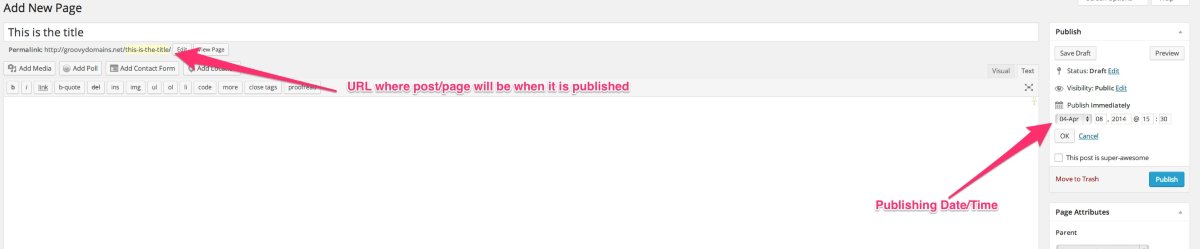
So, you could create a lesson plan for your students that includes all of the links they’ll ever need. However, the link will not work until the page/post is posted on the date you choose.
Does that make sense?
-
Another query! I want to embed links to set subject readings in my WordPress subject site, but can only dump a large, unwieldly address of the type – https://www.lib.uts.edu.au/auth/login?service=https%3A%2F%2Fwww.lib.uts.edu.au%2Fgoto%3Furl%3Dhttps%3A%2F%2Fwww.lib.uts.edu.au%2Fdrr%2F22676%2F976501_fowlersocial.pdf%26_casCheck%3Dtrue
How can I just replace this code with a simple name and still have it as a hot link?thanks
-
Hey Jeff,
I don’t quite understand. Are you trying to embed a link within your post? If so, that can be accomplished following the instructions here:
http://en.support.wordpress.com/links/
If you’re trying to do something different, please explain a bit more and perhaps link to an example so I can troubleshoot more!


- The topic ‘Uploaded vidoes not showing – only audio avilable’ is closed to new replies.


 WordPress.com Forums