

Using Display name to Link back to own blog when making a comment
-
My display name when I make a comment on someone else’s blog is hyperlinked back to a page that says my site has been deleted. I corrected the address to http://www.strucknwords.com in my profile, but it still sends people to a dead end when they click on my name. I’ve also noticed that on the external sites of blogs where I make comments, my name isn’t hyperlinked at all. I’d like my display name to navigate people to my blog all of the time. I had a blog and deleted it, but have had http://www.strucknwords.com for over a year now. Can you help?
The blog I need help with is: (visible only to logged in users)
-
Hi Laura,
Whenever you comment, your display name should link to your Gravatar page:
http://en.gravatar.com/strucknwords
If it’s not, can you please provide a screenshot to the page you end up at? Upload that to your Media > Library page and I’ll take a further look!
Thanks!
-
Hi,
OK, i’ve uploaded the screenshot to my library as it doesn’t take me back to my gravatar.I titled it “Hilger.screenshot”
Thanks!
-
Hi Laura,
Thanks for the screenshot. Can you give me a link to the comment that you wrote?
Thank you!
-
http://strucknwords.wordpress.com/
http://wordpress.com/activities/comments/
All of my comments go back to that same link.
Thanks,
Laura -
Hi Laura,
I was able to fix it! Sorry for the inconvenience. I just made a test comment on my test blog and found that your Gravatar is now linked to your site: strucknwords.com as seen here:
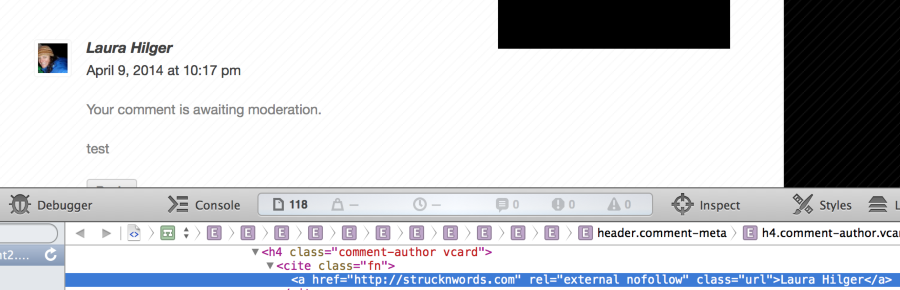
Please note that unfortunately your previous comments will not be updated, but here on out it will link to the correct site.
Thank you for your patience!


- The topic ‘Using Display name to Link back to own blog when making a comment’ is closed to new replies.
 WordPress.com Forums