

Using my custom url for a main website, then linking my blog to it
-
I have a custom domain that I bought through you, but I want to use that domain for an author website, and then move my blog to a sub-domain of that one. I.e. I have http://www.benadamsauthor.com. I want that web address to take me to my author site (designed elsewhere), but my blog to be located at http://www.benadamsauthor.com/blog. I can’t work out how to do that.
The blog I need help with is: (visible only to logged in users)
-
Hi Ben,
Mapping the blog to the address benadamsauthor.com/blog won’t function properly on WordPress.com because our mapping doesn’t support subdirectories like that.
I could help you setup your blog to be hosted at http://blog.benadamsauthor.com/ instead? It would be similar functionality, with your homepage http://www.benadamsauthor.com being hosted at your other site, but blog.benadamsauthor.com being hosted here on WordPress.com. Just a different address than you specified.
Let me know if that’s acceptable. It would entail adding a second Mapping Upgrade for the subdomain blog.benadamsauthor.com which costs $13 per year, and then adjusting the settings of your current domain registration.
Best,
-Alex G.
-
Alex, that sounds like a perfect solution. And I would be grateful for your help in making it happen! Let me know what I need to do to work with you on it.
Ben -
HI Ben,
Cool! Here’s some step-by-step to get this setup. If you hit any snags working through this let me know and we’ll focus on just that step.
Setting Up blog.benadamsauthor.com
Full guide here:
http://en.support.wordpress.com/domains/map-subdomain/- Go to your My Domains Page and click “Edit Domain” next benadamsauthor.com
- Choose the Edit DNS tab
- Under “Add a new DNS record” create a CNAME record “blog” points to benadamsauthor.wordpress.com (example)
- Click “Add”
- Go back to your My Domains page and click Map a Domain Name You Already Own
- Purchase the domain mapping upgrade for blog.benadamsauthor.com
- Go back to your My Domains page, and select the new “blog.benadamsauthor.com” as your primary domain
Pointing benadamsauthor.com to your other site (hosted elsewhere)
Full guide here:
http://en.support.wordpress.com/domains/change-name-servers/Step-by-step for mapping domains varies slightly for each service. However, usually this entails changing the name servers for your domain here on WordPress.com to point to the hosting. The guide above outlines how to change the name servers and also contains links to what the name servers are for several popular hosting services. Let me know if yours is not listed and I can help you look it up.
Once the name servers for the domain point to the hosting service, you may need to configure your account to receive that domain correctly (similar to the Mapping upgrade here at WordPress.com)
Best,
-Alex G.
-
I am sorry but I can’t get past step 1! I can get to the my domains page but when I click the edit button, it doesn’t do anything.
Adam -
Hi Ben,
When you click “Edit Domain” you should get a pop-up window that looks like this (without the blur):
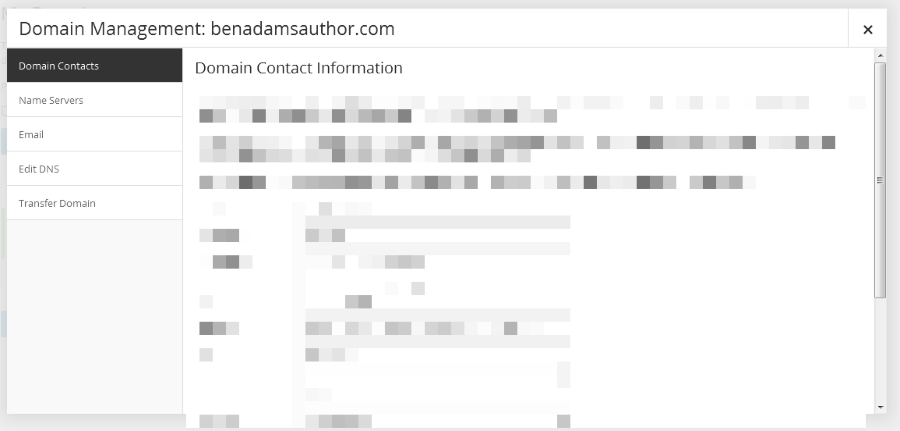
If clicking Edit Domain does nothing, make sure any pop-up or blockers you have enabled are turned off for WordPress.com. Also make sure your Third-Party Cookies are enabled in your browser:
Best,
-Alex G.
-
Look I am really struggling with this. I have disabled addons, and even tried using chrome instead of IE to do this, but nothing gets me to even see step 1. I can’t even find the ‘my domains’ page now! Can’t you do it for me, or talk me through it over the phone? I need to get it done in the next day or so otherwise I might have to scrap the idea altogether and go somewhere else. I am clueless when it comes to this stuff, sorry!
Ben
-
Hi Ben,
Your My Domains page is found under the Store menu of your Dashboard. Or you can reach it directly with this link:
https://benadamsauthor.wordpress.com/wp-admin/paid-upgrades.php?page=domains
I went ahead and added the CNAME record for your current domain. Try picking it up again at Step 5 with mapping blog.benadamsauthor.com
Best,
-Alex G.
-
Thanks!!! I have done it. I may come back to you if there are aany issues with grabbing http://www.benadamsauthor.com as my main author site but appreciate that this is a matter for me to sort rather than you! Thanks for your help!
Ben -


- The topic ‘Using my custom url for a main website, then linking my blog to it’ is closed to new replies.
 WordPress.com Forums