

Using my Tags
-
I have about 30 or so tags listed on my blog, however, when I’m on the dashboard wanting to do a new post, they are not listed out for me to choose from – just maybe 8 or 9 are listed. Do I have to manually type a tag each time I want to use it for a post?
The blog I need help with is: (visible only to logged in users)
-
Hi there,
Are you referring to the tag widget on the Edit Post screen shown here?
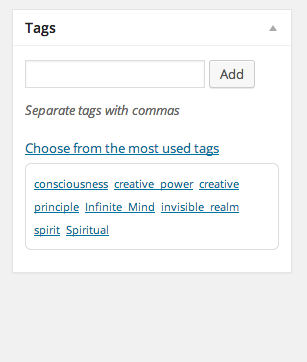
If so, you’re correct; you will only see a handful of your most used tags in that area. However, if you start to type the name of a tag that is not listed (like “foodie” for example), the widget should automatically suggest the tag for you as shown here:

This way, you don’t have to remember the full name of the tag to use it on a post. Does that make sense?
-
Yes, I can see how that works. Guess I'm remembering several years ago, it seemed that I could do a post and just hit a select all button for tags or something – and they would all populate..
Thank you -
Not a problem! There isn’t currently a way to populate all of the tags on your blog (just the most used ones). However, it should autofill the other tags when you start typing. Let me know if you need anything else!
-
Jeremey, you are so kind! Thank you for your guidance. As I get my Blog up and running – I am finding that I have questions. I always try to research and find resolutions before I ask, but there are a couple things currently that I haven’t been able to resolve on my own. Should I post a different topic under HELP for Staff to handle as I did my Tags issue?
-
I’m happy to help here! Feel free to drop any additional questions you have in this thread.
-
Okay!
1) what address do I plug in on my laptop in order to pull up my website blog dashboard to edit or add a new post? I get the blog, just not a way to edit it.
2) Is there a way to do an index of sorts on my sidebar? I have the Archives widget.
3) I found a very comprehensive tutorial by a guy on how to use a Google Search box with code to insert onto my blog – but unfortunately I was not able to follow each step he was saying must be done. Didn’t understand. I thought it would be good for a reader to input a word to search my blog by and get a listing of which posts were appropriate.
-
Please see my answers below:
what address do I plug in on my laptop in order to pull up my website blog dashboard to edit or add a new post? I get the blog, just not a way to edit it.
You should be able to edit your site from the URL here:
https://spirit2go.wordpress.com/wp-admin/
Is there a way to do an index of sorts on my sidebar? I have the Archives widget.
The Archives Widget is great for displaying a breakdown of your site posts. Another option would be to use the Recent Posts widget, which will display the latest posts on your site. Or, you could set a Custom Menu widget to display certain pages/posts.
I found a very comprehensive tutorial by a guy on how to use a Google Search box with code to insert onto my blog – but unfortunately I was not able to follow each step he was saying must be done. Didn’t understand. I thought it would be good for a reader to input a word to search my blog by and get a listing of which posts were appropriate.
More than likely, the instructions provided used a bit of code that isn’t allowed at WordPress.com. If you can direct me to the post, I can take a look and let you know. One easy alternative would be to use the Search Widget shown here:
http://en.support.wordpress.com/widgets/custom-menu-widget/
Would that work?
-
here is the google search tutorial I was looking at:
How to Add Google Custom Search to WordPress (Video Tutorial)
The search widget isn’t exactly what I’m wanting.
thanks guy
-
Ah – yes, that code uses a “script” HTML tag (it starts with <script). Unfortunately, that code is blocked from WordPress.com as explained here:
Can you let me know what kinds of features you’re looking for that aren’t offered through the search widget?
-
what I was looking for was just a small ‘search’ box in the side bar where a user could type in like “ACIM” and it would pull up a listing of any post on the site that references ACIM – so they could zero in on a particular post.
what you suggested might in fact do this, but I couldn’t see how it works….
-
Ah got it! Yes, the Search Widget will do just that. I apologize; I linked the wrong page below. The details of the Search Widget can be found here:
http://en.support.wordpress.com/widgets/search-widget/
Can you give that a try?
-
Perfect! if that widget had been a snake – I’d be dead by now :)
thanks so much, believe it or not – I’m good for now!
-


- The topic ‘Using my Tags’ is closed to new replies.
 WordPress.com Forums