

Utube video imbedding
-
Why can’t I download utube video to my blog? Pictures do well, video doesn’t imbed.
The blog I need help with is: (visible only to logged in users)
-
Hi there!
To quickly embed a Youtube video, you just have to add the link to the direct video URL in your Post Editor. You wouldn’t be able to download Youtube videos to you blog, but embedding would be free as seen here:
http://en.support.wordpress.com/videos/youtube/
Let me know if you have any questions with this!
-
-
Can you provide me the link to the Youtube video that you want to embed?
I’d be happy to take a further look.
Cheers!
-
<object width=”420″ height=”315″><param name=”movie” value=”//www.youtube-nocookie.com/v/qg_24fMjX-c?version=3&hl=en_US&rel=0″></param><param name=”allowFullScreen” value=”true”></param><param name=”allowscriptaccess” value=”always”></param><embed src=”//www.youtube-nocookie.com/v/qg_24fMjX-c?version=3&hl=en_US&rel=0″ type=”application/x-shockwave-flash” width=”420″ height=”315″ allowscriptaccess=”always” allowfullscreen=”true”></embed></object>
-
-
You wouldn’t be able to add that code to your post/page for security purposes. Here’s a list of supported code:
As seen in the support guide that I provided you, you can add the Youtube link directly and that will show up.
-
-
-
Hi there!
I was able to embed the Youtube video by copying and pasting the link you provided me as seen here:
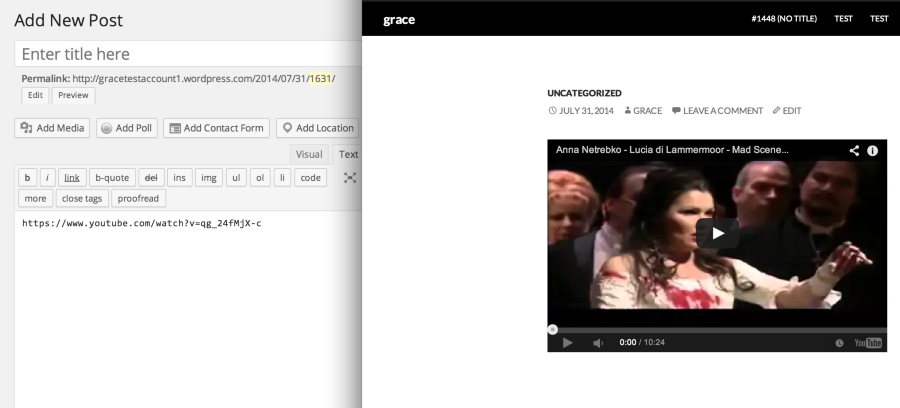
Can you let me know what you are trying? I pasted that link directly into the Post Editor and when I previewed it I was able to see the video.
Let me know if it’s still not working for you!
-
Thanks a million for your help.
I have tried on my laptop and it didn’t work. But then I tried on my Mac desktop and it did work. I need to check my laptop in an Apple store. The problem may have to do with my computer.
Thanks again. -
Oh I see! Also check if it’s just a browser issue.
On your laptop can you please try clearing out your cache and cookies using the guide below?
Then, make sure your browser is updated to the latest version:
Also, try doing this on other browsers like Safari and Firefox.
If it’s not a browser issue, definitely see if there’s an issue with the laptop itself!
-


- The topic ‘Utube video imbedding’ is closed to new replies.


 WordPress.com Forums