

Very Basic Questions
-
Hi,
If someone has a WordPress site which allows you to install Plugins does that mean it is a .ORG hosted site and not a “free blog” site. Is that correct? Or how else do I tell.
Also I am using the Big Brother theme on a free site and it allows me to switch the colour palette and customise it in various ways. However, when I use it on what I think is a .ORG hosted site I have none of these colour palette options for the theme. Any ideas?
Thanks a lot!
-
Question 1.
Yes.Blogger installed plugin capability does not exist on WordPress.COM blogs and there is no upgrade you can purchase here that changes that reality. You are confusing WordPress.ORG and WordPress.COM. For that type of functionality you’d need a self-hosted site running on a paid web hosting service.
http://en.support.wordpress.com/ftp-access/
http://en.support.wordpress.com/plugins/WordPress.COM and WordPress.ORG are completely separate and have different username accounts, logins, features, run different versions of some themes with the same names, and have separate support documentation and separate support forums. Read the differences here http://en.support.wordpress.com/com-vs-org/
You can learn how to get started with a self-hosted WordPress site over at the Codex – http://codex.wordpress.org/Getting_Started_with_WordPress – if you decide that’s the route you want to take. Understand that we do not provide support for that here at WordPress.COM.
If you don’t have a username account at WordPress.ORG account, then click http://wordpress.org/support/ and register one on the top right hand corner of the page that opens, https://wordpress.org/support/register.php so you can post to the support forums there.
Resetting your WordPress.ORG password http://codex.wordpress.org/Resetting_Your_Password
WordPress.org support docs are at https://codex.wordpress.org/Main_PageGet web hosting here http://wordpress.org/hosting
Move your content:
https://en.support.wordpress.com/export/
https://en.support.wordpress.com/moving-a-blog/ -
Question 2
That WordPress>ORG site is not hosted here at WordPress.COM and you are posting to the wrong support forum to get support for it. -
The colour palettes are a WordPress.com-only feature. If you’d like to implement one on your self-hosted site, just provide a link to the two sites and I’ll help you with the CSS needed.
-
Thanks for the offer, I am trying to get this hosted site:
http://tinyurl.com/opw6vknTo look like this wordpress.com site: http://tinyurl.com/n9j6wtb
Any thoughts?
-
Here’s what you’ll need to do:
1. Install the Jetpack plugin and activate the Custom CSS module. This way, your CSS won’t be overwritten when you update the theme. (As alternatives, you could either install a standalone custom CSS plugin, or create a child theme.)
2. Under Appearance > Edit CSS, you’ll find a new editor where you can add custom CSS. Here is the CSS from your featured palette at WordPress.com, copy-paste it into this CSS editor:
@media screen and ( max-width: 767px ) { .breadcrumbs-root, .breadcrumbs-root:visited, .breadcrumbs-ancestor { background-color: transparent !important; color: inherit !important; } } @media screen and ( max-width: 959px ) { .main-navigation ul ul, .main-navigation ul ul li, .main-navigation li:hover, .main-navigation li:hover a { background-color: transparent !important; color: #fff !important; } } body { color: #444444;} .widget { color: #D8D8D8;} .widget-title { color: #D8D8D8;} .widget, .site-footer { background-color: #eaecee;} .widget, .site-footer { background-color: rgba( 234, 236, 238, 0.3 );} .widget { border-top-color: #eaecee;} .widget { border-top-color: rgba( 234, 236, 238, 0.2 );} .site-title a,.site-title a:visited, .site-description { color: #FFFFFF;} ::selection, :selection { color: #FFFFFF;} .breadcrumbs-root, .breadcrumbs-root:visited { color: #FFFFFF;} .main-navigation ul ul li, .main-navigation li:hover { background-color: #ffffff;} .menu-toggle { color: #FFFFFF;} .breadcrumbs-current { color: #6D6D6D;} .site-footer, .site-info { color: #E2EEF7;} .nav-previous a, .nav-next a,.nav-previous a:visited, .nav-next a:visited,.nav-previous a:hover, .nav-next a:hover { color: #FFFFFF;} .main-navigation a, .main-navigation a:visited { color: #FFFFFF;} button:hover, html input[type="button"]:hover, input[type="reset"]:hover, input[type="submit"]:hover, .button:hover, button, html input[type="button"], input[type="reset"], input[type="submit"], .button, .button:visited, #infinite-handle span, #infinite-handle span:hover { color: #FFFFFF;} body, #infinite-footer { background-color: #595959;} .entry-title a { color: #3D3D3D;} .custom-background .site-footer { border-color: #3d3d3d;} ::selection, :selection { background-color: #3d3d3d;} .nav-previous a, .nav-next a { background-color: #3d3d3d;} .main-navigation li:hover a, .main-navigation li:hover a:visited { color: #3D3D3D;} .breadcrumbs-ancestor a,.breadcrumbs-ancestor a:visited { color: #ADADAD;} a, a:visited, .comment-metadata .comment-edit-link, .comment-metadata .comment-edit-link:visited { color: #3D3D3D;} .widget a, .widget a:visited, .widget a:hover, .widget a:focus, .widget a:active { color: #D8D8D8;} a:hover, a:focus, a:active { color: #3D3D3D;} .site-footer a, .site-footer a:visited, .site-footer a:hover,.site-footer a:focus,.site-footer a:active { color: #D8D8D8;} .main-navigation { background-color: #303030;} .main-navigation.has-header { background-color: #3d3d3d;} .main-navigation.has-header { background-color: rgba( 61, 61, 61, 0.6 );} .menu-toggle, .main-navigation.toggled > div > ul { background-color: #303030;} .breadcrumbs-ancestor a:before, .breadcrumbs-ancestor.cat-parents .sep:before { border-left-color: #353535;} .breadcrumbs-root, .breadcrumbs-root:visited { background-color: #303030;} .breadcrumbs-root:before { border-left-color: #303030;} .main-navigation ul li a { border-bottom-color: #383838;} .main-navigation.toggled > div > ul { border-top-color: #383838;} .page-title { color: #3D3D3D;} .site-header { background-color: #383838;} blockquote { border-color: #303030;} button, html input[type="button"], input[type="reset"], input[type="submit"], .button, .button:visited, #infinite-handle span { background-color: #383838;} .breadcrumbs-ancestor { background-color: #494949;} .breadcrumbs-ancestor a:after, .breadcrumbs-ancestor.cat-parents .sep:after { border-left-color: #494949;} .main-navigation ul ul { border-color: #3d3d3d;} .main-navigation ul ul { border-color: rgba( 61, 61, 61, 0.5 );} .main-navigation ul ul li, .main-navigation li:hover a { background-color: #3d3d3d;} .main-navigation ul ul li, .main-navigation li:hover a { background-color: rgba( 61, 61, 61, 0.3 );} button:hover, html input[type="button"]:hover, input[type="reset"]:hover, input[type="submit"]:hover, .button:hover { background-color: #424242;} -
Thanks so much, that made it really easy and the edit custom CSS is a great feature to know about.
Many thanks!
-
Wonderful! Glad that was easy. :)
I’m going to close this thread now since this forum is really for WordPress.com sites and I don’t want other folks to start tacking on new questions here, which tends to happen.
If you need more help with the self-hosted version of Big Brother in the future, please feel free to post over in the WordPress.org forums:
https://wordpress.org/support/forum/themes-and-templates
You’ll need a free WordPress.org account to post – if you don’t already have one, you can register here:
https://wordpress.org/support/register.php
The only catch is that Big Brother is not in the WordPress.org theme directory so it doesn’t have its own support forum, but if you tag your post with wpcom-theme in the tags area it will get attention:
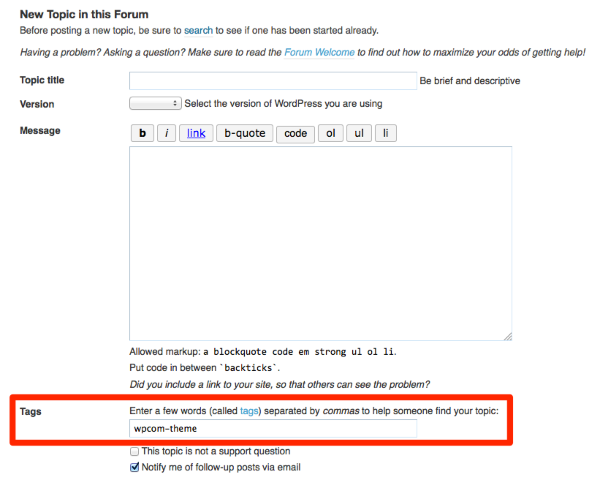
Thanks!


- The topic ‘Very Basic Questions’ is closed to new replies.
 WordPress.com Forums