

View button is now opening a second window (blank). How can this be fixed?
-
When I preview a post using the view button I do see the image and text as they will appear. However, a second window is opened at the same time. This window must be closed separately. Not deadly, just annoying. My browser is Firefox, if that has any bearing.
The blog I need help with is: (visible only to logged in users)
-
Hi there,
Is the second window that is opening up blank? Is there a URL in the second window that resembles this?
https://wordpress.com/public.api/connect/?action=verify&service=wordpress
If so, can you let me know what settings you have under “Content” and “Privacy” under Firefox -> Preferences? I’ve provided screenshots of the tabs for reference.


If not, please let me know a bit more (content in the window, URL, etc) so I can troubleshoot further!
-
Yes, a blank screen. Yes, a similar URL. Unfortunately, I am unable to confirm the content and privacy settings on Firefox, as that browser was co-opted by Comcast. The Comcast home page is firmly in place, so that I can no longer access Firefox directly.
Thank you so much for this help.
A.
-
Hi A,
I believe the issue here is how Firefox is dealing with cookies. WordPress.com uses cookies to help track when you’re logged in. If your browser is set to not accept cookies, clicking a link will display that blank page.
Can you try adding an exception to your browser for WordPress.com or enabling third-party cookies?
-
Any ideas how I might do that? When I log on in the morning, and go to open Firefox the Comcast homepage immediately comes up. There are no prompts on the homepage. None of the drop down menu items (when I open Firefox) allows for the kind of change re: cookies you mention. IT people have told me the Comcast overhead is difficult or impossible to circumvent. I’ve found no help on the internet.
-
Any ideas how I might do that? When I log on in the morning, and go to open Firefox the Comcast homepage immediately comes up. There are no prompts on the homepage. None of the drop down menu items (when I open Firefox) allows for the kind of change re: cookies you mention. IT people have told me the Comcast overhead is difficult or impossible to circumvent. I’ve found no help on the internet.
-
Hi there,
I apologize; I’m not familiar with the Comcast setup. Just to confirm, you do not have a Firefox menu at the top of the page with File, Edit, etc. Is that correct?
-
Yes, that is correct. I have a Firefox icon which provides a drop down menu. However, when I open Firefox using that menu the browser recedes completely into the background.
I rely on Comcast cable for my phone, TV, and internet. Apparently, Comcast is very aggressive as far as its programming. Despite repeated attempts, I have been unable to remove the Comcast homepage. From what I have read online, this is typical.
I guess I will have to live w/ the blank windows (sigh).
-
Hey Anna,
I don’t want you to have to deal with the blank window! Let’s see if we can figure out a workaround. Can you take a screenshot of your entire screen when you’re in Firefox and upload that screenshot to your Media Library? Instructions can be found here:
Let me know once you’ve uploaded it!
-
Did the screen shot reach you? I emailed it last night, but am uncertain I did so correctly.
A.
-
Hi!
What email address did you send it to? It’s likely going to be easier if you just upload it to your Media Library as explained here:
http://en.support.wordpress.com/media/media-add-new/
You don’t have to enter it into a post, just drop it in the library. I’ll be able to pull it up from there!
-
It should be there now. FYI, I never before this issue came up used screen shot, and had no idea there was a media library. I had to view several tutorials just to get this far. Be gentle.
A.
-
Hi Anna!
This is perfect. Unfortunately, the “Windows Help and Support” window is blocking the section I was looking for. Would it be possible for you to upload another screenshot with the “Windows Help and Support” menu dragged out of the way? You should be able to click on the window and move it elsewhere on your screen.
-
That menu was not visible on the screen when I took the shot. I tried 2-3 times to get a shot w/o it. I’ll try again. I’m sorry for all this trouble.
-
Here is what I’ve tried:
1. Hitting print screen button
2. Hitting print screen button together w/ Alt
3. Hitting print screen button and F11 SysRq
4. Hitting print screen button, F11 SysRq, and AltTo no avail.
As far as I can determine, I do not have a Paint feature. The menu which does come up does not have a paste function. None of the 3 options available at the Media Library will not allow me to transfer a photo.
Viewing my photos reveals only the single screen shot you already have. I suspect that was present prior to all my attempts at taking a screen shot (which is why the drop down menu which is blocking your view was not visible to me anytime I attempted to take a screen shot).
At this point, my sanity is in danger.
-
I don’t suppose this is any help. However, in the upper left hand corner of the screen are the Comcast web address, the Comcast logo, shop/upgrade, my account, and support. There is no mention made of Firefox at all.
-
Hi Anna,
No worries! We’ll get this figured out. It looks like Comcast is set as your homepage, meaning it’s automatically the first page you see when you open your browser. However, you should still have the Firefox menu at the top of the page. It looks like I can see the Firefox menu in the screenshot you have provided. It should look like this:
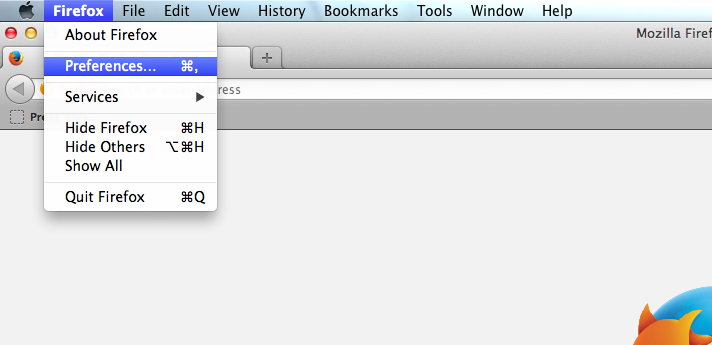
Can you do me a favor and look for that menu? Let me know if you have it!
-
There is no such address on my screens. The Comcast homepage address is http://xfinity.comcast.net/ . The email address is http://web.mail.comcast.net/zimbra/mail?app=mail#2 . That the screen shot has the Firefox address suggests to me it was taken before Comcast was put in place as my homepage. You can find a discussion of this problem at https://support.mozilla.org/en-US/questions/848259 .
-
Hi there,
I’m sorry! I’m not familiar with how to remove that Comcast overlay. Have you tried directions like this?
http://blog.ryanparman.com/2011/07/07/remove-comcastxfinity-start-page-from-firefox-mac/
-


- The topic ‘View button is now opening a second window (blank). How can this be fixed?’ is closed to new replies.
 WordPress.com Forums