

View button is now opening a second window (blank). How can this be fixed?
-
Hi Anna,
I’m sorry I haven’t been much help so far! Can you try downloading another browser and seeing if you have the same issue (Chrome would be best)?
-
I have internet explorer and the situation is the same. I had chrome at one time but did not like it. The blank windows are just another Comcast quirk I am going to have to live with. Thank you again.
-
Hi there,
I just want to try one more thing before we stop trying! I’d hate for you to have to deal with the blank window. Do you by any chance see a Firefox menu like this?
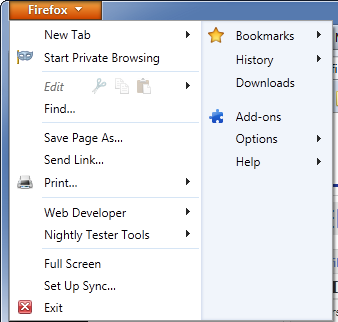
It may not be present like a typically menu with “File, Edit, etc”.
Let me know if you see that at the top of your screen by any chance!
-
I do not have access to Firefox. I do not see this or any Firefox menu. However, if I type the address into the search bar I can bring up a photobucket page.
-
Hi Anna,
One last attempt – can you just take a full screenshot of Firefox without the “Windows Help and Support” window on the screen? That window is currently blocking the region I’m trying to see here:

I realize this was a frustrating process before. I’ve posted step-by-step instructions here:
- Open Firefox and just let it sit on your home page
- Click the “Print Screen” key (this might be labeled PrtScn or something similar)
- You’ll need to open “Paint”, which is a default application that comes on Windows. If I remember correctly, you can use the button in the bottom left-hand corner that resembles the Microsoft flag. From there, use your mouse to highlight “Programs” and then to click on “Paint”. You might need to highlight Programs -> Accessories -> Paint.
- This should open a new, blank page. Now, press the Control key and the “v” key at the same time. Your new screenshot should appear on the page.
- In Paint, click on “File” and “Save”. Save the image somewhere you can access it
- Upload the image to your Media Library as you did before
Can you give those steps a try?
-
-
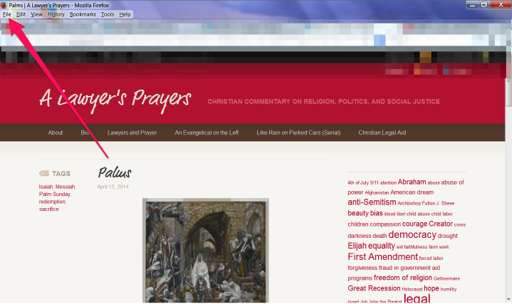
Perfect! This is excellent. At the top of your page, you have a menu that starts with “File” as shown here:
If you click on “Tools” in that menu, you will see a drop-down menu. In that drop-down, there should be an option for “Options”. Click that item. You’ll see something that looks like this:
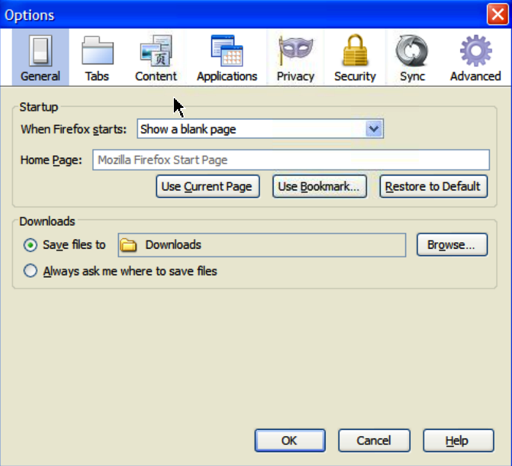
Click “Privacy”, which should have a mask-like icon. On that next page, can you please make sure the settings under History for “Firefox will” is set to “Remember history” as shown here?
-
-
-
Yes, the privacy setting on both my websites reads “remember history”. But the coding mentioned in your email is not present.
-
Thanks for confirming the history! Can you explain a bit more by what you mean by “coding mentioned in your email”? Also, can you try changing your privacy settings to the following?
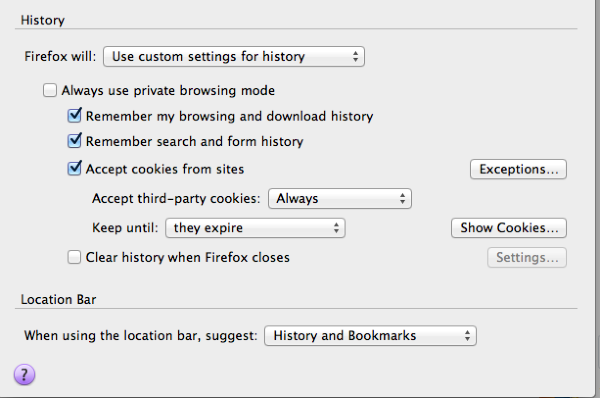


- The topic ‘View button is now opening a second window (blank). How can this be fixed?’ is closed to new replies.
 WordPress.com Forums