

"View Original"?
-
I cannot access the web pages of the blogs I follow. I can manage on the home P.C. by clicking “View Original”, although I have to tell you it’s extremely annoying to be forced to stay in a WP Reader page no matter what.
The big issue is the original page will not show no matter what on my iPad. I actually have to Google the name of the blog and go hunting and pecking for it on the entire Internet. Very very annoying.
In case anyone wonders why I don’t “just love” only seeing it in the Reader, my friends and blogs I read take a great deal of time to design their blogs synergistically with their posts, plus Reader often only shows 1/2 of the post.
The blog I need help with is: (visible only to logged in users)
-
Hi again,
As I said in your other IPad issues thread the best place to post for any IPad and/or iPhone problems is to the IOs forums so you make our WordPress developers aware of your iPad issue. http://ios.forums.wordpress.org/forum/how-to-and-troubleshootingIf you don’t have a username account at WordPress.org, click http://wordpress.org/support/ and register one on the top right hand corner of the page that opens, so you can post to to those forums.
-
Haa, we meet again. :)
Do you know how to get to the original page, though without reading Wps version of the page? This is a problem on my PC as well. I used to be able to see the post in the Reader THEN click again and get to the regular blog.
-
Click the little time link on the bottom left corner of any post in the Reader to connect to the original.
-
Hello!
I have to tell you it’s extremely annoying to be forced to stay in a WP Reader page no matter what.
I’m not sure I understand entirely. The “View Original” link should take you out of the Reader. Is that not happening? What would you like to be able to do here?
timethief is correct about mobile issues. Our mobile applications are open source so posting over there, someone may be able to push a fix. But let’s see if we can troubleshoot a little bit. Could you take a screenshot of what happens after you click on “View Original”? You can do this on an iPad by pressing the home button and the sleep/wake (power).
Are you having this issue through the WordPress.com app? Or are you using the Reader in your browser?
-
-
@shawnajroberts Ok here’s the screenshot
http://inthebarberry.wordpress.com/?attachment_id=12693
So I go to my Reader, and then I want to read a blogger’s post. I click on either the title of the post (Herb de Provence rose cake) or the blog name (Local Milk). When I do it STILL opens in a WordPress page, instead of going to the blog site. So that’s now 3 clicks to see the blog page.
Then as I told Timethief, on my iPad it simply will not open the webpage at all. So now I’m going to Google and looking for Local Milk or (even more fun) “Lauri’s Blog”.
-
In case anyone wonders why I don’t “just love” only seeing it in the Reader, my friends and blogs I read take a great deal of time to design their blogs synergistically with their posts, plus Reader often only shows 1/2 of the post.
Please read this: https://en.forums.wordpress.com/topic/character-length-in-reader-summary?replies=7#post-1854524
Also note that I can provide a link to one of the more popular posts on my blog that received many comments and likes. My readers and I are keenly aware that the ToS allows WordPress.com to promote our posts by providing snippets and links. Promotion does not include republication of full posts in the WordPress.com Reader, thereby duplicating our content. We do not voluntarily provide full posts so the Reader can become magazine filled with duplicate content. We wanted greater control over exactly how much is displayed in the Reader in terms of both number of words, which words they are, and which images are displayed. We made that clear to Staff in forum threads. Read all about how we feel here http://onecoolsitebloggingtips.com/2014/03/09/worrisome-or-not-wordpress-com-reader-developments/
When full copies of your content appear anywhere other than on the site it was originally published on … read the rest here http://onecoolsitebloggingtips.com/2014/03/27/scraping-off-the-blog-scrapers/
-
Hi Timethief, I’m not 100 percent sure I understood your last comment; I do not think WordPress Reader is “bad” or anything. It is a perfectly fine feature, and I use it. But my blog friends write about all types of subjects like science, literature, art and like me they take great pains to design and provide links / photos that I cannot see on the reader. Their blogs are also like stepping into a nice cozy house so I do consider it important to “visit” when reading their blogs. Reader format won’t do for my needs. Again though, I’m not saying its bad.
-
I’m not saying the Reader is bad either. What I am saying is that when full copies of your content appear anywhere other than on the site it was originally published on that is not a good choice to make. If you read the posts and the comments I linked to then you will understand why that is. Also you may click into the site to read the full post but I am not convinced your habit of doing so and creating an actual page view stat is the typical behavior of most readers at all.
-
Oh, I think you misunderstood my original question altogether Timetheif. My point is, when I first started on WordPress, I could see a post on the Reader and then **be taken right to the original blog site.
So in other words, I would go to the Reader, see “Judi” had a new post, then I could click once and be taken to Judi’s page. I do not try to view the post anywhere except on that original page.
I’m not really worried that I’m not following “typical behaviors”, LOL. I do know that my blog friend’s have exactly the same complaint.
-
-
Oh, dont be silly! I appreciate your knowledge and information. I just want to make sure everyone answering knows how I use WordPress and what my goals are, since I know it varies greatly between users. Happy Midsummer by the way……. :)
-
-
Hello again! Thank you for the screenshot and follow up!
I want to assuage any concerns about duplicate content in the Reader. The Reader is basically an RSS feed aggregator. We don’t duplicate your content to display it in the Reader. It’s merely a WordPress.com-centric version of what you would see if you subscribed to all of those blogs through a service like Feedly.
As for your access to the blog directly from the Reader. The footer of every post in the Reader includes a time stamp along with the Reblog, Comment, and Like buttons. You can move directly to the blog post by clicking on the time stamp:

I don’t personally have an iPad, but several of our other Happiness Engineers do. So on Monday I’ll ask one of them to do some testing with the Reader in their browser on the iPad.
Let me know if you have trouble using the time stamp link on your iPad!
-
Wow it worked! On the iPad!! Yippee I wish I had asked this months ago. Thanks a million! Yes I would appreciate hearing what the Happiness Engineers think after testing the iPad, although my iPad was a a hand me down and very old too. Thanks again!
-
-
I’m so glad it’s working for you!
I just had Jeremey do some testing around the iPad app and the browser version of the Reader. He can’t seem to replicate the issue with the “View Original” button.
The time stamp is not a link in the app. But there is an icon that allows you to open the article in Safari:
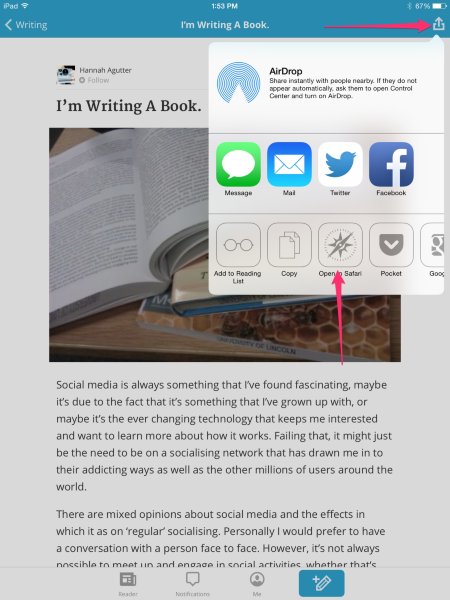
You say your iPad is pretty old, so that may be the issue here. Jeremey’s iPad is running the latest versions. And if your iPad doesn’t have the latest version, you probably need to run an older version of our app.
Let me know if I can help further!


- The topic ‘"View Original"?’ is closed to new replies.
 WordPress.com Forums