

Visual editor is removing my html tags
-
I use a well-formed html template for my posts. I’m using the text editor but whenever I save a draft, it switches to the visual editor and large parts of my html template disappear. I’d prefer not to use the visual editor since I’m comfortable with the text editor. Is there a way to either turn off the visual editor completely OR have it NOT strip my html.
The blog I need help with is: (visible only to logged in users)
-
Hi there!
We were seeing some issue with the Visual editor messing with Text editor input, but we deployed a fix a few hours before you posted.
Can you please clear your cache and cookies and then try again?
If you’re still having trouble, can you send me the HTML code you’re using so I can do some testing and report this to the developers?
-
No it’s not working.
Just some of my own notes: When I open up the post it’s in the visual editor. I seem to remember it being in the text editor before. Or at least it being in the text editor if that’s where I was the last time I was working on a post. When I move to the text editor and save the draft, the post opens in the visual editor and many of the html tags have been stripped and some new ones have been added-. I really don’t have time to replace all the missing tags, especially since they’re there to save me time.
Here’s the template. Sorry it’s so long[removed for readability]
-
Thanks so much for testing that out! I’ve removed your template from the forums and am doing some testing with it. I’ll pass on the issue to the developer.
You can follow our progress on the new editor here:
https://en.forums.wordpress.com/topic/new-post-editor-improvements
-
Hi there!
I’ve been doing some testing with the template you gave me and I’m not able to trigger any stripping for HTML code. Can you tell me anything specific that was stripped from your post? And how that affected the visual layout of the post? Also do you have the draft of the post that was affected that I could take a look at?
-
I find it very strange that it’s working for you.
It’s removed all of the <p class=”abstract”></p> tags and all of the tags
They’ve been replaced by empty lines
For example in the section with the header resources the original template is
<p class=”abstract”></p>
<p class=”abstract”></p>
<p class=”abstract”></p>
<p class=”abstract”></p>
<p class=”abstract”></p>
<p class=”abstract”></p>
<p class=”abstract”></p>
<p class=”abstract”></p>
<p class=”abstract”></p>
<p class=”abstract”></p>
<p class=”abstract”></p>
<p class=”abstract”></p>After saving the draft, it is
As you can see, all the <p></p> and tags have disappeared and are now just empty lines
Also, there are some tags added where I don’t need them with the original tags also <p class=abstracts></p> tags removed.
Of course, this is changing the visual layout since there aren’t any <p> tags anymore. Those tags are defined by the CSS which I’ve paid word press extra to have control over.I’m not really sure how to link you to the draft of the past, I previously sent you the original draft. Is there an email I can send this to you at? Then I could send you examples of the draft before it’s saved and what happens after.
Also just so you know, the tags that have disappeared are empty. I work on this post (which is a newsletter for academics) over a 2 week period and just add content as I need to. So having the empty tags saves me a tonne of time. Not being able to keep empty tags will be a major issue for me.
-
I just noticed when I submitted the message above with the examples of the disappearing tags, that the html tags disappeared from the message. This is probably part of the same problem. Is there another way I can communicate with you? Or I could send you a link to a google doc with examples of the html template before and after it is saved.
-
So here’s the template before it is saved:
https://docs.google.com/document/d/1xkUmy0Zn6GwnxguFPNiUm8or5Ci9XY0_I2wGMHrlfps/edit?usp=sharingAnd this is what I’m left with after it is saved:
https://docs.google.com/document/d/1dk0pFzVxbzmKC0oWMXCoFNxWd7baDun3TiIqiIBs7tQ/edit?usp=sharingIf you line up each template line by line, you’ll see that many of the tags have been removed and replaced by either empty lines or “nbsp;”
Thanks!!!
-
Hi there!
First, back to one of your original questions regarding the editor preference being saved, we do have an issue we’re currently working on that causes the editor to revert to the Visual or Text editor every time (not saving the user preference). So, you’re correct – if you save a post from the Text Editor, it should stick to the Text Editor. We’re working on that!
I took a look at the template you provided, and it looks like a majority of the tags being stripped are the following:
<p class="abstract"></p>I believe that’s happening because there isn’t actually any paragraph text between the two paragraph tags so the editor just thinks you’re trying to create a blank space (hence the nbsp). Can you try putting text between the two p tags and let me know if that helps to conserve the HTML tags?
-
Hi,
Thanks so much for your help and your attention to this issue.
So I put some text in between some of the p tags and they seemed to stay when I saved the draft. Although I didn’t put text between every one so I’m not 100% sure that it will work or not. But it least it gives me some hope. And that’s an easy enough fix that I can live with for now (as long as it works). Thanks for that.
But I did put some text in the “ ” tags and they disappeared. Any help with that one??
A few minutes later . . .
So I played around with this and definitely there’s an issue when there’s no text between the tags. I saved the “a href” tag above with nothing between the tags and it disappeared. I saved it again with text between the tags and it disappeared. But then when I saved it with text between the tags and text after the “=” sign it stayed. So it worked when it was “XXXX“
So I guess, for now, I’ll just change my template so there are no empty tags and the “=” has something following it for the ahref tags. But I do hope that someone will keep on working on this. Thanks again for all your help. -
Sorry I’m posting this again because I obviously don’t know what I’m doing and my tags keep on disappearing :)
Hi,
Thanks so much for your help.
So I put some text in between some of the p tags and they seemed to stay when I saved the draft. Although I didn’t put text between every one so I’m not 100% sure that it will work or not. But it least it gives me some hope. And that’s an easy enough fix that I can live with for now (as long as it works). Thanks for that.
But I did put some text in the
<a href="http://www-ncbi-nlm-nih-gov.login.ezproxy.library.ualberta.ca/pubmed?term="> </a>
tags and they disappeared. Any help with that one??
A few minutes later . . .
So I played around with this and definitely there’s an issue when there’s no text between the tags. I saved thea hreftag above with nothing between the tags and it disappeared. I saved it again with text between the tags and it disappeared. But then when I saved it with text between the tags and text after the=sign it stayed. So it worked when it was<a href="http://www-ncbi-nlm-nih-gov.login.ezproxy.library.ualberta.ca/pubmed?term=XXX">XXXX</a>
So I guess, for now, I’ll just change my template so there are no empty tags and the=has something following it for the ahref tags. But I do hope that someone will keep on working on this. Thanks again for all your help. -
Hi!
So I put some text in between some of the p tags and they seemed to stay when I saved the draft.
Great! I think this should help the p tags stay put.
So I played around with this and definitely there’s an issue when there’s no text between the tags. I saved the a href tag above with nothing between the tags and it disappeared. I saved it again with text between the tags and it disappeared. But then when I saved it with text between the tags and text after the =sign it stayed.
That’s odd; I’m not experiencing the same thing on my side. When I tested out the template function (Copy a Post) using the top portion of the template from your Google doc, I was able to get the link HTML to stick without adding anything after the = sign.
Here’s a snapshot of the template I used:
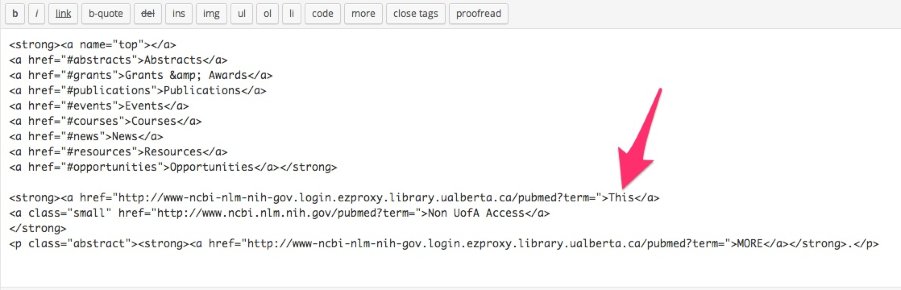
Here’s a screencast of what I experienced pasting that page template into a new page:
I even tried saving it and switching back and forth between the Text and Visual editors, but the tag seemed to stay put. Can you confirm that this is the same method you’re using?
-
Hey,
Everything seems back to normal. All my tags are staying where they belong. It even kept my
<p class="abstract"></p>tags without having to add any text. Awesome!!!
Thanks so much for all your help with this. The people who fix things at wordpress must have done something because I noticed it’s not switching to the visual editor anymore after saving a draft. So it’s all good.Please send out my thanks to all the people involved in fixing this problem.
Thane
-
Great Thane! I’m glad this is now working as expected for you. Please let me know if you need anything else.


- The topic ‘Visual editor is removing my html tags’ is closed to new replies.
 WordPress.com Forums