

want to show thumbnail image with posts in archive
-
I want to be able to display a small image next to each archived post in my category archives. Is there a way to do this? I’m using the 2010 template. I generally include one image with each post, and would like to be able to pick the image up as the thumbnail. Then, I’d like to have this happen automatically (or fairly easily) on future posts. Thank you.
The blog I need help with is: (visible only to logged in users)
-
Hi Miriam,
Since twentyten doesn’t pull images in its Category Archives loops already, the only way this would be possible is adjusting some of the back-end files of your theme. On WordPress.com we can’t allow that kind of access, only additional CSS.
This feature would be available in a few other themes. Here are some links to their demo sites so you can see what they look like.
Ascetica
https://asceticademo.wordpress.com/category/photos/Twentyfifteen
http://twentyfifteendemo.wordpress.com/category/books/Expound:
https://expounddemo.wordpress.com/category/wordpress/Isca
http://iscademo.wordpress.com/category/books/Opti
http://optidemo.wordpress.com/category/wordpress/I know switching themes may be a little too much for this kind of feature, but I don’t see another way.
Let me know if you have other questions, and sorry I don’t have a simpler fix on this one.
Best,
-Alex G.
-
Hi, I don’t want to make major changes to the look of my site right now.
Two followup questions: can I try out these other themes without ‘publishing’ the changes, or does the website have to change (even briefly) every time I change the template?
2 – This is a more general question: I see from googling my questions that a lot of the things I want to do can be done in a wordpress.org site, by changing the code (CSS or HTML). Is there a way I can play with code in the wordpress.com environment? I’ve worked a little with HTML & CSS – not good at it, but could probably follow instructions.
-
Two followup questions: can I try out these other themes without ‘publishing’ the changes, or does the website have to change (even briefly) every time I change the template?
If you’ll visit the themes settings in your dashboard, then search for a theme you’d like to try out, click Preview under the theme:
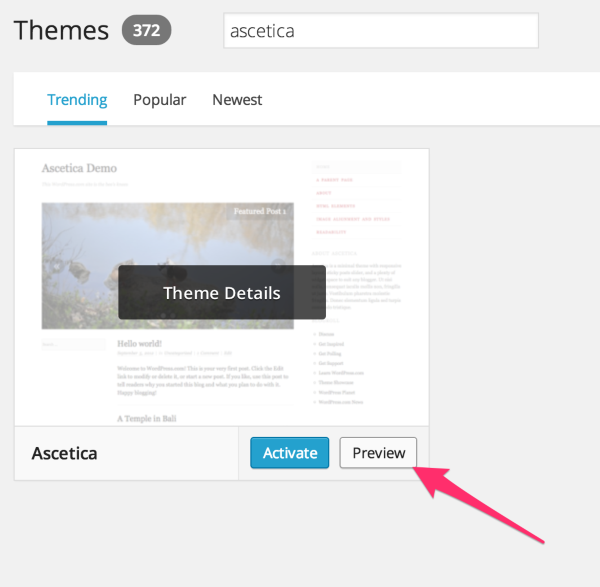
This will let you view your site with your current content, but with that theme, without changing the theme for anyone else.
This is a more general question: I see from googling my questions that a lot of the things I want to do can be done in a wordpress.org site, by changing the code (CSS or HTML). Is there a way I can play with code in the wordpress.com environment? I’ve worked a little with HTML & CSS – not good at it, but could probably follow instructions.
You can edit the CSS of your site on WordPress.com. It requires the Premium plan upgrade (which you have.) To do so, open your blog’s customizer:
Then select the CSS tab and make any edits you’d like. We also have a CSS Customization forum if you’d like help or want to see some ideas.
However, editing the HTML or PHP files is not available on WordPress.com.
On self-hosted sites running the WordPress.org software, it can be a little trickier to setup a site, but you will have complete access to all the back-end files of your environment, your theme — everything.
For your example of wanting to display post thumbnails on a theme that currently wasn’t, here’s a forum thread for someone on WordPress.org that faced the same problem in the twentyten theme and was able to fix it by adding a bit of PHP:
https://wordpress.org/support/topic/display-thumbnails-with-category-archive-summary
More on the differences between WordPress.com and WordPress.org here:
Best,
-Alex G.


- The topic ‘want to show thumbnail image with posts in archive’ is closed to new replies.
 WordPress.com Forums