

Website background will not change!
-
So me and my friend got someone’s Digg 3 column themed website (which is now discontinued). I was trying to change the background and header. The header changed but the background will not! I cleared my cache too. It seems if I go to customize again it is changed, but if I save and publish it doesn’t change. I really need help with this! and could WordPress bring back Digg 3… That would be great.
The blog I need help with is: (visible only to logged in users)
-
Are you using the theme customizer?
https://en.support.wordpress.com/customizer/I tagged this thread for Themes Staff assistance with Digg3 which is a retired theme that loner supports all wordpress.cm features. Please subscribe to it so you are notified when they respond. To subscribe look in the sidebar of this thread, find the subscribe to topics link and click it.
-
Of course I am, I am in the customizer, and I change the background and when I click save and publish it doesn’t change. WordPress.com REALLY should bring Digg 3 back because in the community I come from a lot of people use it.
So how do I get to the thing that you tagged this itno?
-
-
While we are talking about Digg 3, do you think it is possible for WordPress to switch one of my websites to Digg 3 Theme? I know it’s retired but I really don’t wanna move websites, I will lose my view count.
-
-
-
It is what it is ie. management decision that we bloggers have to accept Please do not respond to this comment.
-
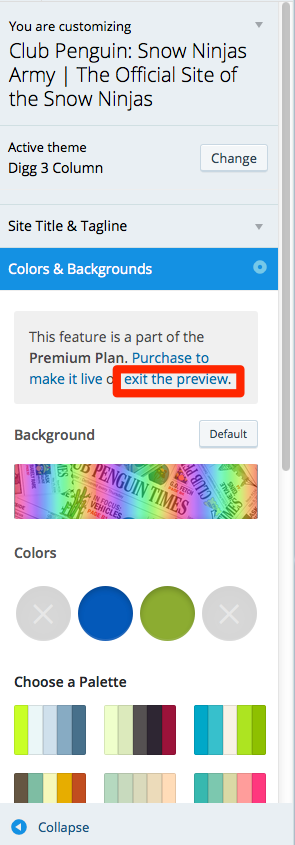
You’ll need to exit the Custom Design preview mode to modify the background. In the Customizer’s Colors & Backgrounds panel, click “exit the preview” and you should be good to go:
-
While we are talking about Digg 3, do you think it is possible for WordPress to switch one of my websites to Digg 3 Theme?
Retired themes are available on any site created until the moment the theme was retired. You can see whether Digg 3 is available on any site by going to the Appearance > Themes menu on that site and searching for Digg.
-
Thanks so much Kathryn! This fixed our problem I believe. Also, just for my opinion, maybe there is a possibility if WordPress did a poll to bring back specific old Themes? Like Digg 3 Column! :)
-
Glad that solved your issue.
We won’t be bringing back retired themes, but we will continue to add new modern, responsive themes that work well on all mobile devices. I hope you find one that you like!


- The topic ‘Website background will not change!’ is closed to new replies.
 WordPress.com Forums