

website coding
-
I can access the link (it works just fine!) using Firefox 33 on a Mac.
As an additional thought you might have the students try a different browser, if possible, such as Chrome, Firefox, Safari. -
Blast! They hid it (why would they do that?). It automatically shows if you tweet the link, or you can get the shortlink this way http://en.support.wordpress.com/shortlinks/
-
when I’m in edit for my Language Arts page, I do see the permalink/shortcut at the top of the page. I don’t want a shortcut for the entire page. the page consists of many individual links and I only need a shortcut for ONE link — #5, Charlotte’s Web. When I go to this specific link and highlight it, the box that comes up does NOT have the line at the top showing me the permalink and shortcut.
-
The WordPress shortlink creator will only work for creating shortlinks to sites hosted on WordPress.com — since the actual Charlotte’s Web page is hosted elsewhere, that tool won’t be useful here.
If you want to try to find a URL shortener that is not blocked by your school, here are few more:
Another option here is instructing the students to right-click on the link, and select Copy Link Address:
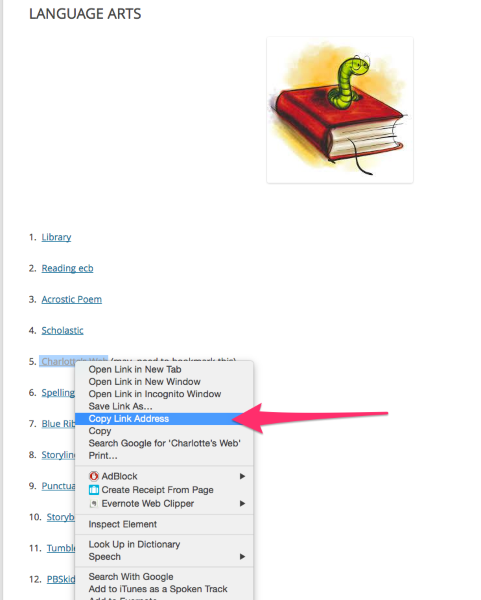
Then paste that address into the a new browser tab or window.
Best,
-Alex G.
-
OK. Good to know. I used the Owl one and changed my link. I’ll try it on the kids machines at school on Monday. If that one doesn’t work, I’ve got two more to try! :) I’ll let you know. THANKS!
-
-
Hi Michelle,
I’m sorry to hear that.
I just checked your site again and you’ve still got standard reference links:

So if clicking the link is bringing up another site, there is something either on your network’s end, or the Scholastic end, that is re-routing it.
Since visiting the page directly, not through a link is working, this makes me think it’s the school network. But like Ash said earlier, without more information about that setup it’s hard for me to speculate beyond that.
Might you send another request to them, include the cloudup screenshot link I just sent with your request, and see what their tests show now that we’ve confirmed URL shorteners are not an option but that the links are standard?
Please let me know what they say, as I’d like to continue helping with anything I can on our end.
Best,
-Alex G.


- The topic ‘website coding’ is closed to new replies.
 WordPress.com Forums