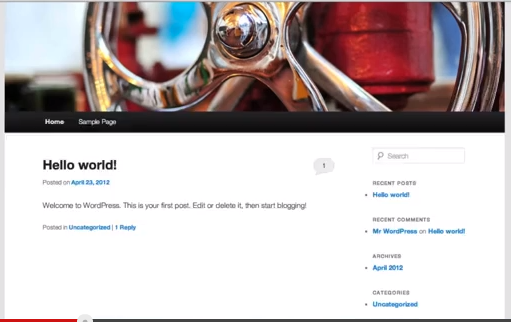
Website didn't look like what it should be, what did I do wrong – please help
-
That is the sample of what I try to do, please help
thank you
The blog I need help with is: (visible only to logged in users)
-
The image is of the Twenty Eleven theme and not the Responsive theme you have on the blog now.
You can quickly and easily change themes to another one found here http://wordpress.com/themes/ and no data will be lost or negatively affected by the change. The only time you may have to do some work is if you are changing to a dramatically different theme and have done any CSS editing.
Please consult your theme description here for instructions on how to set up the showcase page template – no upgrade is required. http://theme.wordpress.com/themes/twentyeleven/
See here http://wpbtips.wordpress.com/2011/05/04/workings-of-duster/ for an article that describes all features of the Twenty Eleven theme which is NOT designed to provide a sidebar on single posts when displayed on their own pages.
To populate the sidebars Ephemera Widget you can make use of the Aside or Link post formats when you create a new entry (or convert an old one).
http://en.support.wordpress.com/themes/post-formats/
http://en.support.wordpress.com/posts/post-formats/Note also that widgets now have “visibility” settings so we can select which pages they display on. See here: http://en.support.wordpress.com/widgets/#widget-visibility
Provided you are logged in as Admin under the same username account that registered the blog go to Dashboard > Appearance > Themes and browse themes until you find one you like and click “activate” or type in the name of the theme you want to use and
click the “activate” link when it appears.After you change your theme all you need to do is go here Dashboard > Appearance > Widgets > Inactive Widgets and re-install them where you want them to appear. The widget contents and settings will be the same as they were prior to changing themes.
-
Thank you kindly for your fast response.
Now I can’t see the image template on my home page – as it’s shows in the sample image
How can I fix that and why can’t I find the permalinks to make my url easier to remember – as sample for my “about me” page- under Setttings? -
What I see now is the Eventbrite Single Event theme. You cannot find any ability to change permalink structure on any free hosted WordPress.COM blog. Please read this comparison so you are clear on the differences http://support.wordpress.com/com-vs-org/
-
Trying to find it…
I did pay for my .com page with WordPress, also I paid host gator
What else do I need to pay for?
Or do I need to wait for it to be up-to-date, since I just did the host gator?Thanks again for your help
-
What did you pay Hostgator for? You don’t need to pay them for hosting. If you got a domain name from them, you need to do the domain mapping to attach it to your blog and then wait till the DNS settles down, and that can take up to 72 hours.
-
Sorry you lost me there, not sure what you mean with domain mapping.
I am so new to all of this -
timethief:
can you please check my website again, I find out how to change it back to the responsive site, but still missing the image on my home page
thanks again


- The topic ‘Website didn't look like what it should be, what did I do wrong – please help’ is closed to new replies.
 WordPress.com Forums