

Website domain
-
Hi, I’m trying to start a new website without having to pay for the domain name. Since I’m just starting, I don’t want to pay, so I’m trying to get the website to be *title*.wordpress.com
However, when I try to launch my site, it’s asking me to choose the site domain, and choosing *title*.wordpress.com isn’t even an option! Please help as I cannot launch my site like this, and I’m not paying to have my own domain. Thanks. -
Hey @maltijapura
It’s definitely unusual not being able to see the free .wordpress.com domain option, were you able to create sites in the past, or is this the first site you’re running into this issue?
I’ve just tested this under my account and the free option is showing on the first-page results when I attempt to create a site on this link https://wordpress.com/new
Would you be able to provide a screenshot of what you’re seeing on your end?
Thanks!
-
Hi there,
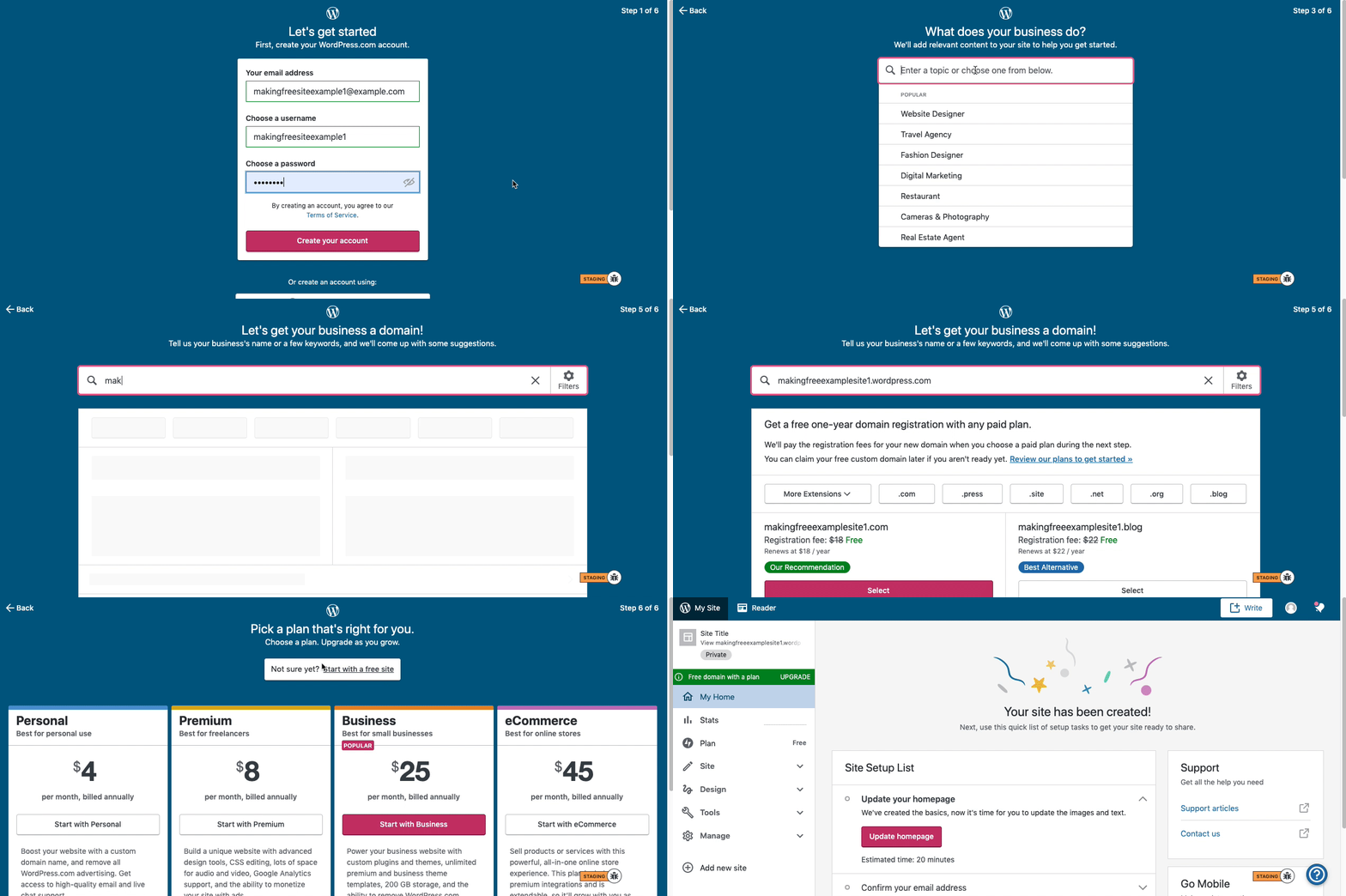
Here are visual instructions on how to create a free
.wordpress.comsite:Step 1: Select email, username, and password.
Step 2: select Blog for a
.home.blogfree site or Business for a.wordpress.comsite.Step 3: Select the Topic of your site.
Step 4: Type in the Title of site (optional).
Step 5: Type in the full, exact site address you want including the
.wordpress.comor.home.blogsubdomain (ex:freeexamplesite.wordpress.com,freeexampleblog.home.blog). The first option should be the free site that you manually typed in. Click select next to that option.Step 6: At the very top, click the link that says: start with a free site.
Then, your free site should be created!
Please follow those steps and if you have any questions, let us know.
Thanks!


- The topic ‘Website domain’ is closed to new replies.
 WordPress.com Forums