

Website not able to be viewed by others
-
I’ve just set up my blog: eleanorcbland.wordpress.com but typing that into an internet browser does not appear to bring up the blog and I don’t know how to rectify this?
The blog I need help with is: (visible only to logged in users)
-
I can access https://eleanorcbland.wordpress.com/ instantly. If you cannot then you may have a browser issue or connectivity issue.
-
For browser issues see here https://en.support.wordpress.com/browser-issues/
You have single published post. If this is a “my blog isn’t on Google” question then note what follows please.
To verify blog ownership of a WordPress.com hosted blog with the major search engines you must use this process > http://en.support.wordpress.com/webmaster-tools/
Note: Even if you do not verify the blog the content will be indexed by search engines so don’t feel panicky about this please.WordPress.com automatically supplies sitemaps for our blogs to search engines – we do nothing. http://en.support.wordpress.com/sitemaps/#xml-sitemaps-for-search-engines
Note that it can take weeks for search engines to index content in a new blog and/or to re-index content under a new URL. Note also that what attracts search engines is unique content in posts (not pages) that cannot be found anywhere else on the internet. Start now publishing original content posts frequently two or even three times weekly. For more information read > http://onecoolsitebloggingtips.com/2010/01/21/omg-i-cant-find-my-blog-on-google
By default the front page of the blog is the only page that will display all published posts on it. As soon as you publish a post not a page the front page error message and searchbox that appears on every new WordPress.COM blog will be gone. http://en.support.wordpress.com/post-vs-page/
I recommend using the step by step tutorial linked to the bottom of your Admin page https://learn.wordpress.com
See also the “Video Quick Start” tutorial http://en.support.wordpress.com/video-quick-start/
The support documentation is all found at the Support link http://en.support.wordpress.com which is also linked to on the bottom of your Admin page.
-
Hi
Perhaps you changed your settings for where people “land” when visiting your site, also known as a Static page.
Under Settings>Reading will show where your posts are going.
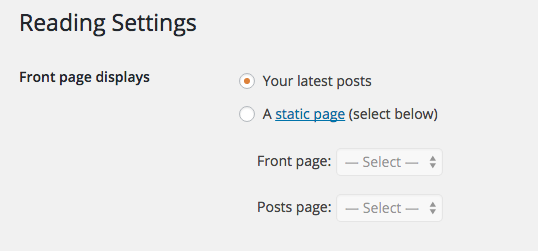
If needed you would create a new PAGE call it BLOG and then update the Reading area to tell which PAGE you want your POSTS to appear on.
-
@heyadamsilver
If so then the Hello post https://eleanorcbland.wordpress.com/2015/08/18/hello-world/ would not appear on the front page of the blog. -
Eleanor-
I guess the question is can you see anything at all or just not blog posts.@timethief – I was under impression that perhaps the Settings>Appearance area was modified, but we don’t know what she can see at the moment.
The site does appear for me just fine as well.
-
I’ve just set up my blog: eleanorcbland.wordpress.com but typing that into an internet browser does not appear to bring up the blog
you have a one hour old site –
If you are using a search function of your browser that would also cause a not found or problems accessing your site – put any URL directly into the address bar for better results


- The topic ‘Website not able to be viewed by others’ is closed to new replies.
 WordPress.com Forums