

website text
-
text on my site is being cut off mid word.
The blog I need help with is: (visible only to logged in users)
-
Hi there,
I took a further look at your site and was not able to find text being cut off as seen here:
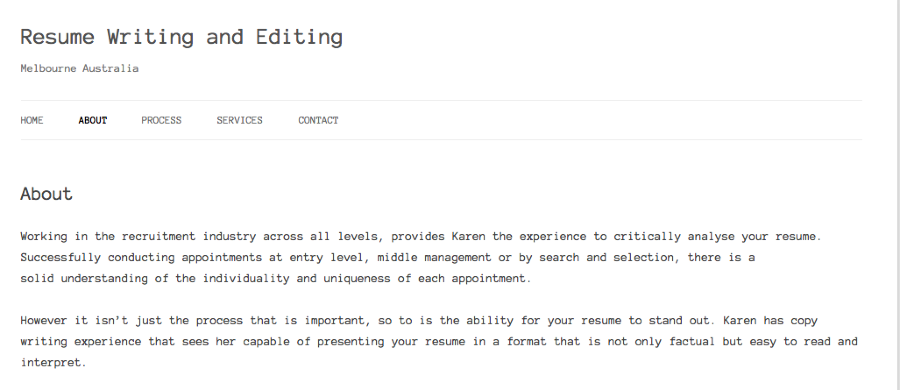
Can you please show me which page you are finding this?
Thank you!
-
Hi there,
The words are being cut off and hyphenated. Eg-
Xdfffgg dfghh dfghh dfghh SSS-
Dfghh dfghh dfghh dfghh foggy-
DiffThis is happening on every page across desk top, I pad and I iphone
I can send you an image if you like? -
Can you please take a screenshot and upload it to your Media > Library page?
I’d be happy to take a further look.
-
Ok I have done this. The words – future, minutes, responsibility are all hyphenated. I don’t want this.
Thanks,
Karen -
Hi Karen,
You can change this with CSS. Please go to Appearance > Customize > CSS and remove the informational content. Then try adding this:
p {
	word-wrap: break-word;
}
Hope you had a wonderful weekend!
-
Hi Grace,
thanks for your help, i have tried this but it still isn’t working! Ive even changed fonts and had a fiddle around with the customise tab. no luck so far…
-
Hi there,
Can you replace the CSS you’re using with the following?
.site-content article, .widget-area .widget {
	word-wrap: normal;
	-webkit-hyphens: none;
	-moz-hyphens: none;
	hyphens: none;
}

.site-content article {
-webkit-hyphens:manual;
-moz-hyphens:manual;
hyphens:manual;
}
Let me know if that works for you!
-
-
Also I am having trouble changing the colour of links in my text – do you have any advice?
-
Hi!
You should be able to change the color of the links using the following CSS:
p a {
	color: #ff5e5e;
}
If you would like to set a different color upon hovering over the link and after visiting a link, add the following as well:
p a:hover {
	color: #ff5e5e;
}

p a:visited {
	color: #ff5e5e;
}
Just change the hex code to the color you’re looking for! Let me know if that doesn’t work for you for some reason.


- The topic ‘website text’ is closed to new replies.
 WordPress.com Forums