

website translations
-
Good Afternoon, I had a few questions but my topic here below has been closed:
As advised on this topic , I just bought 2 new sites in order to have my website http://thetravelersparrow.com/ in French and in English:
fr.thetravelersparrow.com
en.thetravelersparrow.comAs you will see in the topic above, I have been advised to set up those new domains as primary domain, which I did but I had to set up as primary domain: http://www.thetravelersparrow.com again, because every time I typed my website it went to the French website (fr.thetravelersparrow.com ) my questions now are:
1. – how can I add those new sites on my website: http://www.thetravelersparrow.com with flags so when they click to the French and English flags they automatically go to those, soon translated ,websites?
2. – I added a new menu recently:
http://thetravelersparrow.com/tambien-trabajamos-con/Where I will add other company’s websites, but I would the view to be like this:
http://confianzasolidariamadrid.com/webs-amigas/Meaning: they see the company name directly in the menu and they can click on it to see the website. How can I do this?
2. – As you will see, my logo on my website doesn’t look much centered, how can I do so it looks centered and better?
3. – I have created this new menu:
http://thetravelersparrow.com/trabajos-realizados/There is a link to a YouTube channel:
https://www.youtube.com/channel/UCco8tXEopqqWy75g0N82jOw/videosI would like to add it as a video not as a link, I would like people to Access directly to the channel not to see it just as a link, how can is do this?
4.- When I click (in the menu mentioned above) in those links my website disappears, meaning I cannot go back to my website, I have to type it again, because when I click in one of those links instead of a new tab my website disappears and instead the new link takes place, how can I avoid that?
5.- now I would like to begin this web translations into French and English, but when I type:
http://en.thetravelersparrow.com
http://fr.thetravelersparrow.com
It brings me directly to http://thetravelersparrow.com
And if I go to the dashboard to begin the translations I am afraid I will translated it directly in the Spanish one instead in the new English (en) and French (fr) one.
How can I correctly, begin my website translations?
Thank you very muchThe blog I need help with is: (visible only to logged in users)
-
Hello again!
I’m sure we can get your domains working correctly!
1. – how can I add those new sites on my website: http://www.thetravelersparrow.com with flags so when they click to the French and English flags they automatically go to those, soon translated ,websites?
It looks like I didn’t explain this clearly enough in our last thread. You’ll need to have three separate WordPress.com sites. You currently only have one: thetravelersparrow.wordpress.com. You can create a new site here:
https://signup.wordpress.com/signup/
You can just choose a URL like thetravelersparrowfr. Your readers won’t see this domain, they’ll see fr.thetravelersparrow.com.
Once you have two new WordPress.com sites, I can move your Domain Mapping upgrades for fr.thetravelersparrow.com and en.thetravelersparrow.com over to them. Then your domains will work as expected.
2. – I added a new menu recently:
http://thetravelersparrow.com/tambien-trabajamos-con/
Where I will add other company’s websites, but I would the view to be like this:
http://confianzasolidariamadrid.com/webs-amigas/
Meaning: they see the company name directly in the menu and they can click on it to see the website. How can I do this?I don’t speak Spanish, so please bear with me. :) It sounds like you want the links from that page to be in your menu and not just in the page’s content? You can edit your menu through Appearance > Menus. Here’s some information on editing your menu:
Or, if you meant that you’d like to use an image as the link instead we have some directions for creating image links here:
http://en.support.wordpress.com/links/image-links/
2. – As you will see, my logo on my website doesn’t look much centered, how can I do so it looks centered and better?
The best way to fix this is to change the size of your image. The Twenty Twelve theme looks best with a header image of 960 × 250 pixels. Your current image is 507 × 372 pixels. If you change the layout of the image slightly so it fits in the theme’s dimensions, your header will look centered and take up the full width of your site.
3. – I have created this new menu:
http://thetravelersparrow.com/trabajos-realizados/
There is a link to a YouTube channel:
https://www.youtube.com/channel/UCco8tXEopqqWy75g0N82jOw/videos
I would like to add it as a video not as a link, I would like people to Access directly to the channel not to see it just as a link, how can is do this?You can definitely embed individual YouTube videos, or even playlists. However the link you’re using is for a channel. There’s no way to embed a channel into your site.
4.- When I click (in the menu mentioned above) in those links my website disappears, meaning I cannot go back to my website, I have to type it again, because when I click in one of those links instead of a new tab my website disappears and instead the new link takes place, how can I avoid that?
To avoid this, highlight the link and click on the hyperlink editor:
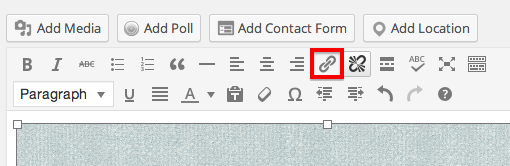
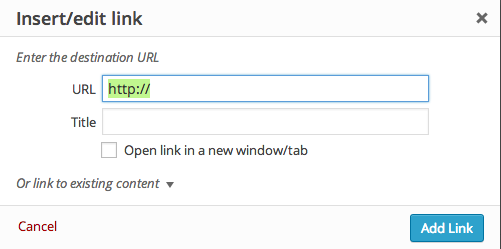
Then, insert the link and the title and check the box that says “Open link in a new window/tab”:
5.- now I would like to begin this web translations into French and English, but when I type:
http://en.thetravelersparrow.com
http://fr.thetravelersparrow.com
It brings me directly to http://thetravelersparrow.com
And if I go to the dashboard to begin the translations I am afraid I will translated it directly in the Spanish one instead in the new English (en) and French (fr) one.
How can I correctly, begin my website translations?Once we have number one up there ^^ sorted out, you’ll be able to translate your site without this confusion. :)
Let me know if I can clarify anything here! And let me know what I can help with next! :D
-
Thanks a lot for your answers!! :-)
1.- your answer “Once you have two new WordPress.com sites, I can move your Domain Mapping upgrades for ….”
I have done so Ive created:
As you said: thetravelersparrowfr
and
thetravelersparrowengot the message:
thetravelersparrowfr.wordpress.com is your new blog. Visit your dashboard.thetravelersparrowen.wordpress.com is your new blog. Visit your dashboard.
Now Ive to wait until you do something right?
2.- ” You can edit your menu through Appearance > Menus”
I did ( I can not send you a screenshot), I added a new menú added all the pages and “nest” the link sub ítem custom: “Agencia de comunicación: Your Brand Design” into page “También trabajamos con” but it doesnt show up in the web.
3,. I did as you said : 960×250 but it look too stretched so I add it with: 960×415 but I think it looks to big, How can I sort this out?
4.- working fine! thanks!!!
5.- I´ll wait until you do whatever is needed.
Thanks a million again!
-
Hello!
1 – Great! I’ve moved your domains to the appropriate sites. Now when you visit thetravelersparrow.com you’ll land on your current site and if you visit fr.thetravelersparrow.com you’ll land on thetravelersparrowfr.wordpress.com.
You’ll just need to recreate your site and content on those other two sites and add some links across them for your readers to access all three translations! Let me know if that gets confusing and I can help you sort it out! :)
2 – Sorry about that. I forgot one last step there, which is setting where your menu will appear. Head back to Appearance > Menus, select Manage Locations across the top. Then select your new menu from the drop down and save your changes!
3 – Yes. Unfortunately your initial image has a different width to height ration than the site would like for the header. What you may want to do is edit your image so that it takes up more vertical space, for instance by moving the bird graphic to the left and moving the text up and to the right.
Let me know how I can help next! :)
-
Thanks a lot, I have made the changes you suggested. It looks better!
I have changed the theme to http://theme.wordpress.com/themes/shine-on/
as it looked a Little bit empy before.
How can I add more menus, more content in my website?.
something like this one:
http://www.yourbranddesign.com/Taking into account it would be the website of an International online marketing and video marketing Enterprise it should look better, more visual. Which theme would you advise me?
If a want use free copyright images for this wordpress website where can I find them?
And lastly, how can I add the flags as the example website you sent me?
I was not able to add a background image, would you maybe know why?
Thanks again for all this great support!
-
Hi there,
How can I add more menus, more content in my website?.
The site at http://www.yourbranddesign.com/ isn’t hosted at WordPress.com, but if you’re interested in that layout you might want to check out some of the magazine-style theme designs we have available here:
http://theme.wordpress.com/themes/features/magazine/
Themes with that magazine style tend to have a layout more like the one you mentioned than other themes like the Shine On theme you’re using now.
If a want use free copyright images for this wordpress website where can I find them?
We have some tips for finding images and other media to use on your site here: Finding Free Images and other Media
And lastly, how can I add the flags as the example website you sent me?
I’m not sure which flags you mean. Can you send me a link to that website? I’d be happy to take a look for you to see if I can help with that. :)
I was not able to add a background image, would you maybe know why?
The Shine On theme that you’re using doesn’t support a Custom Background image. If you choose another theme that does, you’ll be able to add a background image in the theme’s customizer (using the “Customize” link on your My Blogs page).
Please let me know if you have any other questions about that. :)
-
That website is using the Stay theme, so the links to the other languages are made using a Custom Menu in that theme.
-
-
You can use Custom Menus to make links like that on most themes, but not all themes will have the option to put a custom menu in the upper right corner the way you see it on that website.
-
Hello!
I have changed the theme to The Suburbia Theme but I cannot find what I have mentioned you above, the language flags to begin my translation, is there is this theme this option? If not how can I do it?
thank you! -
Hello!!!
I really would need to know to keep on working on my corporate website, thank you in advance for your support..
I would like to know as well how to add more columns to add more articles and information, how to add more content , more categories….the web as it is now: http://thetravelersparrow.com/, seems to me a little empty…thanks -
Hi there!
The Suburbia theme only has the one menu in the sidebar. You can add links to your other language sites to that menu through Appearance > Menus. In order to have a separate menu for your language site links, you’ll need to find a theme that has more than one menu, like Stay or Oxygen.
As for filling the space on your site more, the Suburbia theme will automatically fill the space on your front page with posts if you have it set to display your recent posts instead of a static front page.
You can see this currently on your Blog page. Once you have more posts, that page will fill up even more:
http://thetravelersparrow.com/blog/
Let me know if you have more questions!
-
Ok, yes I have done so:
http://thetravelersparrow.com/
http://thetravelersparrow.com/english/
http://thetravelersparrow.com/frances/I have added it as menu…but is not the ideal way as people have to click twice to go to the french and english website. Will try nevertheless with the other 2 themes you mentioned.
This website:
http://fr.lamaleva.com/ (theme stay) ( I will try as well this theme) they have it in a way that just one click is needed. You know if we the theme I have now I can do it in just one click…?About filling the space I will try with the posts blog as you mentioned as is seems there is nothing else it can be done.
Thanks for your support!
-
Hi there!
Sure, we can get those menu buttons to go directly to your site. Go to Appearance > Menus and open your custom menu to edit.
- Click “Link” on the left side.
- In the first text box, place one of your language site’s URLs, like “http://en.thetravelersparrow.com/”.
- In the second text box, put the menu title such as “English”.
- Click Add to Menu.
- Repeat these steps for your French site.
- Position the links the way you want on the right.
- Save your changes.
Make sure to remove your old menu items as well.
Let me know if I can help further!
-
Great! I did it. Thanks a lot! :-)) is working fine.
I have as well changed the website so it shows my latest posts, and yes indeed, it looks a Little bit more filled…
1.- But since I have done so, when I click in Blog:
http://thetravelersparrow.com/blog/I see nothing! How can I correct this?
2.-When I go to my website:
http://thetravelersparrow.com/
and I do see my posts but the main picture I see is not the one I added at the beginning of the post, the only one that shows the right picture is the 3rd post: “Emprendimiento Internacional con Michael Goldberg”
the other posts dont show the correct picture. How can I correct it?3.- in the french and english website I would have to copy the posts I do in the main page in order to se it directly as in the spanish site, so I think it will be easier to redirect the page in the french and english site to the spanish blog page. Would this be the best way?
Thank you!
-
Hello!
1.- But since I have done so, when I click in Blog:
http://thetravelersparrow.com/blog/
I see nothing! How can I correct this?Since your blog is now shown on your home page, the “Home” button will take you to the Blog. You can remove the blog button from your menu through Appearance > Menus.
2.-When I go to my website:
http://thetravelersparrow.com/
and I do see my posts but the main picture I see is not the one I added at the beginning of the post, the only one that shows the right picture is the 3rd post: “Emprendimiento Internacional con Michael Goldberg”
the other posts dont show the correct picture. How can I correct it?You can avoid this from happening by setting the correct image as the Feature Image on your post. Here’s some more info on doing that:
3.- in the french and english website I would have to copy the posts I do in the main page in order to se it directly as in the spanish site, so I think it will be easier to redirect the page in the french and english site to the spanish blog page. Would this be the best way?
I’m not sure I know what you mean. What page do you want to redirect back to the Spanish site? If you only want to publish posts in Spanish, then yes creating a “Blog” link on the French and English versions that links back to the Spanish site makes the most sense.
-
Thanks a lot again! I will do so… and hope to stop asking questions…I hope for a while! ;-) Hope as well to finish successfully this website very soon!
Thanks again! :-))
-
Yes yes yes! is looking much better! I am getting there!
No more question…for a while I hope. Hope as well to finish soon the website!
Thanks again for your great support ;-)
-


- The topic ‘website translations’ is closed to new replies.
 WordPress.com Forums