

Website won't load
-
my blog cphista won’t load (my other 2 blogs are fine). According to http://www.downforeveryoneorjustme.com it’s “just me”. I’ve tried both IE and FF, browsers, plug-ins, etc. are all up todate. I’ve disabled ghostery and adblock plus w/o any change. Just started today.
Also, when I log in to my user on wordpress.com my notifications won’t open (this issue is some weeks old but persistent).
The blog I need help with is: (visible only to logged in users)
-
This site loads for me http://cphista.wordpress.com/ Please work through what follows and report back.
1. If you are not running one of the browsers and versions listed at http://browsehappy.com/ please try upgrading or switching first.
2. If you are using an IE browser in compatibility mode please disable that mode. http://www.sevenforums.com/tutorials/1196-internet-explorer-compatibility-view-turn-off.html
3. If you are running one of the browsers and versions listed at http://browsehappy.com/
(a) Try clearing your browser’s cache http://www.google.com/support/accounts/bin/answer.py?hl=en&answer=32050
If applicable see here for instructions on how to clear the cache for Chrome and Safari on the iPad:
http://browsers.about.com/od/howtousemobilebrowser1/ss/safari-ipad-clear-cache.htm
http://browsers.about.com/od/howtousemobilebrowser1/ss/How-To-Clear-Browsing-Data-In-Chrome-For-Ipad_6.htm(b) Make sure that you have both third-party cookies enabled and JavaScript enabled
http://en.support.wordpress.com/third-party-cookies/
http://www.google.com/adsense/support/bin/answer.py?answer=12654(c) Disable all browser extensions or add-ons temporarily.
(d) Try enabling HTTPS: http://en.support.wordpress.com/https/
Add both *.wordpress.com and *.wp.com to your list of trusted sites under the Security tab. Make sure to uncheck the box for “Require server verification (https:) for all sites in this zone.” http://en.support.wordpress.com/https/#frequently-asked-questions
4. You can use this link to see if your flash is up to date. http://www.adobe.com/software/flash/about/ If it’s not then go to http://www.adobe.com/products/flashplayer/ and download and install the latest version of flash.
5. Try using another browser.
6. If you are not successful let us know:
(a) Exactly what kind of device you are using to connect to the internet and to WordPress.com.
(b) Exactly which browser (and version of it) you’re using by checking here if necessary http://www.whatbrowser.org/
(c) Exactly what you experience including what any error reports you receive state. -
This site loads for me http://cphista.wordpress.com/
TT: for me the site “load”, but:
a) It has no admin bar
b) it has no footer (credits, etc) -
Hi @cphista,
I was able to load the site just like @timethief as seen here:
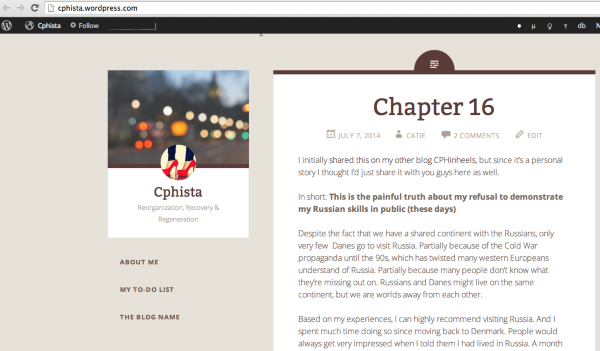
Can you try the troubleshooting steps that @timethief wrote out? They are a big help to figure out what’s going on. Since we are able to view the site on our browsers, I’m thinking it’s an issue outside of WordPress.com specific to your computer/browser.
Let me know if you have any questions with this!
-
Hi, thanks for all the replies (I lost the url to this thread which is why the late answer). The loading issue just started magically working breifly after I wrote my OP (I had already tried all the steps from the timethief without success since they were also listed in another thread with a similiar problem) :-)
However, my notification still won’t load, regardless of what browser used, also after post deactivation of all add-ons on several computes in different locations. The problem is also the same when I try with the mobile version of my phone. Do you have any advice one how to fix this?
-
Hi Catie,
Can you take a screenshot of the issue and upload it to your Media > Library?
Unfortunately, I’m unable to reproduce this so a screenshot is very helpful.
Thank you!


- The topic ‘Website won't load’ is closed to new replies.
 WordPress.com Forums