What
-
If the blog is loading that slowly, it’s perfectly natural that the sidebar would not appear; it is the last thing to load. But you ALSO have serious, cumulative HTML errors from pasting junk code into the blog.
Staff have fixed the Paste so now you cannot paste in junk code, but that doesn’t help you because the errors are already there.
To fix this, go to Settings->Writing and select “WordPress should correct invalidly nested XHTML” and save that setting. Then go to the dashboard Posts->All posts page, set the posts to Private, then set them back to Public. Then scroll back and do the same for the previous 20 posts, and so on. That should fix all the errors in the blog.
And in answer to your blog post: it’s you. It’s not WordPress. And you can fix this.
-
Thanks to all of you for helping here. It’s really appreciated. I can’t address this at this very moment.
But I will look at it when return to my home.I will check this …. and answer in this same thread once I’ve done my part.
-
-
Apologize timethief … didn’t mean to sound like I was giving orders … which, now that I read back, it did.
Truthfully, it wasn’t my intention. It just gets frustrating from this end. I hope you accept my apologies.
-
@hremutek
raincoaster and I have been answering questions here for over 8 years. We predate almost every Support Staff member even being on staff. We also predate all the support docs. We have thick skins and we have heard it all so don’t worry about forgiveness please. Simply got up to the to[p of the thread and follow the insyructions I provided.@5mutek
Oh my! Are we going to keep posting here and holding hands and singing kumbyaya when we know doing that just makes it longer to get Staff help? LOL :DKnow that I don’t post smarm ever. I am a plain speaking Canuck. In fact I don’t post into any thread unless I actually have a solution to the problem being posed, or unless I know that the solution has to come from Staff. LOL :D
-
@hrexach, it looks like you may be copying content from other sites and posting it on your own, and the styling code from those posts is coming over and interfering with your site’s layout.
This post seems to be particularly problematic, but with over 8000 posts it’s hard to say if it’s the only one:
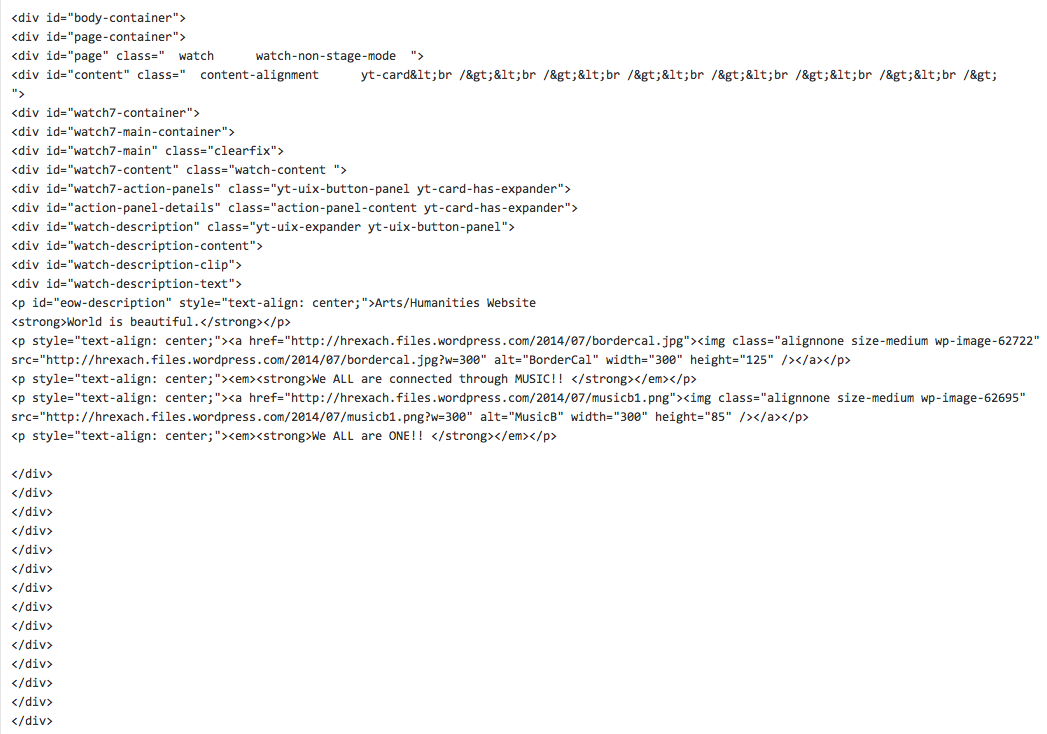
http://hrexach.wordpress.com/2014/07/22/maleficent-a-second-view/If you go to the post editor for that post and click on the “Text” tab (rather than “Visual”) you will see a lot of code that looks like this:
`<div id=”body-container”>
<div id=”page-container”>
<div id=”page” class=” watch watch-non-stage-mode “>`All of that is breaking things for your site on WordPress.com.
Please redo that post without the code, or delete the post entirely, and see if that helps. If not, please let me know and I can try to find another problematic post.
In the future, when you copy content, please use the Post as Plain Text option, which will strip extraneous code:
http://en.support.wordpress.com/microsoft-word/#plain-textAlso, timethief was correct that your site is loading extremely slowly (though that isn’t the cause of your sidebar issue). This is largely due to the large number of images that have to load.
I would strongly recommend that you reduce the amount of content in your sidebar, particularly images, and possibly upload a smaller version of your background image (I’m not sure how large it is, but ideally it should be under 800kb, and even smaller if you can manage it). Both of those things should help speed up the loading of the site. You should also optimize all images in your posts, as large images there will also slow things down.
For more on how to optimize images to improve page load speeds, see:
-
Hi there!! Just got this …. an experienced blogger friend suggested that I let you know this:
“It might help if you let them know that your blog is a “free blog” and not self-hosted. On self-hosted blogs, administrators can enter code. We cannot enter code on free blogs. Also, make sure that you did not post your issue on a dot org support forum.Since Word Press was able to see that nestling code is the problem, then they have to own up to that code being placed their by their recent merger and only they can correct it.”
Does this make any difference in what is happening?
-
Jackiedana … I just went to the post you mentioned .. Maleficent and removed it altogether.
-
That did the trick!! All is back where it should be … wow!!
Still don’t understand what I did .. that caused the problem. You guys are whizzes!!
-
-
-
@hrexach
I already confirmed that your blog is a wordpress.com hosted blog prior to posting my first response above. We always do that prior to responding. No none of that text at https://en.forums.wordpress.com/topic/what-7?replies=30#post-1959827 makes a bit of difference. -
“It might help if you let them know that your blog is a “free blog” and not self-hosted. On self-hosted blogs, administrators can enter code. We cannot enter code on free blogs. Also, make sure that you did not post your issue on a dot org support forum.
Since Word Press was able to see that nestling code is the problem, then they have to own up to that code being placed their by their recent merger and only they can correct it.”This is only partly accurate. You cannot modify the underlying code of a WordPress.com site, nor can you enter executable code on your site. However, you can enter HTML code in your Dashboard editor that adversely affect how your site displays.
I will take a look again to see if I can find any other posts that could be causing this issue. As I noted before, you have quite a few, so this may not be easy to pin down.
-
Ok, guys. I’m totally lost …. I really don’t know what I’ve done. I go to the some of the provided links and the offer technical info.
Would there be an easier way to get this fixed? I’m sorry to be such a pain …. but I’m feeling like I don’t know anything about blogging!I’m sorry.
-
I don’t think your know what you are asking. There is no easy way to fix cumulative errors that were caused by copying and pasting content into the blog. The entire blog appears to be comprised of copied and pasted stuff from elsewhere. The result of copy and pasting into the Tiny MCE editor in WordPress blogs is unexpected and cumulative errors because it will contain lot of code that’s not compliant unless you know how to use the built-in features in the Visual editor http://en.support.wordpress.com/visual-editor/#pasting-text
You can of hire a coder to to go through every one of your posts and correct the multitude to errors I discovered right off the bat but that won’t come cheap. Code Poet is a directory of WordPress professionals, web designers, and developers brought to you by Automattic, the company behind WordPress.com. Here’s the link http://codepoet.com/
-
It looks like your post here had the same issue as the previous one:
http://hrexach.wordpress.com/2014/07/23/at-the-end-of-the-day-wordpress-malfunction-or-is-it-me-2/If you look at the individual post, you’ll see that the background is showing through the actual post, making it very difficult to read without the expected white background. If you remove that post as well, your site should (as best as I can tell) work properly again.
The issue appears to be in how you are pasting in the content, and carrying over a lot of stray HTML code. You can see the code here: https://hrexach.wordpress.com/wp-admin/post.php?post=62790&action=edit (click on the Text tab).
Here is a screenshot of the code in particular that I believe is breaking things:
https://i.cloudup.com/aopxBE-NY2.pngThe DIV tags are “valid” HTML but are going to conflict with the underlying code in the theme, so things will not display correctly. I’m not exactly sure where you are picking that code up, but it generally happens when you cut and paste content from other sites without using the Paste as Plain Text option.
-
I can see the background showing through that particular post. That’s the one done after I noticed the issue. I’m going to remove it.
The screen shot that you sent … doesn’t make any sense to me.:-(
-


- The topic ‘What’ is closed to new replies.
 WordPress.com Forums