

What did I miss when trying to put in the recipe shortcode?
-
I followed the directions for embedding a recipe but somehow it isn’t showing up on my blog page correctly. I have the page still in draft. If I need to publish it let me know so you can see it. Am I suppose to enter all the information for the recipe without spaces or writing it out in a list and numbered steps? Really would like to use this feature.
ThanksThe blog I need help with is: (visible only to logged in users)
-
Hi there!
I just took a look at your recipe on this post:
http://basic2best.com/2014/03/31/cabbage-sausage-potatoes-easy/
It looks like you’re almost there! You’ve got a double border going on the top because of the extra
[recipe]as shown here: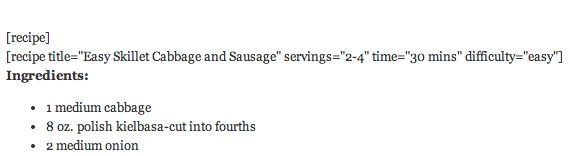
Once you delete the [recipe] (leave the line after it [recipe title=…), the double border will go away.
Does this clarify things? Did you have any other questions about the recipe short code?
-
Shawna, Thanks so much. That cleared up my problem with the print button also. I was just following the directions and the way it was written it looked like you were suppose to put in [recipe] then [recipe=title”…..] then write the recipe then put [/recipe] at the end. Also I had to put in a space between each item like servings, time, etc. I couldn’t get it to work until I did, but the directions looked like there were no spaces. Maybe for us novices you could look back at the directions and see if you could make it cleared. Thank you again, now I have one more tool to make my site better.
-
Thanks for that feedback! That’s super helpful! I’ll definitely check out our Recipe shortcode directions and try to make those things more clear.
Let me know if I can help with anything else! :)


- The topic ‘What did I miss when trying to put in the recipe shortcode?’ is closed to new replies.


 WordPress.com Forums