

What do I need to do to switch from Windows to Mac?
-
After not posting anything for a long time, due to no longer having a computer, I recently used my iPhone 5 for a post. With the exception of not being able to figure out how to intersperse photos between paragraphs, I did ok.
As I am finally going to buy a new computer, I am considering switching from a Windows PC to a Mac. Do I need to do anything special? Will my WordPress experience be the same?
Also, is it not possible to load a slide show (I pay for it) from iPhone? Or intersperse photos so they’re not all at the top of the post? And why did my subscribers not get email notifications when I posted, though I haven’t changed any settings?
I realize there are several questions here. Hopefully I can group them together?
Thank you!The blog I need help with is: (visible only to logged in users)
-
Howdy!
Glad your getting back to blogging. :)
As I am finally going to buy a new computer, I am considering switching from a Windows PC to a Mac. Do I need to do anything special? Will my WordPress experience be the same?
Since everything on WordPress.com is managed through a web browser, everything will work the same way on Windows and Mac.
We recommend that you use either Mozilla Firefox or Google Chrome for optimal performance with WordPress.com. But Safari, the browser that comes preinstalled on Apple computers, works well too. :)
Also, is it not possible to load a slide show (I pay for it) from iPhone
You can add an gallery using a shortcode, but it’s kind of hard in the iOS app.
- Using the app, start a new post.
- Title the post, tap on the content area
- Add this gallery shortcode to your content area:
[gallery] - Slide your keyboard away
- Tap the image icon in the lower right
- Add as many images as you would like to see in your gallery (I may be wrong, but I think you MUST upload from your iPad or take a fresh photo – you don’t really have Media Gallery access)
- Tap on the pencil icon in the lower left of the pane
- Remove all the HTML around your image URLs, add commas after each image URL except your last one
- Move your close bracket from gallery to enclose all your image URLs.
- Should look something like this
- Publish
Or intersperse photos so they’re not all at the top of the post?
This can be done, but on the iOS app the images will always be placed in the same spot. So you’ll need to add all the photos first, then type in the text between the images to move them around.
On the web interface, where your typing cursor is in the post’s body is where the image will be placed. So you could type out your text, then add the photos later if you wanted.
And why did my subscribers not get email notifications when I posted, though I haven’t changed any settings?
New post emails are determined by the subscriber’s notification settings, not any setting in your blog.
If any subscribers report missing any notification emails, send them here:
https://wordpress.com/following/edit/
Make sure your blog is listed there, if it’s not they’ll first need to Follow your blog.
Once they do, have them click “Edit” next to your blog and make sure the email options are set to their preference:
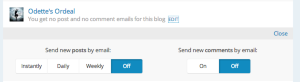
-Alex G.
-
Alex, thank you for your detailed answers! I’m still puzzled about email subscribers who haven’t canceled their subscriptions not getting an email with my recent blog post. It seems no one did. These aren’t WP people, just my own readers that subscribed years ago.
Maybe I need to ‘reset’ from a computer, like I apparently need to reset Twitter and FB auto posts. Twitter and FB are not crushing priority, as I was still able to post the link to those social media platforms. Not sure about my email subscribers. -
I’m still puzzled about email subscribers who haven’t canceled their subscriptions not getting an email with my recent blog post. It seems no one did. These aren’t WP people, just my own readers that subscribed years ago.
If they don’t have a WordPress.com account, just follow over email, they can reach their settings by clicking Manage Subscriptions at the bottom of one of your previous emails:
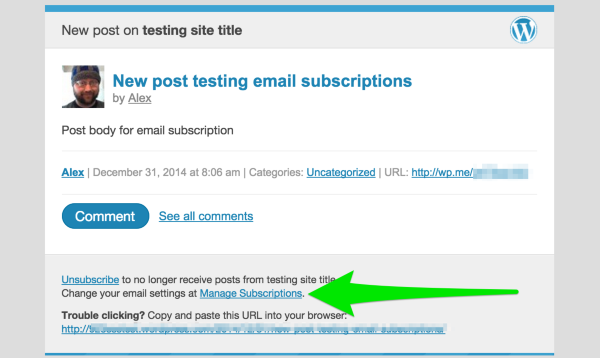
There, they can re-save their email subscription that should clear anything up.
If they don’t have any old post emails saved,, have them contact us here (from the email they use to subscribe) and we can take care of it for them:
There’s nothing for you to reset on for your email subscribers.
like I apparently need to reset Twitter and FB auto posts. Twitter and FB are not crushing priority, as I was still able to post the link to those social media platforms.
If you’re seeing problems with pushing to Twitter or Facebook, then disconnecting and reconnecting those usually clears it up. We have steps for that here:
http://en.support.wordpress.com/publicize/#reconnecting-services
-Alex G.


- The topic ‘What do I need to do to switch from Windows to Mac?’ is closed to new replies.
 WordPress.com Forums