

What else should I do to make "HOME" function as my blog page?
-
I can’t make my home page be my blog page and I’ve done everything suggested.
I use the Twenty Eleven theme. The blog is Linnea Johnson’s Collected Works (linneajohnsonauthordotcom.wordpress or wordpress.com/linneajohnsonauthor). It is still private because it is in process.
If I go to the site by clicking on the link at the very top of the dashboard (Linnea Johnson’s Collected Works), I go to the page with my first post. But when I click on “HOME” I am connected to a static page with no post. There is no way to get back to the actual blog page from any other page, but Home is supposed to be the blog page. Clearing my cache does not help.
My setting for Reading is “Front Page Displays your Latest Posts.”
The Appearance/Menus/Menu Structure lists “home” at the top of the menu list.
The page number setting for Home is 1. The tab for Home appears first on the left.What else do I have to do to make “Home” function as my blog page?
The blog I need help with is: (visible only to logged in users)
-
Hi there!
Currently, your “Home” menu option is pointing to http://linneajohnsonauthor.com/about as shown here:
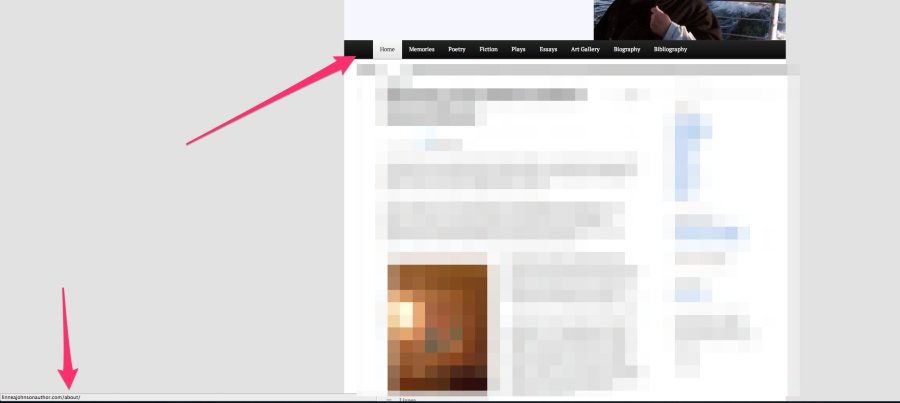
This is happening because your current page setup with the title “Home” is actually set to the URL of “/about” as shown here:
https://linneajohnsonauthordotcom.wordpress.com/wp-admin/post.php?post=1&action=edit

Does that make sense?
To fix this, you’ll likely want to change the “Home” title on your “About” page to “About”. This way, you still have a page where you can put information about you for readers to see!
Then, navigate to Appearance -> Menus. From that page, remove the “Home” (or now called “About) page from your menu by clicking “Remove” as shown here:
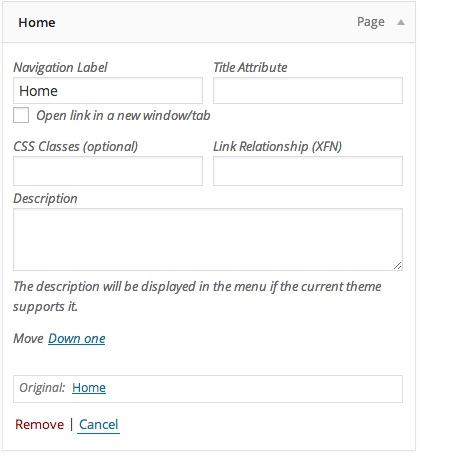
Then, add a custom link as shown here:
Set the “Link Text” to “Home”. Set the URL to http://linneajohnsonauthor.com/. Then, position the new menu item at the top. Now, the “Home” menu icon should navigate to your front page.
Let me know if that works for what you’re looking to do!
-
Thanks much. The fix worked. Now “Home” is the blog page and also shows the sidebar as desired.
-


- The topic ‘What else should I do to make "HOME" function as my blog page?’ is closed to new replies.


 WordPress.com Forums