

When Creativity Doesn't Pay
-
I can only surmise that I’ve accidentally stumbled upon the fact that WordPress.com will choke on certain characters placed in certain places. I’ve been getting creative – but not going crazy – in my blogging. I have for a long time enclosed quotations, often, in asterisks. For example, I might offer the following excerpt (which is not one, but only an example):
*******
For example, I might offer the following excerpt (which is not one, but only an example):
*******Then I bumped things up with enclosing characters such as:
——>
Then I bumped things up with enclosing characters such as:
<—–and
:::::::>
and
<:::::::and
>>>>>
and
<<<<<But now I’m finding that it’s just not worth it. Assuming that what I type is what I’ll find in my post, I’ve posted stuff and then, when re-reading it, was completely flustered and dumbfounded. And my productivity is taking a hit. At first I thought it was just me forgetting to hit the ‘save’ button or something. I just went through this crap now, again. But this time, after about 4 tries, I took some screen captures.
I will revert to my simpler formatting styles, bland though they may be. And I do hope that that’s all it was. But if anyone wants to confirm for me that I have drawn the right conclusion, or just add their own thoughts about this, then that would be nice.
I can use Photobucket or box. I can never be sure which code works. If this doesn’t, I’ll find one that does:
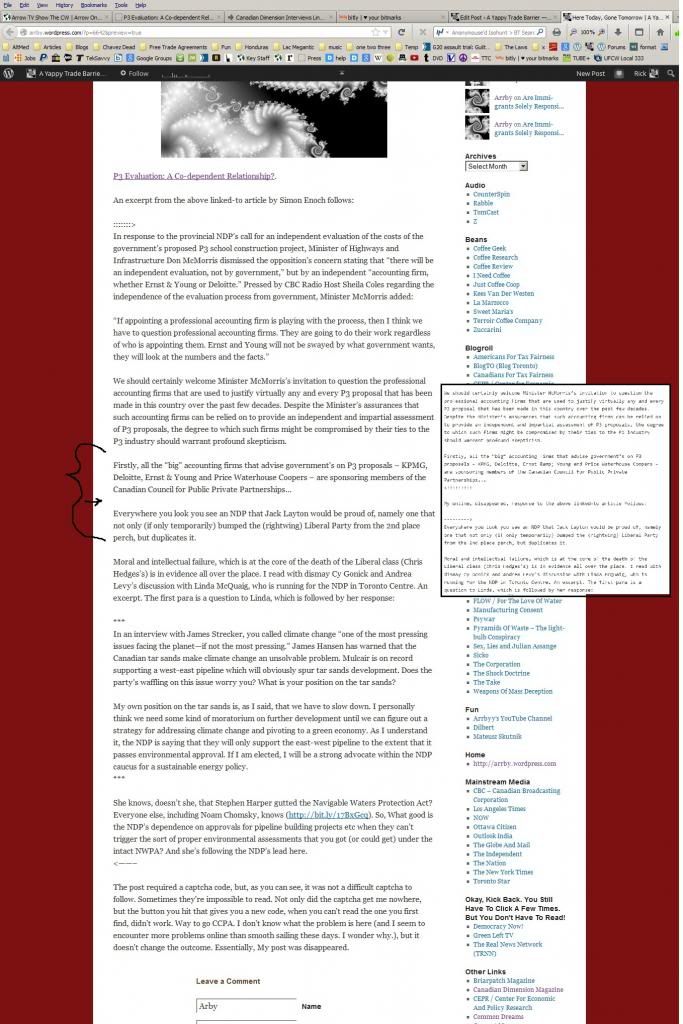
The blog I need help with is: (visible only to logged in users)
-
-
Am I right that my creative formatting is causing text and the formatting characters to disappear, as my screen shot shows?
-
text put between
<–
and
–>
is script used when you MEAN things to disappear/be hidden on a html page. -
Yes. The problem is your use of the pointed brackets. They are active HTML tag components. If you find something else you can use, do it. That will eliminate your problems.
-
-
For this sort of creativity, better use HTML entities:
http://www.danshort.com/HTMLentities/I can use Photobucket or box. I can never be sure which code works. If this doesn’t, I’ll find one that does:
Why not upload the screenshot to your own blog?
-
Okay. Well that was an interesting journey. Thanks folks.
Justpi: It was just as easy to upload my image to photobucket or box and this isn’t anything I want to blog about.
Thanks all.
-
I just looked at those codes. Codes I can’t use on WP are shown. No explanation for what the codes do is offered. No matter. I can live without them. I’ve experienced far too much distraction with this and other things lately. I’m always happy to come here though and pass stuff by you people. Later and happy blogging!
-
It was just as easy to upload my image to photobucket or box and this isn’t anything I want to blog about.
I didn’t say insert it in a post, I said upload it to your blog. You can upload an image to your blog without inserting it anywhere. You do this via Media > Add New (dashboard sidebar).
I just looked at those codes. Codes I can’t use on WP are shown. No explanation for what the codes do is offered.
? If you’re talking about the page I linked to, of course you can use them on WP – I wouldn’t have suggested them if you couldn’t.
-
Justpi: Okay. Now I know. But do you get the same flexibility with a pic on WordPress.com as you do with Photobucket and box? I note that you can view the image (image or doc) easily on box (image only on Photobucket), enlarging it, scrolling it, for example. Still, It’s no easier or difficult for me. As well, I use Photobucket and box for ‘work’. My blog is work too, but I those other services can be used to support my work on WordPress or outside of it.
I still don’t understand the code thing. I saw nothing there indicating what the codes do. I don’t get it at all. But don’t sweat it. We both have other things to do. Mainly, I won’t be wasting my time experimenting with formatting on WP going forward. Thanks again. Later…


- The topic ‘When Creativity Doesn't Pay’ is closed to new replies.
 WordPress.com Forums